I’m currently evaluating eM Client with a view towards moving a small company over to it, but I’m experiencing an issue with the background colour of new emails in the inbox. I’ve responded to an admittedly old related thread to ask for help, and when I received no replies I reached out to support via email - but I’ve had no response from them.
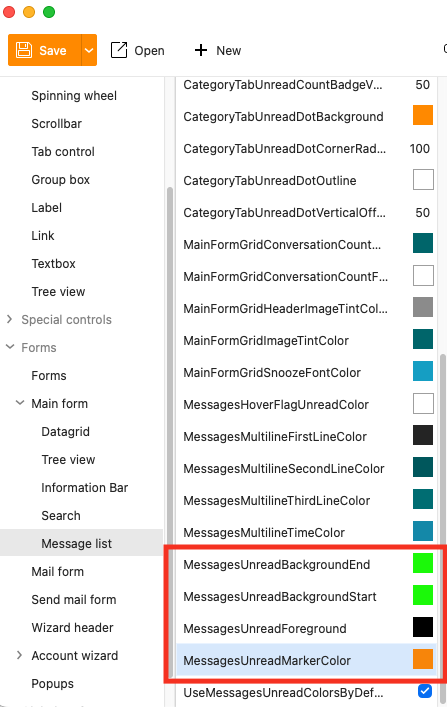
The problem is that the settings in theme editor to change email background colours in the message list don’t seem to be working - they are MessagesUnreadBackgroundStart , MessagesUnreadBackgroundEnd , and MessagesUnreadForeground. Changing these has no effect. Other options such as MessagesUnreadMarkerColor seem to be working correctly.
I’m on a Mac, I’m using eM Client 10.3.2622 (9cd48bf).
Hoping someone here will be able to help.
I’m also curious to know how responsive support generally are once you’ve purchased the product?
I’m currently evaluating eM Client with a view towards moving a small company over to it, but I’m experiencing an issue with the background colour of new emails in the inbox.
See @skybat post below from the following thread that might help with your issue with any theme.
You can also click the “light / dark” toggle icon at the top right of the body of the email if you carnt see a specific email “if you are using the Dark Theme”.
If you are not using Dark Theme and have tried to modify a theme but it’s not changing, make sure you “save it” and then “reimport it” or it won’t change.
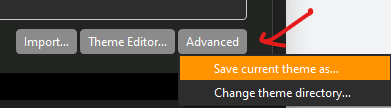
If you are modifying an existing Theme, you first “Save the Theme”, by clicking the “Advanced” button at the bottom right. Give the Theme a custom name when saving so you know what it is.
Then “modify that saved theme” in the eM Client “Theme editor and then resave your modified theme again.
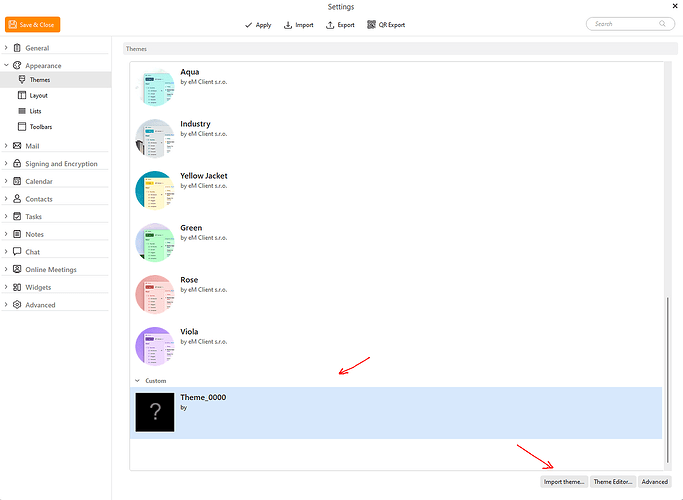
Then “import that modified saved theme” back into the themes using the “Import” button at the bottom of Themes. Next click your custom theme as in the example below and click Apply and Save & Close.
I’m also curious to know how responsive support generally are once you’ve purchased the product?
Usually approx 24-48 hours but might be longer if it’s a weekend. If you are inside the 30day trial for any pre purchase assistance you can also email [email protected]
If you purchase the program you get 12 months VIP support via going to the following support page and login and lodge a support ticket.
Thanks for your reply cyberzork. Unfortunately this isn’t the issue I have, I don’t think I’ve explained very clearly.
I’m referring to the background of new/unread emails when shown in the Inbox or folder listing. Here’s an old thread explaining how to do it:
But changing the three properties mentioned doesn’t have any effect for me - the background and text colour don’t change at all. However all other properties I’ve edited in the theme editor do seem to work.
I’ve tried changing the theme back to the default and editing that, but nothing I do can make these three properties actually update the colours.
I’ve just installed eM Client in a Windows 11 virtual machine as a test. I added a Microsoft 365 account and attempted to adjust the unread message background and foreground colours, but they don’t work. So this doesn’t appear to be a Mac-only issue. This appears to be a bug, unless I’m doing something wrong?!
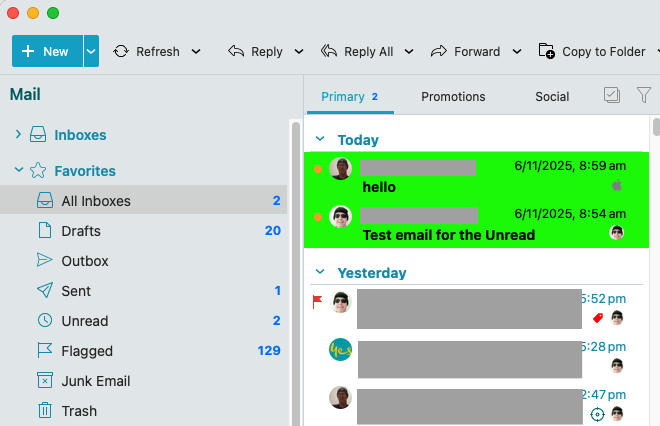
Ok i tested with the eg: “Industry” theme and “Mystic” theme and successfully changed the background of the Unread messages to “Green” and changed the foreground Text colour to “Black”. Also set Unread bullet to “Orange” using the latest eM Client Mac V10.3.2622
Note:- The Dark Theme and other lighter themes didn’t change for me with the same settings, so i suspect “there is other elements that need to be changed within those Themes” or there is possibly bugs but i don’t know. Others on this forum who are more skilled might be able to assist you with that. If you purchase the program I would lodge a support ticket with your modified theme to be investigated.
Thanks for this - that’s really helpful. I’ve just checked those themes and they’re working for me as well, and I notice they have a different background colour for unread messages as default. So I guess there’s another setting in the Light/Dark themes (and a few of the others) that’s overriding or needs to be changed before these colours take effect.
I found the issue - there’s a couple of ways to enable this:
1 - In the theme editor there’s a tickbox titled UseMessagesaUnreadColorsByDefault (seen in the bottom of your screenshot). This needs to be ticked, but it wasn’t mentioned in the original thread describing how to use the feature.
2 - There’s a setting in Settings > Mail > Read > Message List that determines if the theme colours are used, effectively providing an override for UseMessagesaUnreadColorsByDefault.
Thanks for helping to find the problem, I really appreciate your help!