With the provider GMX, several email addresses can be created for one email account. They share a common inbox. When sending a new email, the desired sending email address can be selected. When replying to an email, the address used to receive the email is used.
This is implemented very well in Thunderbird. I create an account with my main email address and can add other addresses associated with this account.
In em-Client, I have to create an account for each address in order to be able to select all addresses when sending emails. All IMap folders are created multiple times (in my case, four times) and the database keeps growing. When an email appears in my inbox, I receive a notification that I have received four new emails. One notification for each address.
Please consider implementing a solution similar to Thunderbird. Perhaps this could be implemented in em-Client.
Hi Arthur, could these other addresses perhaps just work as Aliases for the main account?
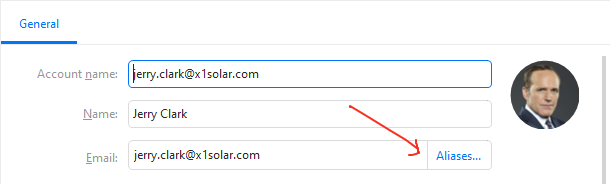
You can add aliases in menu>Accounts uner the General tab.
Alternatively if you already have all the other email addresses set up, simply uncheck the IMAP service for those other accounts but keep SMTP - that way you will be able to keep sending from these addresses, but they will not have their own folders in the folder list.
Again in Menu>Accounts, General tab of each account, down in SERVICES section.
Thank you very much. My problem has been completely solved.
The ‘aliases’ button should not be a pale grey, but should be clearly visible. I completely overlooked it, assuming that the function was not available.
GMX allows multiple email addresses (aliases) under one mailbox. Thunderbird handles this correctly by using one account with multiple sender addresses and a shared inbox.
In em-Client, each address must be added as a separate account. This causes duplicated IMAP folders, multiple notifications for the same email, and unnecessary database growth.
You can also add alias email address’s “to existing email address’s” without creating separate mail accounts as per @Olivia_Rust advised in her post link further up this thread.