Hello,
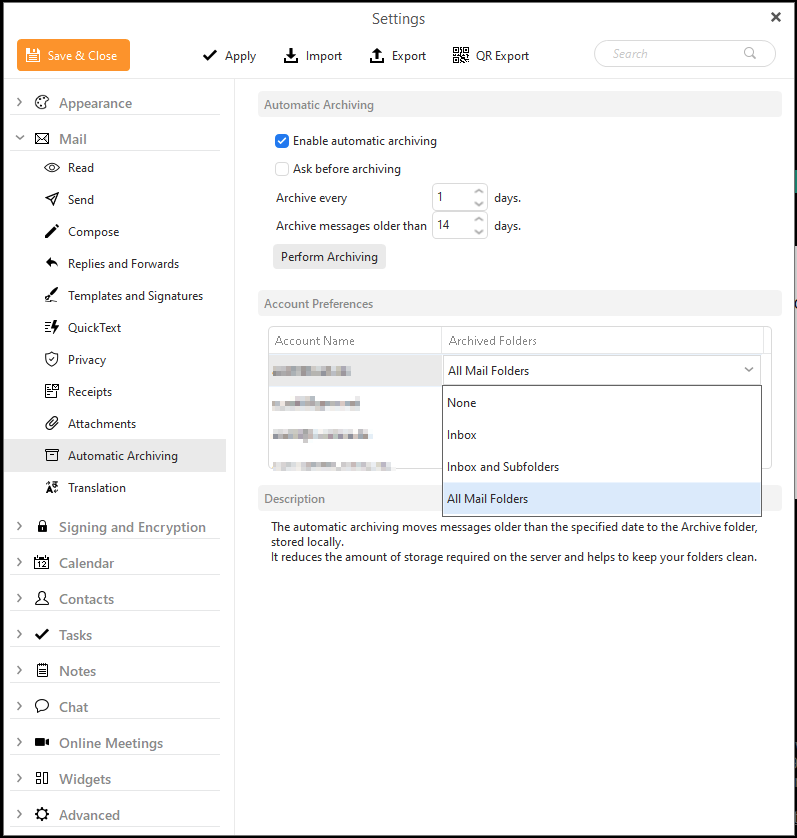
I like to use automatic archiving. It ensures that all messages are available offline and don’t clog up my mailbox. Unfortunately, there is no option in the folder selection dialog to select only the folders that I need.
So I always have to archive everything and delete it manually afterwards. For example, I only want to save the Inbox, Sent and Archive folders. I don’t need the recycle bin and the junk folder. Please program a more precise selection dialog that gives me the option of archiving exactly the folders that I really need.
Thank you very much.
Hello eM Client Team,
I submitted a feature request a long time ago. Version 11 has since been released, and a lot of emphasis was placed on AI features. But the feature that would really make users’ lives easier is still as buggy as ever. When will the Auto Archive feature be revised and improved?
Greetings Andreas
What exactly is buggy? I see a feature request in this thread, not a bug report. Is there a bug report somewhere? Is it this feature request? Automatic local Archiving rules per folder | Mail | eM Client
We prioritize feature requests based on votes.