As I use emClient on the desktop I’ve switched from another Android Mail App (Nine) as well on my Android Mobile.
Addresses /Contacts are synced to the Phone (Exchange/CardDav), but they do not seem to be available to other Android Apps like WhatsApp.
Do I miss a setting?
If your Exchange / CardDAV contacts are not available in What’s app and are already synced to your mobile phone", “then you haven’t allowed permission to your phone contacts in What’s app” as is not enabled by default in What’s app.
You can Google how to do that or go to the What’s app website for documentation.
If your Exchange / CardDAV contacts are not available in your eM Client mobile app, then I would use the QR Export code option from eM Client for desktop to add them automatically.
https://www.emclient.com/webdocumentation/en/10.0/emclient/default.htm#QR%20Export/QR%20Export.htm.
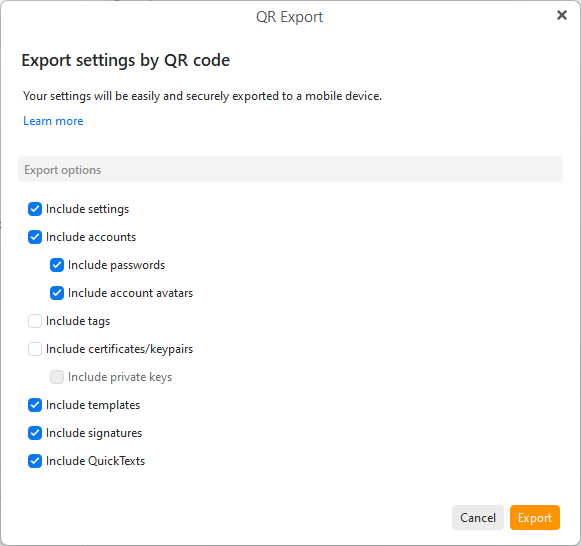
To export on the desktop via QR Code, go to “Menu / Tools / QR Export” & follow the prompts.
Or on the desktop, go to “Menu / Settings (Preferences)” and “click the QR Export button in the toolbar” of the Settings window will give you the options to export.
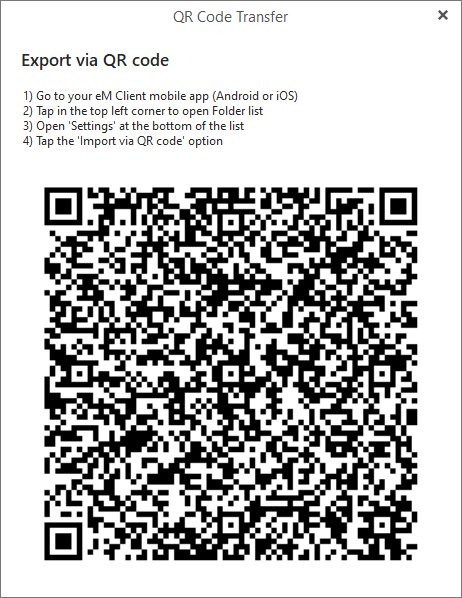
Select all the Settings, Accounts & any other options you want on the QR Export screen. Then click “Export”, and when the QR Code appears “open the eM Client mobile app” and choose the option to scan the QR Code as per the QR Code instructions
Thanks for your explications @cyberzork
I checked WhatsApp permissions - it has access to contacts. Furthermore with my former email client it worked as well.
I’ve installed the accounts on my phone exactly as you described using the QR code.
As the contacts aren’t available in any app than emClient (not in phone etc).
I think, that the emClient contacts are not availabe as Android address book - aren’t they?
If your Desktop contacts in eM Client are not in your Android phone address book contacts, then you will need to either export them from your Mail account contacts in eM Client or Local contacts in eM Client to a vCard (.vcf) file, and then import / add them to your Android phone address book contacts.
You can export Desktop mail account contacts or Local contacts in eM Client contacts via “Menu / File / Export” in whatever format you need. Then copy that to your mobile phone and import the contacts.
Thanks for you reply, but this procedure is definitely to much handwork. I have multiple accounts with address books (and calendars) - if I do need to manually export them after each change to the phones address book, it’s not a solution for me.
I would expect that emClient gives the possibility to expose it’s contacts as addressbook(s) in Android.
Maybe oneday. You can vote for that idea via the following Sleekplan page and add any comments you want.
I have exactly the same problem. Using IceWarp as our backend mail server. Using eM Client for desktop which synchronizes contacts just fine. Have recently switched from OfficeMail Pro for Android to eM Client for Android, but have to continue running OfficeMail Pro ONLY for contact syncrhonization. Would be great if eM Client for Android could handle this.
Regarding OfficeMail Pro, how do you think the EM Client Android app compares/works in comparison to it? I’m a long time user of Nine and OfficeMail Pro on Android, but I recently installed EM Client on my Windows desktop and have really liked it.
I like it a lot. It just works the way I want an email client to work, and is quite configurable. More importantly, my wife likes it (she does almost everything on her phone, while I am more of a laptop person). I have been using eM Client for Windows for a couple of years and only moved her to the Windows version recently, and to the Android version a couple of weeks ago. The feature she raves about is the sorting of mail into “primary” and “other” categories, which also happens on the phone. In fact, generally, there’s pretty good feature/settings overlap between the two versions.
One thing I’d suggest - get the Windows version fully configured the way you like it before installing the Android version. Then use the feature where your settings come over to your phone via a QR code. That works really well.
Good luck
Thank you for the feedback.
Bump on this. Is this issue resolved (or feature added) in the Beta em Client 11 for Android?
I continue to pay for an OfficeMail Pro subscription ONLY to synchronize contacts, as it does this correctly and exposes em Client contacts to all other applications (phone, messages, etc).