I would like to search for certain keywords in only the subject and body of all emails. When I look at the dropdown of options from the search textbox, there is no option that says just “Subject” and “Body.” I think searching by subject and body only is a common scenario when searching for emails.
On my end I only see the options shown in the attached image.
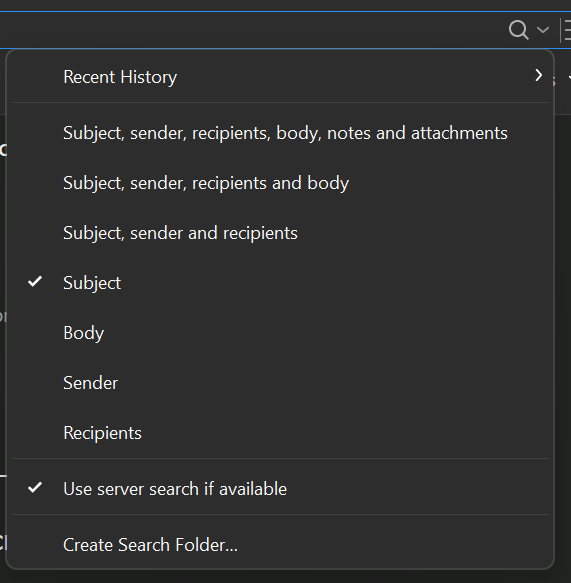
While playing around, I found two different ways to search on only Subject and Body of emails.
As an example, I wanted to find all emails that contain all the following words: Mike, PayPal, Shipped in either the Subject or Body of all emails.
-
Type in the search textbox the following: content:Mike PayPal Shipped and press Enter to get search results. Note that a space delimited search string means every word must be found, whereas a comma-delimited search string means any one of the words must be found.
-
Open the advanced Search dialog by clicking on the extreme right part of the Search textbox. Then type in textbox that has the title Has the words:, which is for the body (though not sure since it does not explicitly state Body in the textbox title???), and also type the same text in the textbox for Subject in this special dialog. Click on Create Search Folder and a new folder will be created under the Search Folders folder, which will contain the search results. Make sure you’ve mentioned the correct delimited search string i.e. either space-delimited or comma-delimited as explained in (1).
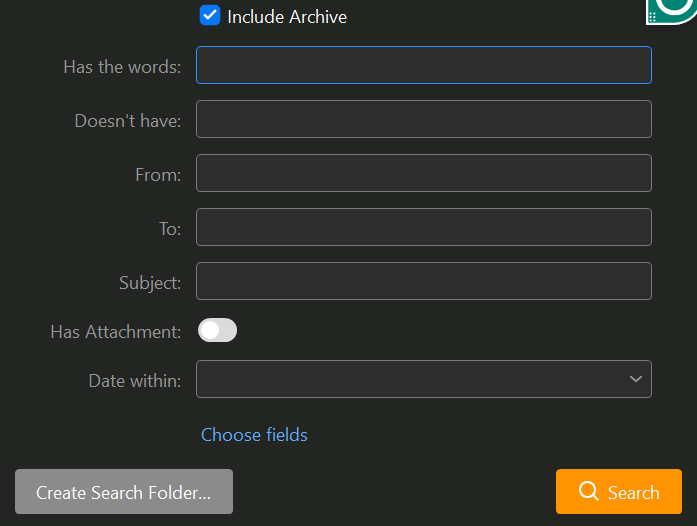
After posting an answer, I found there is a way to add the Body field in the advanced search dialog that I described in the second method in my last message. Also, the text field saying “Has the words” will search in the subject as well as the body and not just the body as I originally thought. To search specifically in Body, just add the field “Body” from the “Choose fields” link.
We’re glad to hear you were able to find one of the options for a more exact search.
Alternatively, you can also search only in specific fields by using keywords - type body: directly into the search box, followed by the text you’re looking for and press enter - eM Client will look for this text just inside the message body.
We’ve explained all the search options in detail on our blog, including the keywords options, here is the link: eM Client Search: Stop scrolling, start finding | eM Client
1 Like
Your app, eM Client, is really very powerful as I discover more features during use of your product. I guess I still have several powerful features undiscovered, like security encryption. I would rate eM Client as the best desktop email program I have encountered so far in my life. I am still exploring the capabilities of your mobile app and hope it turns out to be as good as your desktop app.
I guess I still have several powerful features undiscovered, like security encryption
See this thread post on sending encrypted mail using PGP keys and eM Client keybook etc
1 Like
Thank you for sending that information because I could never understand the email encryption that is in the eM Client app. I will read the links you sent.
Is the public key to be shared with the recipients, or does the decryption happen automatically behind the scenes when an encrypted email is sent? And why does the eM Client app prompt for saving the keys?
Is the public key to be shared with the recipients
Yes a public key is distributed to others.
All is explained in those links in the thread.
Quote:
-
A Private key that should be kept secret and not revealed to anybody. It’s used to digitally sign outgoing messages, or to decrypt incoming messages.
-
A Public key that is to be distributed to other users. Public key is used to validate the digital signature of incoming messages, or to send encrypted messages to other users
1 Like
That makes it less appealing. Recipients just want to open and read the email, rather than deal with something technical like a public key. If it were automated, it would have great value.
However, it could be used without any hesitation by more technically minded people.
It seems promising for sending confidential information, but I’m not sure about using it for everyday normal emails.
I need to read more to fully understand how encryption works from X to Y and also from Y to X, i.e., two ways between two people. Both X and Y need to have eM Client app installed for this to work.
If you want to know any further information, suggest you email [email protected]