I often get Operations errors, when folder rules are applied to incoming messages.
However the messages are sent to the correct folders.
Sorry I have lost the log of this due to a restart! But basically along the lines of ‘Cannot find folder’
Screenshot your custom rule in this thread and we might then be able to see why it’s doing it. Blank out anything personal in the rule.
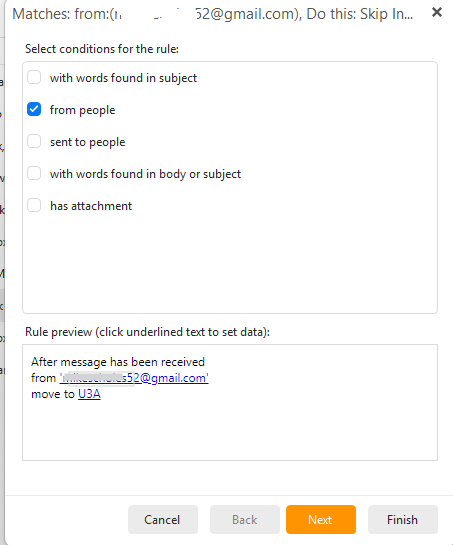
I have 9 rules set up at present all are much the same as this one, and any of them can produce the error randomly, I used to have a lot more rules in a previous install, but need to sort this before putting them all back!
Ok that rule looks fine to me.
If you have already tried removing and re-adding the rules which should normally fix it, then “try uninstalling and reinstalling eM Client” as might be a problem with your actual installation.
If you do try uninstalling and reinstalling and have Windows “don’t delete the database” when asked on the uninstall wizard. Then reinstall the same version either from the release history page for Pc or Mac, or Windows store if you have Windows and originally installed it from there. Before uninstalling also suggest to make a manual backup via “Menu / Backup” incase you need to restore for any reason.
if you still have the same rule errors after reinstalling eM Client, then i would suggest next if you have a current active paid Pro, Personal or Business license, go to the VIP support page and login and lodge a support ticket and link this thread. if you have run out of your 12months support you can get another year extension via the following page VIP Support Extension | eM Client
I will try recreating the rules as suggested, AFIK though this can happen for any of the 9 current rules.
Its possible that I have already tried a reinstall, I use the free version emClient, but will try again
But before I do that what might be relevant is that it is possible that this happens only at start up.
and I run EmClient with ‘Run on system Startup’ enabled. Could this be an issue?
Hi
Deleting and reinstating rules didn’t work, same with Removing EmClient and reinstalling.
I don’t use the paid version, don’t need the extras.
I don’t think I mentioned that my mail provider is gmail. But I seem to remember looking at this a while ago (its been going on for some time) and reading something about it being to do with timings when the mail is transferred from the gmail servers, and that there was a fix but it was quite complex involving the account server settings and that is why I didn’t attempt it? Does this sound plausable?
This is the error message. Something to do with gmail perhaps?
Rule ‘After message has been received from ‘[email protected]’ move to folder’ failed with error: Destination folder not found: /253eea81-4aec-4593-962f-0e2f74708621/INBOX/U3A.