bonjour message d’erreur que faire
[Google Contacts] L’envoi vers le dossier ‘jm***********@gmail.com/Autres contacts’ a échoué en raison de l’erreur suivante: Parameter validation failed for “resourceName” : The value did not match the regular expression ^people/[^/]+$
merci de votre aide
The value did not match the regular expression ^people/[^/]+$
To fix the value did not match the regular expression ^people/[^/]+$ error in eM Client, “Go to eM Client Contacts section”, and then “Right click” on “Contacts” directly under your Gmail account and click “Properties” at the bottom.
Then click the “Repair” tab at the top, and finally click “Repair” as per this example post. The repair can take a little while as it clears the local cache.
If that still doesn’t fix it, go to “Menu / Accounts” and remove and readd your Gmail account via the “automatic account wizard” at the top.
Note: If you do remove and readd your account, make a manual backup first via “Menu / Backup” incase you need to restore for any reason.
(Why you get that error in eM Client)
The Google Contacts Other folder is “Read Only” so you can only delete contacts in there online in your Google Contacts.
Other Google Contacts are email address’s “that were only typed in the To: line” and have never been added as a Google Contact. So they all end up in Other contacts as are unknown.
Open your web browser and go to the following Google Contacts webpage. https://contacts.google.com . Then press the “menu on the left” & you can select Other contacts and delete any you don’t want.
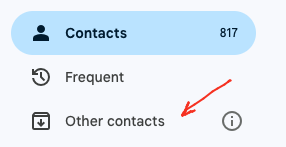
What I suggest to do with those Gmail Other contacts (if you maybe want to keep those contacts for future) rather than deleting them, is to “close eM Client” and then “go online to your Google Contacts” and drag them from “Other Contacts” to your main Google “Contacts”.
Or alternatively “on the far right of Other contacts online”, hover your mouse and click the “Save Contact” icon to add / move them to your main Google Contacts as in the example below.

[quote=“cyberzork, post:2, topic:115038, full:true”]
La valeur ne correspond pas à l’expression régulière ^people/[^/]+$
Pour corriger l’erreur « La valeur ne correspond pas à l’expression régulière ^people/[^/]+$ » dans eM Client, accédez à la section Contacts d’eM Client, puis faites un clic droit sur « Contacts » directement sous votre compte Gmail et cliquez sur « Propriétés » en bas.
Cliquez ensuite sur l’onglet « Réparer » en haut, puis sur « Réparer » comme indiqué dans cet exemple . La réparation peut prendre un certain temps, car elle efface le cache local.
Si le problème persiste, allez dans « Menu / Comptes » et supprimez puis rajoutez votre compte Gmail via l’« assistant de compte automatique » en haut de la page.
Remarque : Si vous supprimez puis rajoutez votre compte, effectuez d’abord une sauvegarde manuelle via « Menu / Sauvegarde » au cas où vous auriez besoin de le restaurer pour une raison quelconque.
(Pourquoi cette erreur s’affiche-t-elle dans eM Client ?)
Le dossier « Autres » de Google Contacts est en « Lecture seule », vous pouvez donc uniquement supprimer les contacts qui s’y trouvent en ligne dans vos contacts Google.
Les autres contacts Google sont des adresses e-mail saisies uniquement dans le champ « À » et qui n’ont jamais été ajoutées comme contact Google. Elles apparaissent donc toutes dans la catégorie « Autres contacts » comme étant inconnues.
Ouvrez votre navigateur web et accédez à la page Google Contacts suivante : https://contacts.google.com . Cliquez ensuite sur le menu de gauche, sélectionnez « Autres contacts » et supprimez ceux que vous ne souhaitez pas conserver.
Ce que je vous suggère de faire avec ces autres contacts Gmail (si vous souhaitez éventuellement les conserver pour plus tard), plutôt que de les supprimer, c’est de « fermer eM Client », puis de « vous connecter à vos contacts Google » et de les faire glisser de « Autres contacts » vers vos « Contacts » Google principaux.
Ou bien, tout à droite de « Autres contacts en ligne », survolez la page avec votre souris et cliquez sur l’icône « Enregistrer le contact » pour les ajouter/déplacer vers vos contacts Google principaux, comme dans l’exemple ci-dessous.
Merci beaucoup de votre aide efficace Cordialement