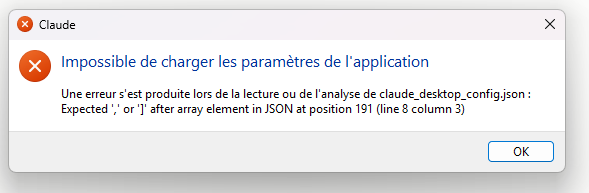
Environment: eM Client 11.0.473 (9e16cce), Microsoft Store version, Windows 11. Claude Desktop 2.7032.0.0 (MSIX).
Config (as generated by eM Client, “Claude App” tab):
"command": "C:\\Users\\<user>\\AppData\\Local\\Microsoft\\WindowsApps\\eMClientStore.exe", "args": ["--mcp"]
Issue: Claude Desktop starts the process and sends initialize (id 0). eM Client replies with a JSON-RPC error response with "id": null instead of id: 0. Claude rejects it (ZodError: expected string/number, received null), then the process exits: “Server disconnected”.
Manual test from PowerShell, with eM Client running, piping the same initialize request to eMClientStore.exe --mcp: no output at all, process exits immediately.
Expected: a valid initialize result, or at least an error echoing the request id, so the actual cause is visible.
Log excerpt attached (mcp-server-emclient.log).
2026-09-24T09:23:55.303Z [emclient] [info] Initializing server… { metadata: undefined }
2026-09-24T09:23:55.303Z [emclient] [info] Era probe verdict: legacy (exec lane pinned — no sibling probe) { metadata: undefined }
2026-09-24T09:23:55.728Z [emclient] [info] Using MCP server command: C:\Users\marcw\AppData\Local\Microsoft\WindowsApps\eMClientStore.exe with path: {
metadata: {
paths: [
‘C:\Program Files\Git\cmd’,
‘C:\Program Files\Git\mingw64\bin’,
‘C:\Program Files (x86)\NVIDIA Corporation\PhysX\Common’,
‘C:\windows\system32’,
‘C:\windows’,
‘C:\windows\System32\Wbem’,
‘C:\windows\System32\WindowsPowerShell\v1.0\’,
‘C:\windows\System32\OpenSSH\’,
‘C:\WINDOWS\system32’,
‘C:\WINDOWS’,
‘C:\WINDOWS\System32\Wbem’,
‘C:\WINDOWS\System32\WindowsPowerShell\v1.0\’,
‘C:\WINDOWS\System32\OpenSSH\’,
‘C:\Program Files (x86)\Windows Kits\8.1\Windows Performance Toolkit\’,
‘C:\Program Files\dotnet\’,
‘C:\ProgramData\chocolatey\bin’,
‘C:\Program Files\NVIDIA Corporation\NVIDIA app\NvDLISR’,
‘C:\Program Files\PuTTY\’,
‘C:\Program Files\SafeNet\Authentication\SAC\x64’,
‘C:\Program Files\SafeNet\Authentication\SAC\x32’,
‘C:\Users\marcw\.local\bin’,
‘C:\Users\marcw\AppData\Local\Microsoft\WindowsApps’,
‘C:\Users\marcw\AppData\Local\Programs\Microsoft VS Code\bin’,
‘C:\Users\marcw\AppData\Local\PowerToys\DSCModules\’,
[length]: 24
]
}
} %o
2026-09-24T09:23:55.743Z [emclient] [info] Server started and connected successfully { metadata: undefined }
2026-09-24T09:23:55.743Z [emclient] [info] Shutting down server… { metadata: undefined }
2026-09-24T09:23:55.743Z [emclient] [info] Client transport closed { metadata: undefined }
2026-09-24T09:23:55.743Z [emclient] [info] Server transport closed (intentional shutdown) { metadata: undefined }
2026-09-24T09:23:55.743Z [emclient] [info] Client transport closed { metadata: undefined }
2026-09-24T09:23:56.077Z [emclient] [info] Server transport closed { metadata: undefined }
2026-09-24T09:23:56.077Z [emclient] [info] Client transport closed { metadata: undefined }
2026-09-24T09:23:56.077Z [emclient] [info] Initializing server… { metadata: undefined }
2026-09-24T09:23:56.077Z [emclient] [info] Era probe verdict: legacy (exec lane pinned — no sibling probe) { metadata: undefined }
2026-09-24T09:23:56.078Z [emclient] [info] Using MCP server command: C:\Users\marcw\AppData\Local\Microsoft\WindowsApps\eMClientStore.exe with path: {
metadata: {
paths: [
‘C:\Program Files\Git\cmd’,
‘C:\Program Files\Git\mingw64\bin’,
‘C:\Program Files (x86)\NVIDIA Corporation\PhysX\Common’,
‘C:\windows\system32’,
‘C:\windows’,
‘C:\windows\System32\Wbem’,
‘C:\windows\System32\WindowsPowerShell\v1.0\’,
‘C:\windows\System32\OpenSSH\’,
‘C:\WINDOWS\system32’,
‘C:\WINDOWS’,
‘C:\WINDOWS\System32\Wbem’,
‘C:\WINDOWS\System32\WindowsPowerShell\v1.0\’,
‘C:\WINDOWS\System32\OpenSSH\’,
‘C:\Program Files (x86)\Windows Kits\8.1\Windows Performance Toolkit\’,
‘C:\Program Files\dotnet\’,
‘C:\ProgramData\chocolatey\bin’,
‘C:\Program Files\NVIDIA Corporation\NVIDIA app\NvDLISR’,
‘C:\Program Files\PuTTY\’,
‘C:\Program Files\SafeNet\Authentication\SAC\x64’,
‘C:\Program Files\SafeNet\Authentication\SAC\x32’,
‘C:\Users\marcw\.local\bin’,
‘C:\Users\marcw\AppData\Local\Microsoft\WindowsApps’,
‘C:\Users\marcw\AppData\Local\Programs\Microsoft VS Code\bin’,
‘C:\Users\marcw\AppData\Local\PowerToys\DSCModules\’,
[length]: 24
]
}
} %o
2026-09-24T09:23:56.091Z [emclient] [info] Server started and connected successfully { metadata: undefined }
2026-09-24T09:23:56.126Z [emclient] [info] Message from client: method=“initialize” id=0 params { metadata: undefined }
2026-09-24T09:23:56.240Z [emclient] [error] Couldn’t start for Cowork and Code sessions. Error: Connection closed { metadata: { context: ‘shared-pool’, stack: undefined } }
2026-09-24T09:23:56.387Z [emclient] [error] [
{
“code”: “invalid_union”,
“errors”: [
[
{
“code”: “invalid_union”,
“errors”: [
[
{
“expected”: “string”,
“code”: “invalid_type”,
“path”: ,
“message”: “Invalid input: expected string, received null”
}
],
[
{
“expected”: “number”,
“code”: “invalid_type”,
“path”: ,
“message”: “Invalid input: expected number, received null”
}
]
],
“path”: [
“id”
],
“message”: “Invalid input”
},
{
“expected”: “string”,
“code”: “invalid_type”,
“path”: [
“method”
],
“message”: “Invalid input: expected string, received undefined”
},
{
“code”: “unrecognized_keys”,
“keys”: [
“error”
],
“path”: ,
“message”: “Unrecognized key: "error"”
}
],
[
{
“expected”: “string”,
“code”: “invalid_type”,
“path”: [
“method”
],
“message”: “Invalid input: expected string, received undefined”
},
{
“code”: “unrecognized_keys”,
“keys”: [
“id”,
“error”
],
“path”: ,
“message”: “Unrecognized keys: "id", "error"”
}
],
[
{
“code”: “invalid_union”,
“errors”: [
[
{
“expected”: “string”,
“code”: “invalid_type”,
“path”: ,
“message”: “Invalid input: expected string, received null”
}
],
[
{
“expected”: “number”,
“code”: “invalid_type”,
“path”: ,
“message”: “Invalid input: expected number, received null”
}
]
],
“path”: [
“id”
],
“message”: “Invalid input”
},
{
“expected”: “object”,
“code”: “invalid_type”,
“path”: [
“result”
],
“message”: “Invalid input: expected object, received undefined”
},
{
“code”: “unrecognized_keys”,
“keys”: [
“error”
],
“path”: ,
“message”: “Unrecognized key: "error"”
}
],
[
{
“code”: “invalid_union”,
“errors”: [
[
{
“expected”: “string”,
“code”: “invalid_type”,
“path”: ,
“message”: “Invalid input: expected string, received null”
}
],
[
{
“expected”: “number”,
“code”: “invalid_type”,
“path”: ,
“message”: “Invalid input: expected number, received null”
}
]
],
“path”: [
“id”
],
“message”: “Invalid input”
}
]
],
“path”: ,
“message”: “Invalid input”
}
] {
metadata: {
context: ‘connection’,
stack: ‘ZodError: [\n’ +
’ {\n’ +
’ “code”: “invalid_union”,\n’ +
’ “errors”: [\n’ +
’ [\n’ +
’ {\n’ +
’ “code”: “invalid_union”,\n’ +
’ “errors”: [\n’ +
’ [\n’ +
’ {\n’ +
’ “expected”: “string”,\n’ +
’ “code”: “invalid_type”,\n’ +
’ “path”: ,\n’ +
’ “message”: “Invalid input: expected string, received null”\n’ +
’ }\n’ +
’ ],\n’ +
’ [\n’ +
’ {\n’ +
’ “expected”: “number”,\n’ +
’ “code”: “invalid_type”,\n’ +
’ “path”: ,\n’ +
’ “message”: “Invalid input: expected number, received null”\n’ +
’ }\n’ +
’ ]\n’ +
’ ],\n’ +
’ “path”: [\n’ +
’ “id”\n’ +
’ ],\n’ +
’ “message”: “Invalid input”\n’ +
’ },\n’ +
’ {\n’ +
’ “expected”: “string”,\n’ +
’ “code”: “invalid_type”,\n’ +
’ “path”: [\n’ +
’ “method”\n’ +
’ ],\n’ +
’ “message”: “Invalid input: expected string, received undefined”\n’ +
’ },\n’ +
’ {\n’ +
’ “code”: “unrecognized_keys”,\n’ +
’ “keys”: [\n’ +
’ “error”\n’ +
’ ],\n’ +
’ “path”: ,\n’ +
’ “message”: “Unrecognized key: \“error\””\n’ +
’ }\n’ +
’ ],\n’ +
’ [\n’ +
’ {\n’ +
’ “expected”: “string”,\n’ +
’ “code”: “invalid_type”,\n’ +
’ “path”: [\n’ +
’ “method”\n’ +
’ ],\n’ +
’ “message”: “Invalid input: expected string, received undefined”\n’ +
’ },\n’ +
’ {\n’ +
’ “code”: “unrecognized_keys”,\n’ +
’ “keys”: [\n’ +
’ “id”,\n’ +
’ “error”\n’ +
’ ],\n’ +
’ “path”: ,\n’ +
’ “message”: “Unrecognized keys: \“id\”, \“error\””\n’ +
’ }\n’ +
’ ],\n’ +
’ [\n’ +
’ {\n’ +
’ “code”: “invalid_union”,\n’ +
’ “errors”: [\n’ +
’ [\n’ +
’ {\n’ +
’ “expected”: “string”,\n’ +
’ “code”: “invalid_type”,\n’ +
’ “path”: ,\n’ +
’ “message”: “Invalid input: expected string, received null”\n’ +
’ }\n’ +
’ ],\n’ +
’ [\n’ +
’ {\n’ +
’ “expected”: “number”,\n’ +
’ “code”: “invalid_type”,\n’ +
’ “path”: ,\n’ +
’ “message”: “Invalid input: expected number, received null”\n’ +
’ }\n’ +
’ ]\n’ +
’ ],\n’ +
’ “path”: [\n’ +
’ “id”\n’ +
’ ],\n’ +
’ “message”: “Invalid input”\n’ +
’ },\n’ +
’ {\n’ +
’ “expected”: “object”,\n’ +
’ “code”: “invalid_type”,\n’ +
’ “path”: [\n’ +
’ “result”\n’ +
’ ],\n’ +
’ “message”: “Invalid input: expected object, received undefined”\n’ +
’ },\n’ +
’ {\n’ +
’ “code”: “unrecognized_keys”,\n’ +
’ “keys”: [\n’ +
’ “error”\n’ +
’ ],\n’ +
’ “path”: ,\n’ +
’ “message”: “Unrecognized key: \“error\””\n’ +
’ }\n’ +
’ ],\n’ +
’ [\n’ +
’ {\n’ +
’ “code”: “invalid_union”,\n’ +
’ “errors”: [\n’ +
’ [\n’ +
’ {\n’ +
’ “expected”: “string”,\n’ +
’ “code”: “invalid_type”,\n’ +
’ “path”: ,\n’ +
’ “message”: “Invalid input: expected string, received null”\n’ +
’ }\n’ +
’ ],\n’ +
’ [\n’ +
’ {\n’ +
’ “expected”: “number”,\n’ +
’ “code”: “invalid_type”,\n’ +
’ “path”: ,\n’ +
’ “message”: “Invalid input: expected number, received null”\n’ +
’ }\n’ +
’ ]\n’ +
’ ],\n’ +
’ “path”: [\n’ +
’ “id”\n’ +
’ ],\n’ +
’ “message”: “Invalid input”\n’ +
’ }\n’ +
’ ]\n’ +
’ ],\n’ +
’ “path”: ,\n’ +
’ “message”: “Invalid input”\n’ +
’ }\n’ +
‘]\n’ +
’ at lZe (C:\Program Files\WindowsApps\Claude_2.7032.0.0_x64__pzs8sxrjxfjjc\app\resources\app.asar\.vite\build\index.chunk-BN5NQxx9.js:7:794558)\n’ +
’ at cZe.readMessage (C:\Program Files\WindowsApps\Claude_2.7032.0.0_x64__pzs8sxrjxfjjc\app\resources\app.asar\.vite\build\index.chunk-BN5NQxx9.js:7:794428)\n’ +
’ at Xm.processReadBuffer (C:\Program Files\WindowsApps\Claude_2.7032.0.0_x64__pzs8sxrjxfjjc\app\resources\app.asar\.vite\build\index.chunk-BN5NQxx9.js:13:161522)\n’ +
’ at Socket. (C:\Program Files\WindowsApps\Claude_2.7032.0.0_x64__pzs8sxrjxfjjc\app\resources\app.asar\.vite\build\index.chunk-BN5NQxx9.js:13:161110)\n’ +
’ at Socket.emit (node:events:514:28)\n’ +
’ at addChunk (node:internal/streams/readable:568:12)\n’ +
’ at readableAddChunkPushByteMode (node:internal/streams/readable:519:3)\n’ +
’ at Readable.push (node:internal/streams/readable:399:5)\n’ +
’ at Pipe.onStreamRead (node:internal/stream_base_commons:189:23)’
}
}
2026-09-24T09:23:56.420Z [emclient] [info] Server transport closed { metadata: undefined }
2026-09-24T09:23:56.420Z [emclient] [info] Server transport closed unexpectedly, this is likely due to the process exiting early. If you are developing this MCP server you can add output to stderr (i.e. console.error('...') in JavaScript, print('...', file=sys.stderr) in python) and it will appear in this log. { metadata: undefined }
2026-09-24T09:23:56.420Z [emclient] [error] Server disconnected. For troubleshooting guidance, please visit our debugging documentation { metadata: { context: ‘connection’, stack: undefined } }
2026-09-24T09:23:56.420Z [emclient] [info] Client transport closed { metadata: undefined }
2026-09-24T09:23:56.420Z [emclient] [info] Client transport closed { metadata: undefined }
2026-09-24T09:23:56.649Z [emclient] [error] Couldn’t start for Cowork and Code sessions. Error: Connection closed { metadata: { context: ‘shared-pool’, stack: undefined } }
2026-09-24T09:24:17.951Z [emclient] [error] Couldn’t start for Cowork and Code sessions. Error: Connection closed { metadata: { context: ‘shared-pool’, stack: undefined } }
2026-09-24T09:25:27.114Z [emclient] [error] Couldn’t start for Cowork and Code sessions. Error: Connection closed { metadata: { context: ‘shared-pool’, stack: undefined } }
2026-09-24T09:29:27.675Z [emclient] [error] Couldn’t start for Cowork and Code sessions. Error: Connection closed { metadata: { context: ‘shared-pool’, stack: undefined } }
2026-09-24T09:45:03.153Z [emclient] [error] Couldn’t start for Cowork and Code sessions. Error: Connection closed { metadata: { context: ‘shared-pool’, stack: undefined } }
2026-09-24T10:08:00.884Z [emclient] [error] Couldn’t start for Cowork and Code sessions. Error: Connection closed { metadata: { context: ‘shared-pool’, stack: undefined } }