I’m evaluating eM client, which looks very nice. Run into this issue, however.
I have some email aliases set up in my MS account.
If I use Outlook on the web, I can choose to send from any of the aliases as I compose the email (there is a menu in the From: field).
The exact same thing happens in Outlook Classic on Windows (10 & 11).
And the email arrives to the recipient with the chosen address shown.
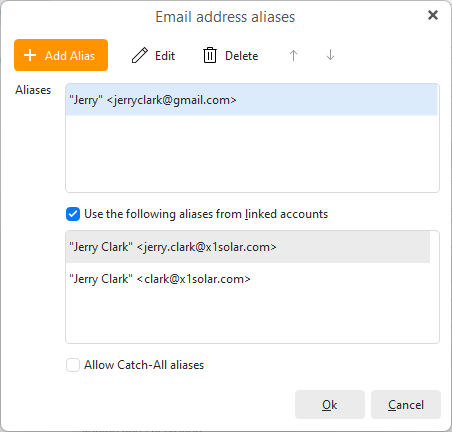
In eM client, I would (should I?) expect that the aliases are synced from the server and shown in the “linked accounts” at the bottom of the Aliases dialog.
This doesn’t happen.
If I try to add them manually in the top field of the Aliases dialog, I can send the email from the alias, but in the Sent folder is shown with the main address in the From field, not the Alias.
And the mail is received with some giberrish email address (and thrown to Spam).
So I’m stuck. How do I make the Outlook aliases work, which are seamless in Outlook (both on web and on desktop)?
After doing some more tests and reading a number of threads on this forum regarding the same issue, my conclusion is that eM Client does not support Outlook aliases.
I would suggest adding a section of “Known issues and limitations” in the Aliases chapter of the documentation and also in the Email Services | eM Client section of the website.
It would prevent unsuspecting people from wasting their time chasing features that are not actually there.
eM Client does support Outlook Aliases. I have them setup and they work just fine. Here is how to set them up. I am not sure what version you are on: 8 or 9 or 10, the following documentation pages are for version 10
The Outlook aliases defined in my Microsoft account are not showing up in the lower part of the dialog (linked accounts).
I can add them manually, in the top section of the same dialog.
After doing that, I can use them but the email arrives at the recipient with the main email in the From: field, and the Alias is set only as the Reply-To: address.
Which is not really an alias.
This checks with the various other threads on this forum, asking about the same thing.
Sorry they are not working for you. As you indicated, I cannot get my defined ones to show, so I added them manually. I sent an email using an alias, I verified the outgoing email header, and it was sent from and shows my alias in the header as the from address.
Interesting.
On my side it definitely doesn’t work as expected (only giving a Reply-to: address), tested on two systems, one with Windows 10 and another with Windows 11.
Upon further investigation, you are correct. It does not work; it will not use the alias as the email address. Good catch, I will add my vote to your enhancement request.
So my feature request on Sleekplan wasn’t published, but got a reply to it from @Olivia_Rust , suggesting to reach Support as there might be some esoteric solution, presumably necessary on free Outlook accounts.
I can’t reply there, because the post is still moderated.
First, my Outlook account is not free, I’m on a M365 Family paid account. Not a Business account, but not a free one either.
Second, it’s not clear to me why that possible solution wasn’t mentioned or suggested by anyone from eM Client in this very thread.
Or in any of the many threads that were discussing the same issue for some time.
Anyway, I uninstalled eM Client yesterday as I felt that I already spent way too much time on trying to make basic stuff work.
I liked a ton of stuff about eM Client, but in the end, it doesn’t (easily) do something that is vital for me, and was dissapointed in the lack of interest shown from the company towards its (potential) users.
Well, the thing is that outlook.com is real mess. There are former hotmail.com accounts that are accessible only via legacy “Airmail” protocol, that is very buggy and does not support alias sync at all. The business outlook.com accounts should include full Exchange protocol, so we connect to these via EWS and in that case it should work. You will see whether eM Client uses AirSync or EWS in the account detail → Services section (tab “General”). We also have to send emails via Airmail instead of SMTP because Microsoft has introduced a bug in authentication mechanism (oAUTH) and at least for more than 2 months Microsoft was not able to fix it, so we’ve changed the default protocol for sending from SMTP to AirSync. If you use manual aliases we send the message correctly with “From” address taken from the selected alias, but Microsoft server replaces that alias address with the primary email address (the behavior you now experience). This is a behavior out of our control. Outlook desktop now uses a private nonstandard protocol to connect to outlook.com accounts, which is probably the reason why it works. We can’t use that protocol, because there is no specification for it. However we’ve implemented another protocol which is public (MS Graph), that might replace EWS and Airsync on outlook.com accounts in the future and may resolve some of these problems. However currently the status of the protocol is still not good and it contains a lot of bugs and lacking some elementary functionality. Many of these techniques seems to be used by Microsoft to get rid of 3rd party client from managing outlook.com accounts. But we will fight with these techniques.
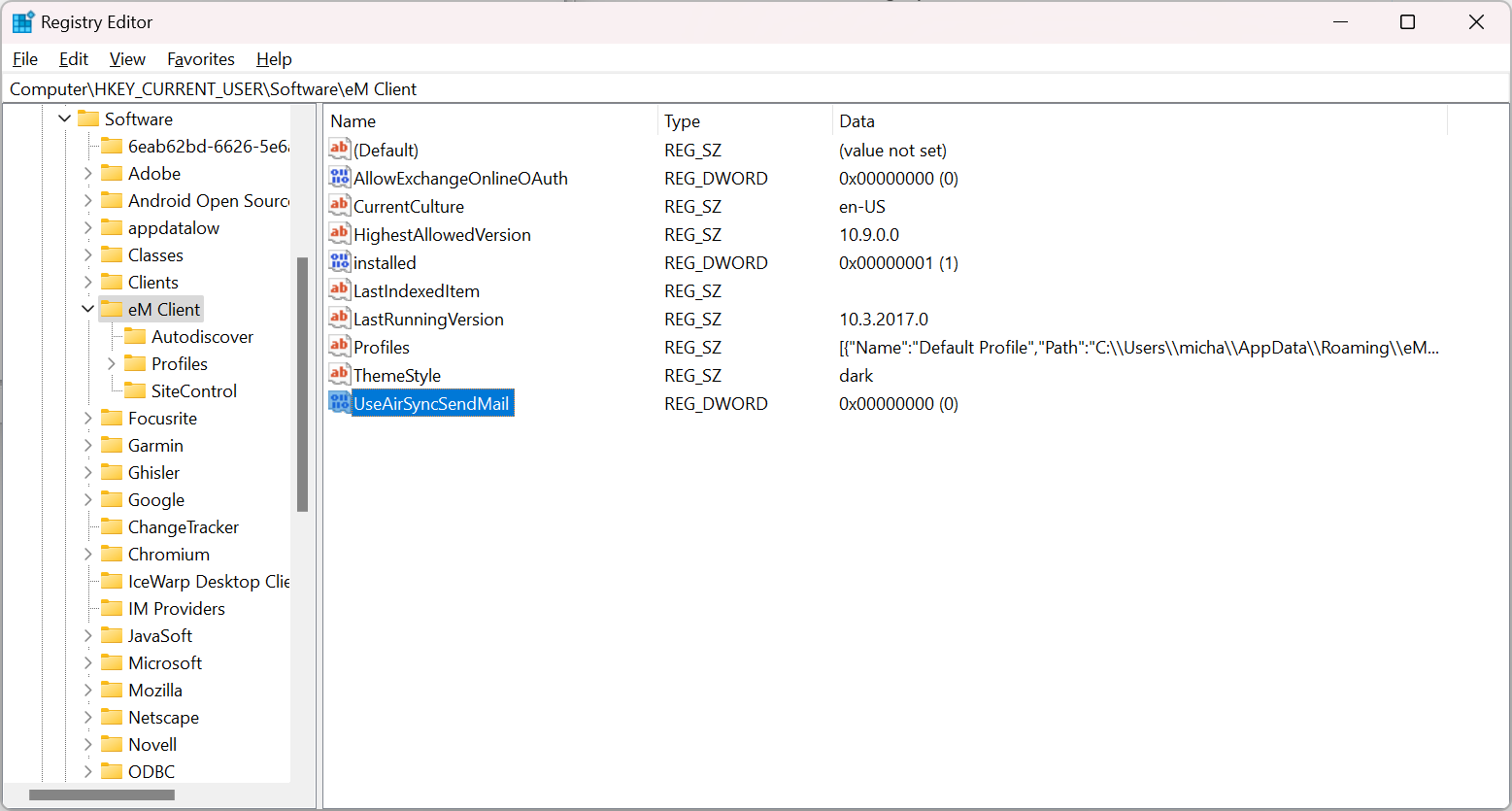
I have some rather good news. We’ve done some testing and found out that once SMTP is used for sending instead of AirSync, the “From” address is not replaced and it works as expected. As the Microsoft finally fixed the autentication issue with SMTP, SMTP can now be used for sending via outlook.com.
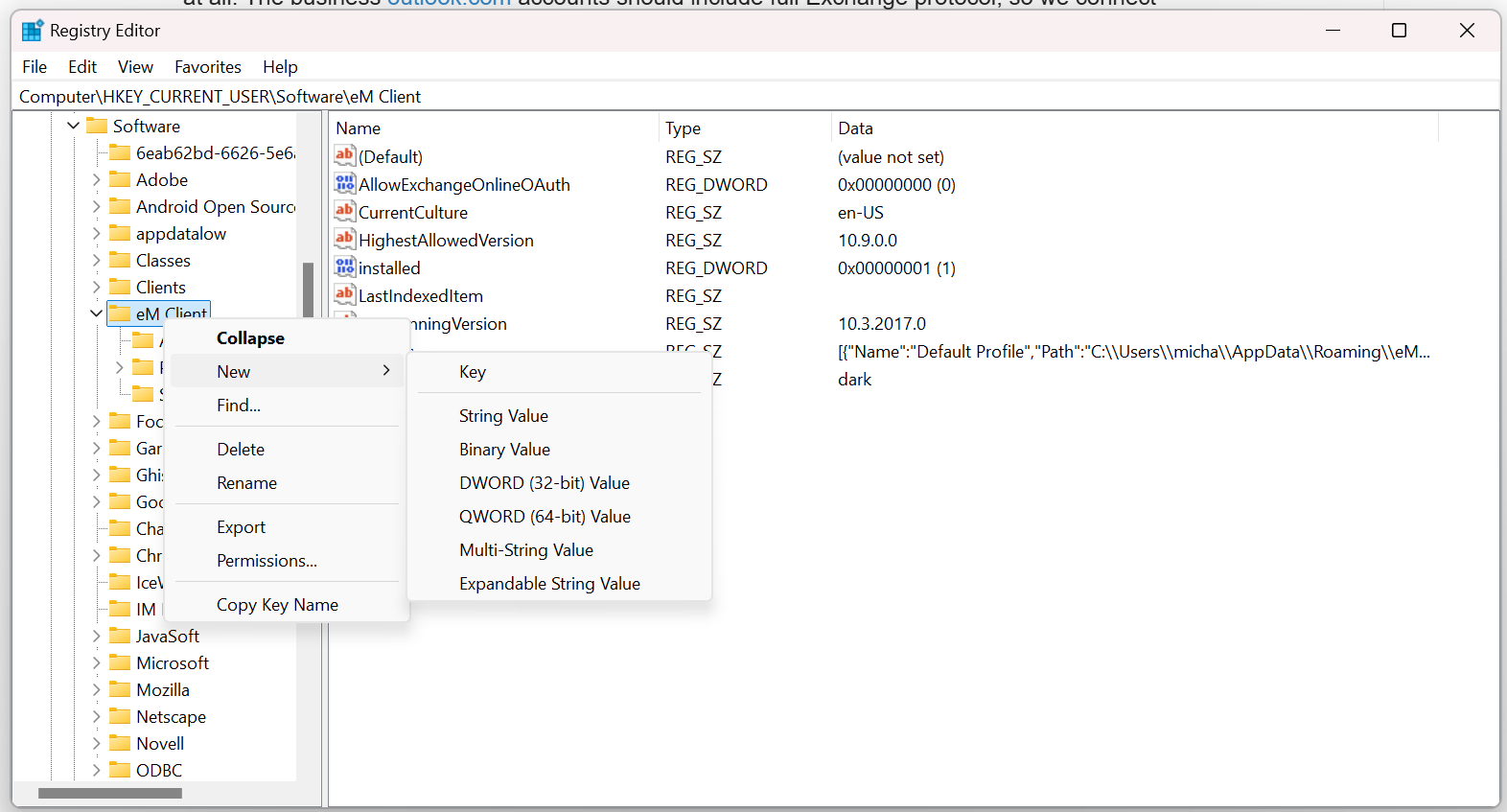
That behavior (send via SMTP instead of AirSync) can be achieved with adding this key to registry settings:
Knowing this would have saved me a lot of time and frustration.
Again, since this is known behaviour, it should be documented.
Otherwise, people can be exposing their email addresses while falsely believing they are using Aliases.
I sympathise with what you guys have to deal with. It’s not funny, and it’s sad that the whole email landscape nowadays is basically made of proprietary solutions that attempt to lock you in.
But I sympathise with my time even more.
In the end I’m just someone who wants to deal with his email. It doesn’t work, and there’s zero information available to clarify why that is happening.
There’s a long list of threads complaining about this, for years. Yet, if I’m not mistaken, this is the first time that this question was actually answered by someone from eM Client, a clear cause was described and a possible solution was offered.
Thank you @Michal_Burger this information is great to have. I don’t use alases as much as @digitallysane. But the detailed answer was very nice to have. It is tough when you have to play with the big boys such as Microsoft to get help or around their vision for their product. I have written interfaces for software to hardware(56k modems come to mind) and software to software, and at times it was tough to get help from even a small vendor, so I feel your pain. Thank you for a wonderful product, I was a long-time user of Outlook since the first versions came out. eM Client just works for me.
PS on your DWORD addition to the registry. I would recommend that the user export the current Registry as a backup prior to the change.
I agree there was not enough information and documentation about the topic and I (as CEO) apologize for that. We are primarily focused on VIP support, but recently (with more support staff) we put a lot more effort to address topics on the forum as well.
Once Microsoft had introduced the authentication bug, we’ve come up with the solution pretty quickly, because a lot of users were not able to send emails with outlook.com accounts. We described that in this blog post:
We believed it is a temporary solution, but it took Microsoft about a year to fix it, so it remained there. Now it is (hopefully finally) fixed by MS, so we may remove that workaround with the next update and no registry setting (which is of course cumbersome) won’t be necessary any more. That should also resolve that another bug with From being replaced when sending. To be honest we were not fully aware of this issue. It probably started happening at some point of time.
Good tip to add all of this to FAQ and documentation. I believe it won’t be necessary with the next update when we prefer SMTP for sending messages again.
Once again thank you for your patience and it is a good feedback we need to better communicate such issues. We try, but it seems not always enough.
Yesterday we’ve released version 10.3.2545 https://www.emclient.com/dist/v10.3.2545/setup.msi
where we changed the default for sending emails back from AirSync to SMTP protocol, as it seems the bug on Microsoft side with SMTP authentication is hopefully finally fixed. This means the wrong from address when using aliases issue should now be resolved for all the users with no need to change some settings or registry hacks.