Major dilemma! I may NOT be using eM Client ever AGAIN!

Revised:

Everybody knows that OneDrive is “intrusiveware”, and that Microsoft is on a take over the world campaign to put everyone in their back pocket! And now, eM Client is cloud backing up mandatorily to OneDrive upon attaching files such as .PDF’s to an outbound draft! There is NOTHING in the way of shutting this off! Mind you, OneDrive is NOT installed on my Windows 11 machine – though it regularly reinstalls itself! Moreover, eM Client – I hope & pray you do not sell out to Microsoft this way!? OneDrive crashes EVERY TIME I ever tried it on many machines. It’s the worst of all pieces of crap software EVER conceived and written. Do you realize that this feature is in fact CRASHING eM Client also? I have tried attaching several times … and it crashes it… I have to task manager kill eM Client and restart it… and as it stands, I am going back to Gmail in Chrome perpetually because at least I can attach files there with reliability and normalcy.

Sigh…

Please at least tell everyone HOW in the HELL to turn off this BLOODY feature!!! It breaks your software! I want to make you aware – so that this may be corrected.

– a very concerned potential customer who WAS planning on buying a real license!

**

Addendum:

**

I am not ruling out this entire ordeal as being the direct result of Microsoft apart from eM Client’s awareness! I have seen Microsoft do this regularly – just as they are trying to steal away Google’s Play App store on the Android platform. They are an aggressive company. So, if you guys are not aware of this – then I would not be surprised. But do tell us how to turn this feature off, please.

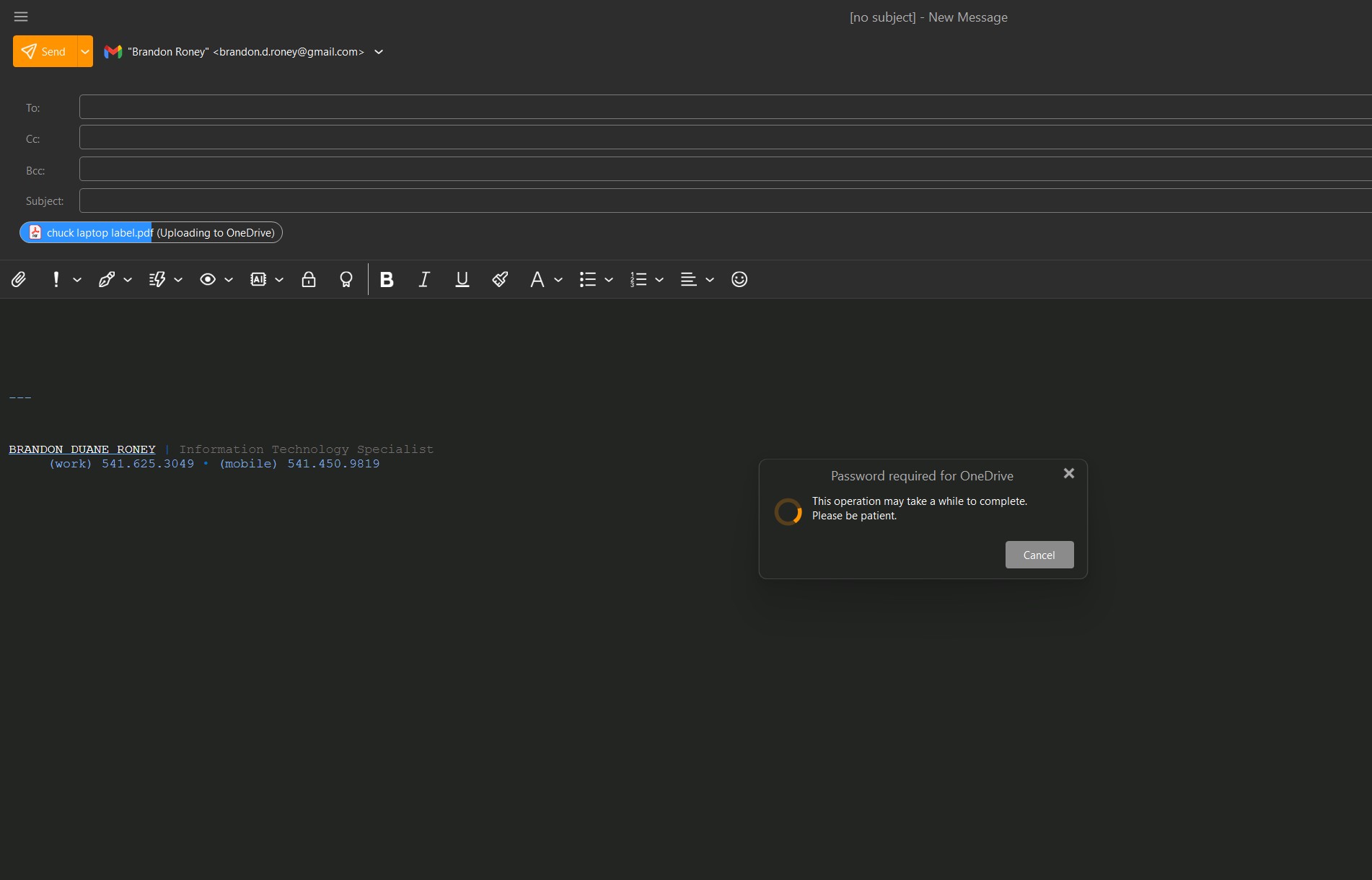
Enclosing a picture showing what is happening. Upon adding an attachment, it goes into an unrecoverable spin operation trying to authenticate to OneDrive – that isn’t even installed on my system. :sad_but_relieved_face: Thank you.

Hi Brandon, we are in no way associated with Microsoft and definitely do not have any features that would upload your data to OneDrive without your action.

Even with the Cloud Storage feature - which you need to enable yourself, log in with your MS account, and have the OneDrive app installed - so without having it installed it would not work at all - you STILL need to select yourself that you want to change this attachment to a cloud attachment.

Since we definitely aren’t uploading any data to OneDrive (definitely not in any way mandatory) we cannot tell for sure what’s happening on your device, but perhaps a Windows update installed the OneDrive app back for you?
I recommend checking your system for the OneDrive app/settings and make sure to turn off any system/data backups it could be doing.

3 Likes

jueves 22 enero 2026 :: 1318hrs (UTC +0100)

Hey@fierywraith1

First I am pleased to endorse all that @Olivia_Rust has posted, and I am not
an employee of eMC, just a user with, like you, an opinion.

Your opening gambit that, "Everybody knows that OneDrive is intrusiveware,
and that Microsoft is on a take over the world campaign to put everyone in
their back pocket!" - is to say the least somewhat of a sweeping statement
and could possibly be construed as a libel.

I have OneDrive enabled on all my PC’s and having just checked can confirm
that there is absolutely nothing directly related to eMC with the exception of
copies of images that I have posted on this Forum where there is no indication
that this was done relative to eMC.

Further there are no eMC Backup or Database files and if in fact you have
evidence of such perhaps a screenshot of this would be useful.

You quote, “OneDrive is NOT installed on my Windows 11 machine – AT ALL!”
Strange then that you have this issue with OneDrive.

Also I fail to understand how OneDrive causes your PC to crash if it is not
as you say enabled, can you explain?

Then you say, "Please at least tell everyone HOW in the HELL to turn off this
BLOODY feature!!! It breaks your software! Don’t you care? Surely you know!"
Only the account holder if not you can do this via the Microsoft Account.

Finally, eMC does not appear in the default list of Folders on OneDrive, if it
is there it must have been added by the account holder.

skybat

¡Buena suerte!

¡Saludos desde Sevilla la soleada en España!
¡Mis mejores deseos y mantente a salvo!

[email protected]

Hablo español, luego portugués, inglés, francés y alemán
con conocimiento de varios otros idiomas.

2 Likes

For what it’s worth, as a user, with Windows, I did not see Em Client working with Onedrive - I have Onedrive disabled on my PC and life is good. :slight_smile:

Relja

2 Likes

I have augmented my original post. And I have enclosed a snippet picture to show what is occurring. I do NOT rule out – whatsoever – that eM client may be entirely unaware of Microsoft somehow usurping full control and doing all this – and thereby overriding their eM Client’s settings via Window’s low level all-ubiquitous API.

– A concerned and frustrated user

Honestly, haven’t you seen how OneDrive constantly reinstalls itself – and forces everyone to cloud backup against their wishes?! There is NO way to turn it off. Every time I uninstall OneDrive, it comes back! There may be a hack somewhere to permanently disable it – if you know of one, please share it with me. :wink:

Microsoft is being extremely aggressive; and yes, this is sweeping – but it is not libel, ONLY unmitigated fact. I will not apologize for telling the truth.

Thank you. I have augmented my original post. And I have enclosed a picture. I am glad you have been plagued like me – it is sooooooo utterly frustrating. LOL. And so many HAVE experienced it. I am not declaring eM client to even be privy to these goings on; it could be all ON MICROSOFT, and wouldn’t surprise me in the slightest.

@fierywraith1

Honestly, haven’t you seen how OneDrive constantly reinstalls itself – and forces everyone to cloud backup against their wishes?! There is NO way to turn it off.

You can easily disable and unlink One Drive from automatically backing up by reading the following.

See this Microsoft link on how to.

“Turn off, disable, or uninstall / Unlink OneDrive”

3 Likes

@fierywraith1 Based on the screenshot, it seems you indeed enabled the Cloud Attachments feature.

This setting is NOT mandatory and will not set itself up on its own. It seems you added it and perhaps forgot about it.

Go to Settings > Mail > Attachments, find the OneDrive account, select it and remove it.

5 Likes

Indeed Kim, it was present in there! But – I did not “have” it in there – it was in there by it’s own manipulative means. Thank you.

I am sure this will fix the problem. Sigh…

#billgatesneedstorepent :wink: