All emails from a specific sender in one of my four accounts are only displayed in gray. Black and orange blocks run across the top of the mail window. You can view the source code, but for example, the toggle switch between light and dark view does nothing, and other interactions are also not possible. This applies to all emails from this sender (a ticket system, unsigned, HTML emails). The account is an Exchange on-premise account.
Strangely, the mobile client (iOS) has no problem displaying these emails.
What can I do to view these emails? Or what else do you need for a fault analysis?
The bar above the mail looks like this:
It turned out that the host was listed in an address book, and so an image from the signature was loaded. However, this image didn’t load because you had to be logged in anywhere, and emclient isn’t.
The question remains: Why is there no timeout when reloading images in emclient?? Unfortunately, I can’t use the program like this.
Mail clients don’t normally have timeouts settings when remote email images aren’t loading or email isn’t loading in the body.
If an email isn’t loading body contents “and you have added the account and logged in / authenticated ok” then you have three options to reload it.
Click the “Refresh” button, Or “click on another mail folder and then click back to that mail folder”, Or “failing that close and reopen the program” which will force a re-sync.
If you still dont see the remote email or remote images in the body, then you might have the Privacy Settings “possibly blocking the senders email”. You can check that via going to “Menu / Settings (Preferences) / Mail / Privacy”.
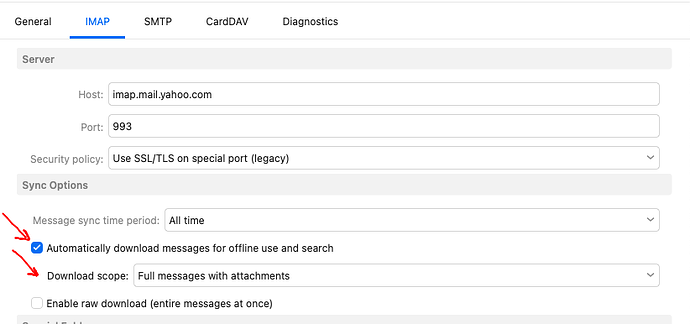
Lastly if you have an eg: IMAP / Exchange account you can set the account to download emails and attachments offline “so the body contents loads quicker” to avoid waiting for the remote email to load with the orange dots as in the below IMAP Yahoo example.
eM Client V10 example) to download messages offline including attachments.
Thank you for your reply. However, the problem isn’t that the images take a long time to load, but that they simply never load. The image in this sender’s signature is on a website that can only be accessed via login, and eM Client is not logged in there (nor should it be). This is, of course, very idiotic of the sender, but it shouldn’t cripple my client.
The problem is that the bar with the orange-black squares runs forever, and I have no way to cancel it or for it to cancel itself.
In such a case (image to be loaded from external sources), I would expect the loading to end after a timeout and a broken image to be displayed, just like any web browser does. I would also like, as in any web browser, a button with which I can cancel the loading process and then interact with the email.
I can work around the problem by disabling the option in Email/Privacy “Show content from people in the contact list.” However, I find this very impractical for emails from everyone else in my contact list.