Hi there. Few minutes ago I tried to check my events in calendar, but to my despair, it’s gone. It was working fine until yesterday, but today it simply disappeared.
I use only one account and it’s local, it’s not connect to any other server.
Thanks for any assistance.
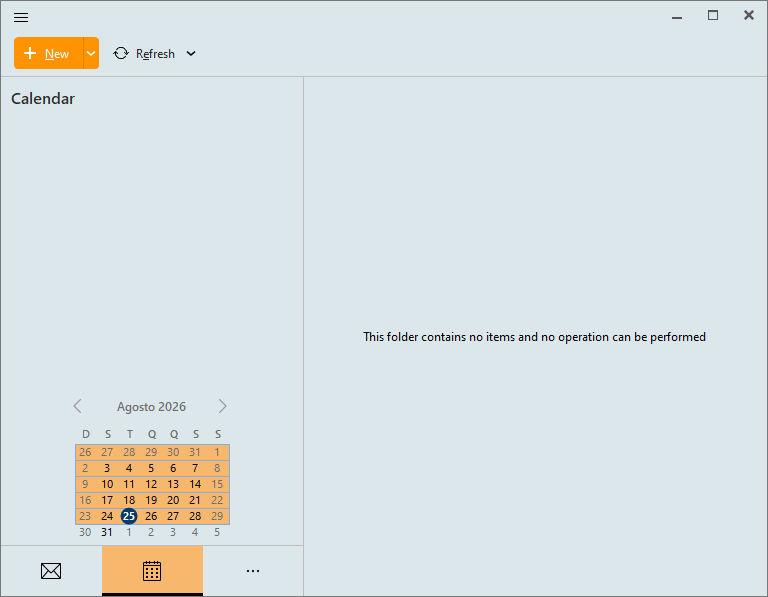
I tried to check my events in calendar, but to my despair, it’s gone. It was working fine until yesterday, but today it simply disappeared.
I use only one account and it’s local, it’s not connect to any other server
Could be you might have changed your eM Client user Profile so eM Client opens blank.
Or you might have changed your database storage location so eM Client also opens blank.
Or you might have logged into the OS with a different user profile so then it’s blank.
So first make sure you are logged into your computer with the correct user profile.
If you are already logged into your computer with the correct user profile, then if you are using eM Client V10 and previously setup different user profiles, go to “Menu / Profiles” and make sure you are switched into your usual profile.
If you are already logged into the correct eM Client user profile or there is no other profiles, then go to “Menu / Settings / General / Storage” and check that your database location is still the same. As could be you might have moved it.
If it’s still the same location then if you backup eM Client regularly, suggest to go to “Menu / File / Restore” and restore a recent backup when you know the calendar was there. Any new emails, contacts, calendar events etc since the backup will update when eM Client reconnects / syncs.
Note: If you have a POP account “then before restoring your backup” go to “Menu / File / Export” and export your account email messages, contacts, tasks or notes you need to a folder on your desktop to then reimport later after the restore via "Menu / File / Restore.
Hi there,
- No, I didn’t change my eM Client user Profile.
- No, I didn’t change the database storage location.
- No, I always log into the same OS user profile.
- Yes, I’m using eM Client V10 [10.4.5674 (fcbf2a4)], and no, I have only one profile (default), so I didn’t switch to another profile.
- I didn’t change the database location. I checked it and the files are there, but there’s no file called calendar (I don’t if that’s the name for the calendar database file).
And what I find strange is that no calendar appears at all. Shouldn’t it at least show a blank calendar? But it doesn’t display anything.
Unfortunately I didn’t make any backup.
Additionally, I made a test, I created a test event with a time defined and a 5 minutes reminder. At the specified time eM Client noticed me about the event. Even so, no calendar is showed.
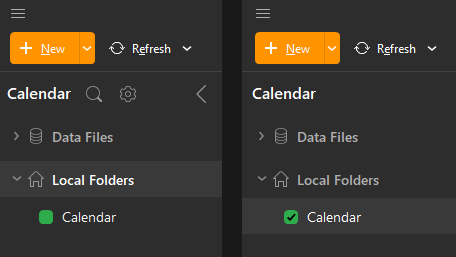
Have you selected the Calendar with the checkmark?
On the left calendar it is not checked and all i get is an empty calendar, exactly as the one in your screen dump. The calendar to the right have the checkmark in place and that´s what you want.
It is easy to un-check it by mistake so it´s worth checking it. 
Hi Thunderbolt.
Thanks for the tip, but in my App, the tree structure (Data Files, Local Folders) simply doesn’t exist. As one can see in the image I sent, nothing appears. If I put the pointer over the name “Calendar”, the options “Filter” and “Settings” appear, but nothing else.
Additionally, I made a test, I created a test event with a time defined and a 5 minutes reminder. At the specified time eM Client noticed me about the event. Even so, no calendar is showed.
Data Files do only appear if you have/use any Data Files, so if you don´t have them, iow not using Data Files, it is normal. Go to Menu > Data Files to see if you have any mounted there.
I use Data Files, so that´s why i have it there.
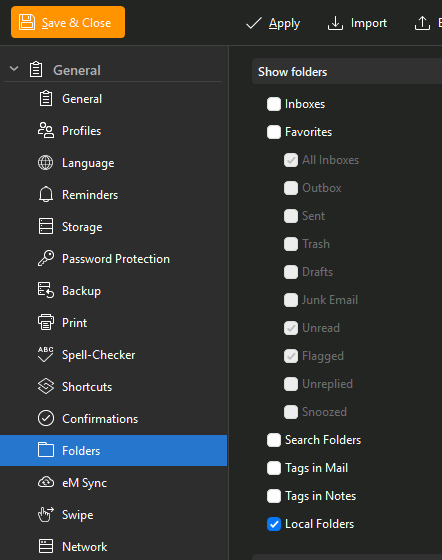
Are Local Folders checked if you go to Menu > Settings > General > Folders?
1 Like
Hi Thunderbolt, Local Folders was unchecked. Now it’s all Ok. Thanks a lot.
1 Like
You´re welcome!
Thanks for reporting back!