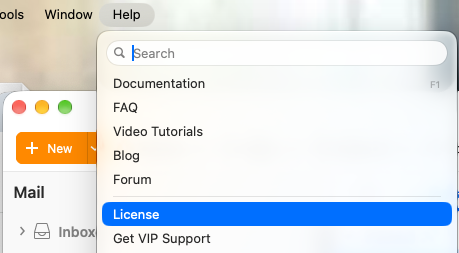
Hi, I have paid for my license, and I am using EMClient in my IMAC, I have always used also my Macbook, but this morning I have been asked to insert the licence in my emclient on the Macbook. I saw on the Macbook that the License voice is under HELP, but I cannot find it in the EMClient in the IMac…
How is this possible?
How is this even imaginable that there are 2 layouts and that the license numebr is not under the main voices as for example Settings…
Now I cannot work with my Macbook also if I have paid…
Can someone help me?
Thank you,
Laura
I saw on the Macbook that the License voice is under HELP, but I cannot find it in the EMClient in the IMac
If you don’t have the License option under Help as per below V11.0.1389 example screenshot below, then you must have a Beta version which didn’t require a license for testing.
So “close eM Client” and go to the Release History Page and download the latest Non Beta Mac version and install which also has alot of fixes and updates in them. The Beta versions will show with a eg: Beta update under them where the last Mac V11 Beta was V11.0.865
If you dont have a license for V11 you can get the previous versions also available when you scroll down on that page such as V10.4.5674 release version if you have a license for that.
Note: Before installing the update make a backup of your current version via “Menu / Backup” incase you need to restore for any reason. You can see when thats completed in Show Operations via the dropdown on the right of Refresh.
Lastly to run eM Client on both computers at the same time, you need to either have a Pro Multi Device License or a Personal 3 Device License or Business Multi Device License.