I’m running into an issue when trying to send video files via eM Client as part of my usual workflow. I edit and export short videos with capcut for Mac, and then attach them directly in eM Client to send out. The problem is:
Larger files either fail to send
Or get stuck in the outbox for a long time
Sometimes they send, but only after multiple retries
The files themselves are fine and play without issues locally, so it seems more related to how eM Client handles larger attachments.
I know email has size limits, but I’m trying to understand:
Is there a recommended file size limit to stay under for smooth sending?
Does eM Client have any settings that help with large attachments?
Or is it generally better to avoid attachments and use links instead?
Curious how others handle sending video files through email without running into these issues.
The size attachment you send is “dependant on your SMTP sending server”.
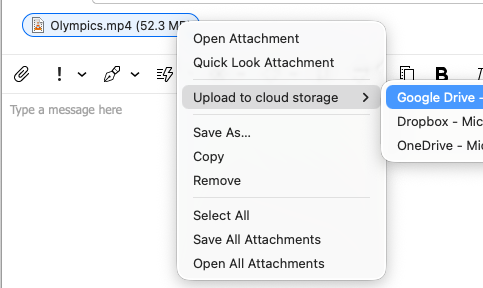
So if you have a file attachment that is too large, you can optionally send the file as a “Cloud file attachment” via using cloud drives such as Google Drive, One Drive, Dropbox, Nextcloud etc
One you have you cloud drive setup in Settings, compose the email and then “add the attachment”, and then “right click on the attachment” and choose your Cloud drive to upload it to. You will see a progress bar across the attachment when its uploading to your cloud drive.
Then finally send your email once the attachments are all uploaded. The cloud drive attachments go on an “eM Client Attachments” folder. Once the recipient has received and downloaded your attachments delete them from your Cloud drive.