eM Client does not add/show a tag NonJunk or any other tag based on the header X-Spam-Flag: NO.
Have you perhaps used Thunderbird (or another mail app based on Thunderbird) previously? Their adaptive Junk filter is what assigns the NonJunk state as a tag and then they keep that tag hidden - but when synchronized to another app via IMAP, it shows as any other custom tag.
So turning off that feature in Thunderbird and then removing the tag manually is what solves the issue.
To get rid of the tag, you can also create a rule like this in Menu>Rules:
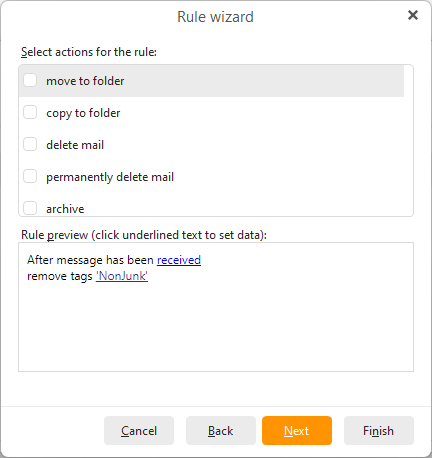
You can specify that tag name in that rule, you don’t need to add any other tag and this does not create the tag in your Local tag list.
You can then run that rule manually (Apply rule) on all folders to remove the tag from all messages and also keep it running just in case. But I would recommend trying to find and turn off the source of the tag or it will probably just keep returning.