How do i get rid of the NonJunk label?
See @Son-of-A-Gun post below on how to remove tags / labels
Also eM Client documentation on Tags / Labels
“Working with Tags”
Note: If the above doesn’t help you, then screenshot the label you want to remove in this thread and blankout anything personal.
I don’t want any tags at all: removed all tags via the route you describe, but this one persists.
Rightclicking on a NonJunk-tagged email, Menu tags: can click to remove it or choose ‘no tag’, but that removes the tag from THAT email only.
It is not related to Gmail or mail provider.
No option: “no tags at all”?

eM Client does not add/show a tag NonJunk or any other tag based on the header X-Spam-Flag: NO.
Have you perhaps used Thunderbird (or another mail app based on Thunderbird) previously? Their adaptive Junk filter is what assigns the NonJunk state as a tag and then they keep that tag hidden - but when synchronized to another app via IMAP, it shows as any other custom tag.
So turning off that feature in Thunderbird and then removing the tag manually is what solves the issue.
To get rid of the tag, you can also create a rule like this in Menu>Rules:
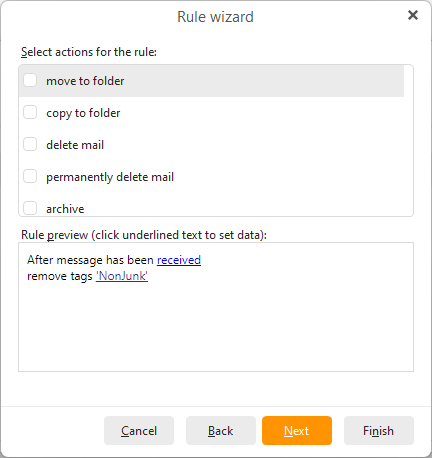
You can specify that tag name in that rule, you don’t need to add any other tag and this does not create the tag in your Local tag list.
You can then run that rule manually (Apply rule) on all folders to remove the tag from all messages and also keep it running just in case. But I would recommend trying to find and turn off the source of the tag or it will probably just keep returning.
1 Like
Enlightening! new rule hides tag in eMClient, for now.
Turning off the feature in Thunderbird - meaning: turning off its filter, or could I just turn off their tagging?
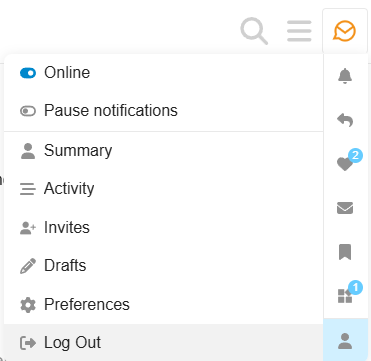
(sideline: where is the Log-out button on this page?)
Well the setting in Thunderbird specifically applies to their adaptive Junk filter feature, so it applies to their own filtering feature. I’d expect that other messages with spam headers already assigned by the server will still be correctly recognized, but that is just my guess - I do not have inside knowledge on Thunderbird 
If you need to log out of the forum it’s in the top right - click your account icon, then the “user” icon in the bottom left of the pop-up menu, and then click log out.