Bonjour,
Tous les messages reçus se trouvent dans la Corbeille !
mon adresse mail est avec Gmail, sous windows 10
Merci de me donner les paramètres à appliquer pour rmédier à cela !
j’ai vérifié les REGLES il n’y a rien de noté
Merci
J.M.
Sounds like you have accidentally blacklisted the Gmail domain.
Go to “Menu / Settings / Mail / Blacklist & Whitelist” and click “Manage Blacklist” at the bottom.
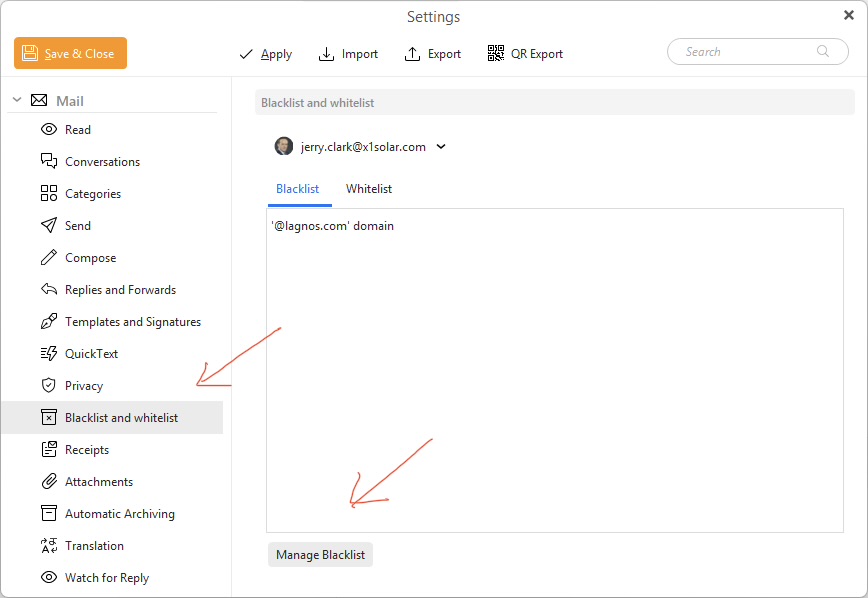
1 Like
Bonjour, merci pour la réponse, mais dans ma version EmClient il n’y a pas la commande Blacklist
il y a t-il un paramétrage à faire sur Gmail.com
MERCI
J.M.
If you have eM Client V7/8/9 go to “Menu / Rules” Pc or “Menu / Tools / Rules” Mac and dblclick the black list to view and edit it.
Or you could “clear the checkbox” next to the blacklist if you want to test if it’s a blacklist issue.
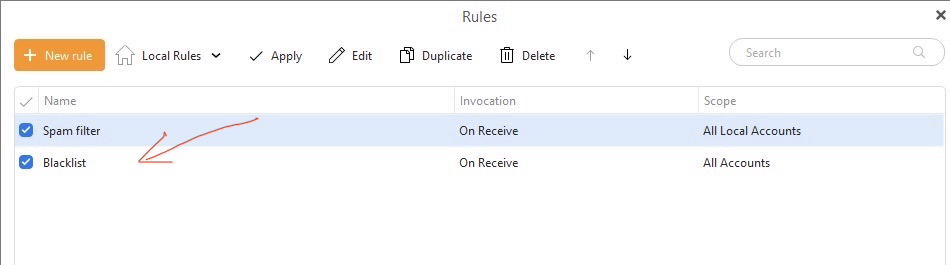
If you don’t have a blacklist in there or you do but disabling the blacklist makes no difference, then “if there is other custom rules in there” other than the default POP Spam filter at the top, then also dblclick any other custom rules in there to view & edit them, just incase you may have accidentally blocked the Gmail Domain with a custom rule.
Is there a setting I need to adjust on Gmail.com?
You don’t normally have to do anything in Gmail unless you have previously put filters in there.
But if you want to check, then go to your Gmail account online via browser and do the following.
“How to View and Manage Blocked Senders (Desktop)”
- Open Gmail on your computer.
- Click the Settings gear icon in the top right, then select See all settings.
- Click the Filters and Blocked Addresses tab at the top.
- Scroll down to the list of blocked email addresses.
- To unblock: Select the address(es) and click Unblock selected addresses