My work uses Exchange to provide Email service. POP3 is not available. They also have a size limit for the email account. I hit this size limit pretty fast. Now I want to delete messages on the server, but keep them in my eM Client. Currently, when I remove them on the server, they are also deleted in eM.
Can I configure eM to not delete the local copy?
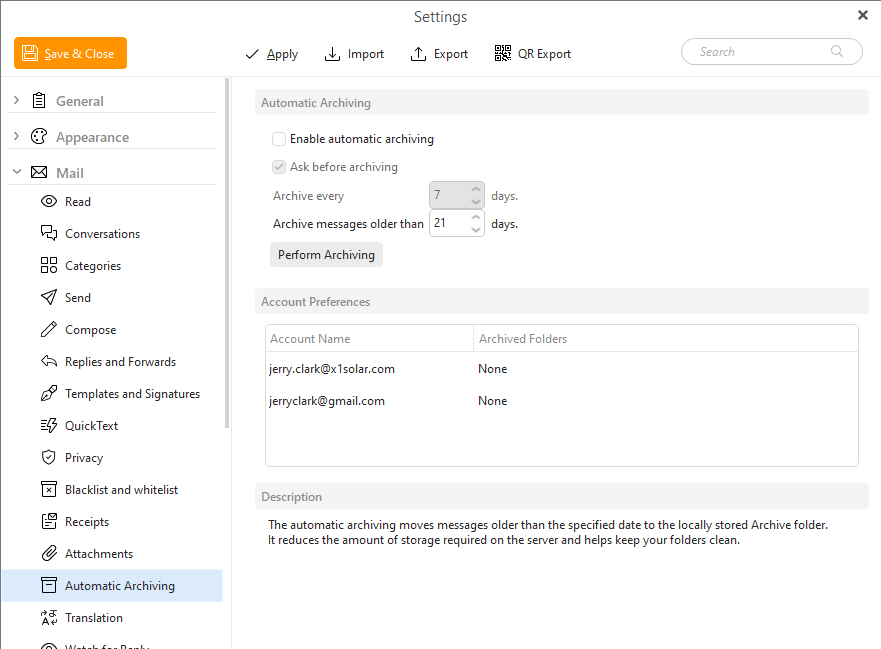
Should I do this via “Archiving”?
If you are moving server messages into Local Folders at the bottom left of eM Client either in one of the default existing folders or creating custom folders “they don’t normally delete from there” as is stored locally in the database. So make sure you are moving them in Local Folders.
If you have moved “a lot of messages at once” to Local Folders and you don’t see them all straight away, be patient as it might just be taking time for them to all fully sync / show locally depending on your internet connection speed. You can check the progress after moving in “Show Operations” via the dropdown arrow on the right of Refresh.
If you don’t have Local Folders enabled and have eM Client V10, go to “Menu / Settings / General / Folders” and check Local Folders & Save Settings.
If you do move messages to local folders make sure to backup regularly either automatically via the “Menu / Settings / General / Backup” or manually via “Menu / Backup” incase you need to restore those messages anytime in the future.
If you have eM Client V10 you can alternatively go to “Menu / Data files” and create a (.emdf) data file in your eg: Documents or Downloads folder to move messages into a custom folder or folders under the data file. The data file/s show above Local Folders. These are similar to (.pst) files if you have used Outlook previously in the past.
To backup data files go to “Menu / Data files” and “unmount your data file or files” and then backup your (.emdf) data files manually to another drive and then once backed up go back to “Menu / Data files” and mount your data files again.
Should I do this via “Archiving”?
Yes you can also do eg: automatic archiving if you want which moves messages older than x days from your online server mailbox to an archive folder.
See the eM Client blog on Archiving your emails
Also see eM Client automatic archiving documentation