Hi All,
Since a few days I will get spam / junk mails with pictures included. My privacy option is set to none. Why did I receive picturs and how can I change it so that I will alway get text messages.
thanks and regards
Michael
Hi All,
Since a few days I will get spam / junk mails with pictures included. My privacy option is set to none. Why did I receive picturs and how can I change it so that I will alway get text messages.
thanks and regards
Michael
Why did I receive pictures and how can I change it so that I will alway get text messages.
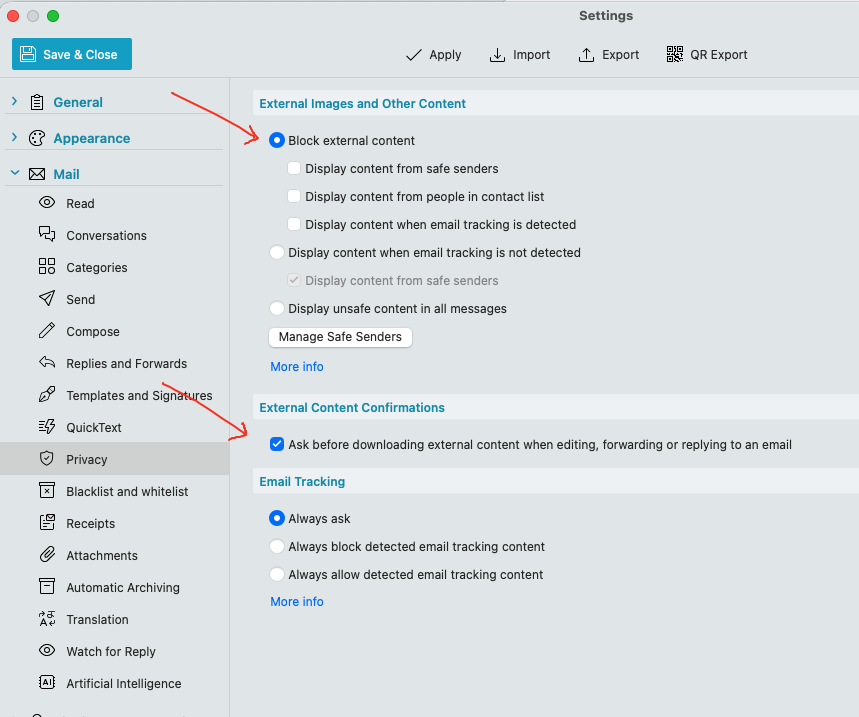
Normally you just go to “Menu / Settings (Preferences) / Mail / Privacy” and set to “Block external content”. Also set to "Ask before downloading external content when editing, forwarding or replying to email.
That normally blocks the “external image content” within the HTML email as per the second screenshot below which then shows “no external images inside the square boxes” and eM Client will then ask you at the top of the email to “Download pictures” or “Always download pictures from external senders” if you want to.
Apart from that you can also eg: right click in the body of the received email and select “Format / Plain Text” if you dont want HTML email view as in the third screenshot below without any HTML background.

Hi Support,
thanks for your quick answer! But, that does not solve my problem. I’ll guess that it is the HMTL- option against text view. The junk author is exploiting the fact that HTML is displayed. And then shows his pictures.
There may be an option to prevent junk mail from being displayed in HTML?
Regards Michael