Having eM Client on my iPhone and PC is VERY attractive.
Installing iOS version asks for a “pin” to create an export QR Code.
Never had a pin. username and pw all I needed. I have the license available.
Using 10.4.4209 (free) on a Win11 pc.
I back up eM Client daily and keep the last 5.
installing iOS version asks for a “pin” to create an export QR Code.
Never had a pin. username and pw all I needed. I have the license available.
Could be your not doing it correctly, as installing and opening the eM Client mobile app doesn’t normally ask for any pins when scanning the QR code for me personally to import from the desktop as per the following Desktop to Mobile QR Export steps below.
If you are getting asked for pin numbers to install apps on your iOS device, that might be an actual eg: Apple app store pin or your Apple iPhone power on pin.
“Export Desktop to Mobile app via QR code”
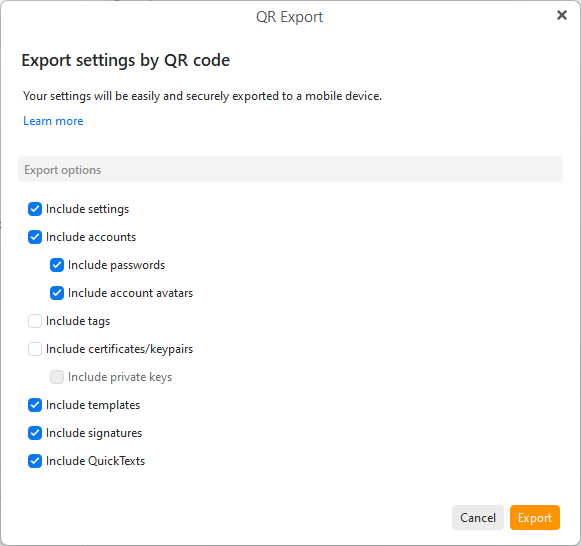
First “close the Mobile app” and then on the Desktop go to “Menu / Tools / QR Export” and select / check all the options, and click “Export” as per the first example screenshot below.
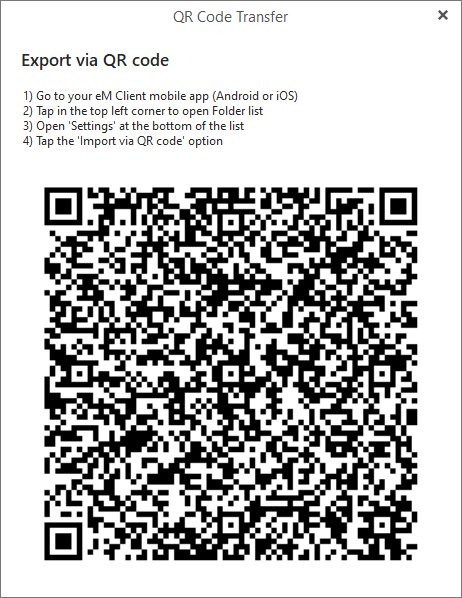
Then when you see the QR code appear, “open the Mobile app” and press "Menu / Settings / Import/Export and press Import via QR Code as per the eM Client online documentation link.