One regular email address is suddenly being flagged JUNK. The address is in my contact list, it is not on the blacklist, and it is not being flagged by gmail itself. There is no “Not Junk” option that I can find anywhere, and no whitelist I can access. How can I get eM Client to quit mislabeling this address?
One regular email address is suddenly being flagged JUNK. The address is in my contact list, it is not on the blacklist, and it is not being flagged by gmail itself.
If you have an email address or sender that is automatically going to the junkmail folder and its definitely not in your blacklist, then go to “Menu / Rules” (pc) “Menu / Tools / Rules” (mac) and see if there are any custom rules in there (apart from the basic spam rule at the top).
If you do have any custom rules in there, “dblclick them to view inside” and see if that sender has been accidentally added in a eg: move to junkmail rule. If you have alot of rules in there and your unsure if any of them are doing it, suggest then to disable all of them to rule out if its anything in there causing it.
Now if there are no custom rules setup in there and the sender is not in the blacklist, then it means that Gmail is automatically moving that email “at the server end” due to something found in either the “header, subject or body of the email”.
So when that senders email arrives next in your Junkmail / Spam folder, go online into your Gmail webmail Junkmail folder and “mark that email as Not Spam” as in the example below. That will train Gmail to keep that sender in your Inbox in future.
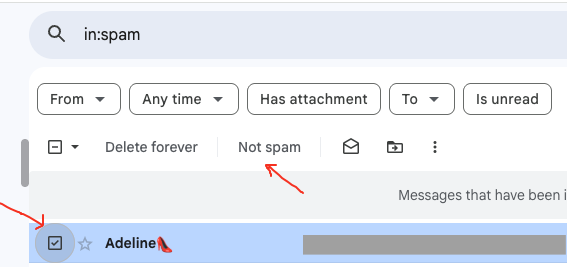
You can also optionally setup that sender in your Gmail online whitelist via following the below example.
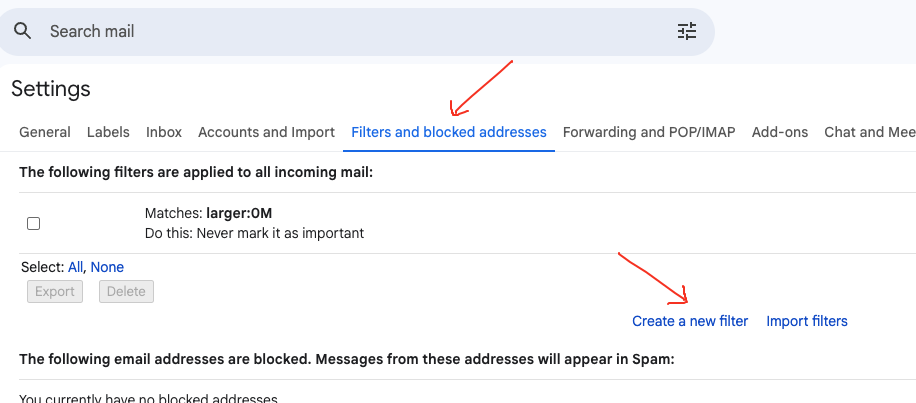
Click the Gear icon” at the top right of Gmail online. Then click “See All Settings” and click “Filters and Blocked address’s” along the top.
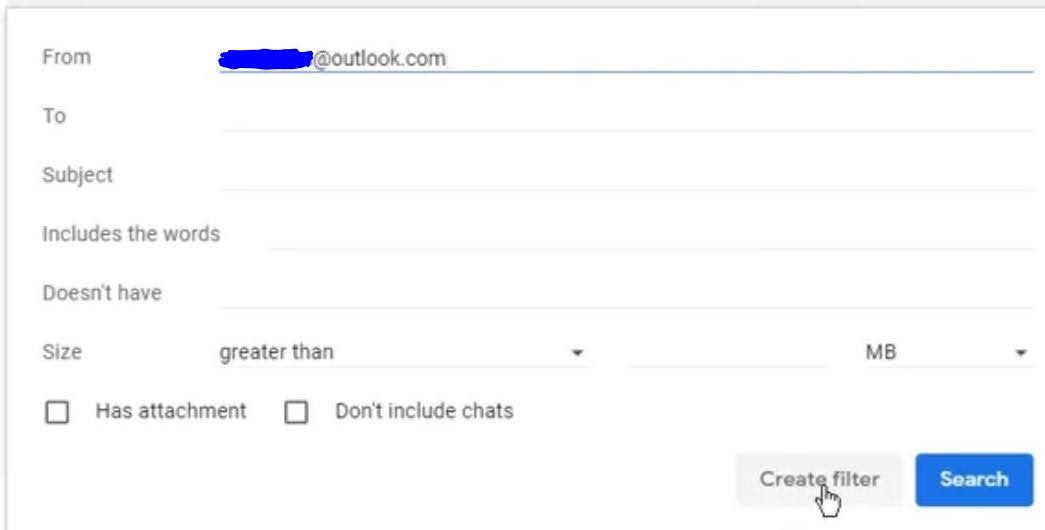
Then click “Create New Filter” and “type the email address at the top” you want to whitelist.
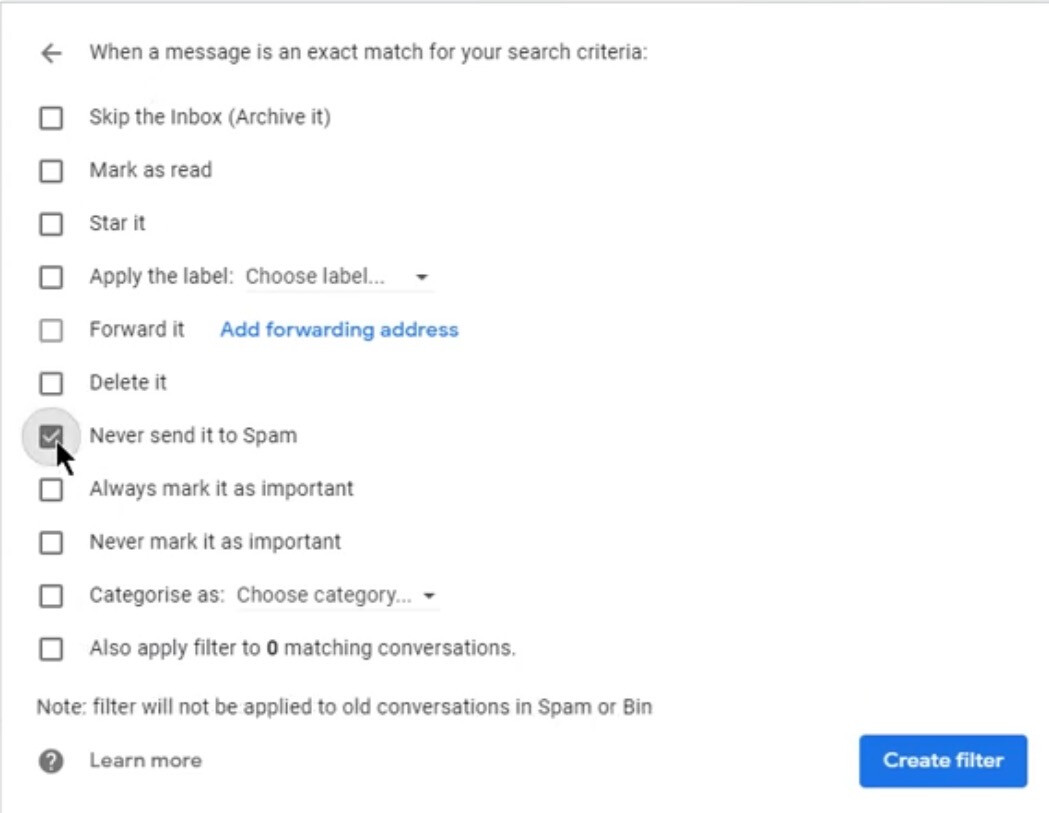
Then click “Create Filter” at the bottom, and then check the box marked “Never send it to Spam” and finally click “Create Filter”.
Thanks for all your suggestions. First off, I was wrong–the error is in GMAIL, not eM Client (sorry).
Secondly, JUNK designation is persisting despite the fact that I have the address in my google con6tacts, and I have repeatedly tried to correct the designation using the Not Spam button, and I have built a filter “Never Send to Spam” around this address. It still goes to Spam and is marked as junk.
I think their AI Spam-detector has flaws. There are at least 4 addresses I have found being mis-characterized as JUNK, including some even from me!!! And I note several others in the Forum have experienced what looks to be this same problem.
My only recourse, other than to create a new email account outside Google, is to monitor Spam and Trash just as if they are Inbox. Likewise Updates and Forums that Gmail continues to “help” me by labeling. All I want is an inbox!!! I can do the trashing all by myself, thank you.
If you have a way to turn off ALL this google categorization, I would appreciate learning about it.
Thanks again for your response.
JUNK designation is persisting despite the fact that I have the address in my google contacts, and I have repeatedly tried to correct the designation using the Not Spam button, and I have built a filter “Never Send to Spam” around this address. It still goes to Spam and is marked as junk
[/quote]
Ok as you have already tried marking the senders email as not spam online and also created a filter to never send to spam online, I would suggest next to contact Google technical support via Gmail community website or phone for further assistance.