when i try to import via QR code i get this error message:
SpellCheckerIMFile enthält keine erlaubten Werte
i also tried to import the settings via a setting-xml file - same error message.
i have version 9 on the desktop and 10 on the mobile. the desktop is windows 11, language english. the mobile is android 16, language german. maybe that is causing the problem.
There is currently an issue with importing via QR Code on Android which could be related to your issue and sounds like a new Playstore update will be out soon. See @Olivia_Rust post below.
So in the meantime, try manually setup your Accounts etc in the app via “Menu / Settings”.
in the meantime i managed to import individual mail accounts via qr code - except the gmail account did not work.
i sent a message to [email protected] but had no reply yet.
we are very sorry for the inconvenience and not offering a timely advice. Unfortunately, we have not received any email regarding this error. Are you certain you have spelled the address correctly?
If you haven’t already, we suggest to completely uninstall the eM Client mobile app and then install it again. In one instance where we encountered the same error message, there was no fault found in the exported data or the import process and reinstall resolved the problem.
i am not able to import the emclient data into my new mobile (fairphone 6, android 16). i always get this error message:
SpellCheckerIMFile enthält keine erlaubten Werte
i have tried to import the settings file - same result. my old mobile has updated to the latest release without any problems.
now i will import the different accounts again. but still got problems with the gmail account - i get into a loop that repeats all the time to finalise.
If the reinstall did not improve the situation, could you kindly try contacting us at the [email protected] address again, or at my own [email protected]?
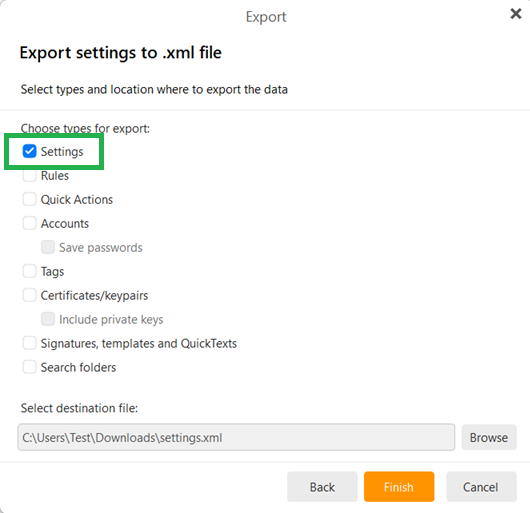
For now, we are interested in seeing the exact value of “SpellCheckerIMFile” which is apparently causing the import failure. So, please, export only the Settings into a xml file, not accounts or other personal data, and attach it to your email.