I’m successfully use em client (version 10.4.4124) on my windows 10 desktop to my xfinity (comcast) email account. I downloaded the em client app (version 10.3.4567) from Google Play Store to my android phone (Galaxy S20 FE 5G - Android Version 13). Using the same account information for both imap and smtp (confirmed by comparing both settings), smtp succesfully completes testing on the phone but imap fails saying the server isn’t responding. As a result - all I see is local folders and no messages downloaded. I don’t have any antivirus or firewall software running on my phone. And em client doesn’t appear to have the same version avaiable for the android that it has for windows. I’ve cleared the cache and database multiple times in the app and I’ve reset the phone and re-installed the app from the store multiple times. Any suggestions on how to get the imap working?
Did you set up the account manually in the Android version or use the QR import from desktop?
If you haven’t tried the Import can you give that a try as well?
If both manual setup and import fail, please reach out to [email protected] - they can help troubleshoot and create IMAP logs to analyze why the account doesn’t work.
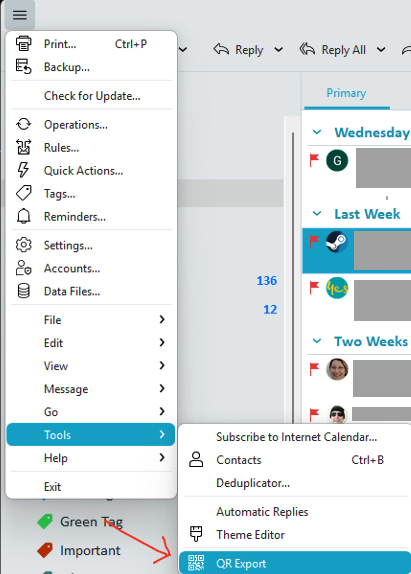
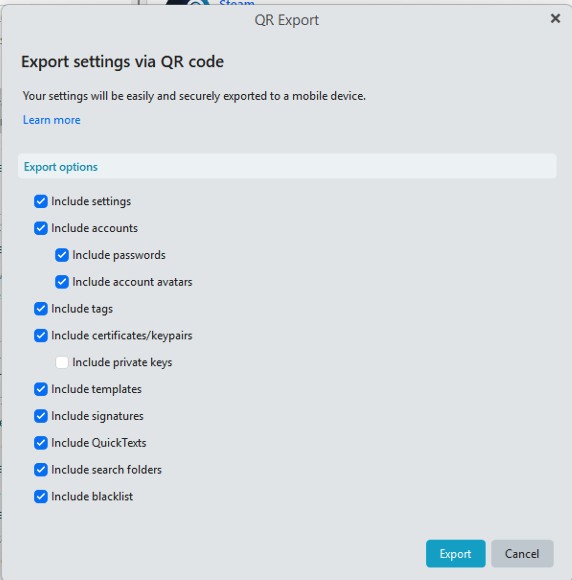
As @Olivia_Rust advised try “removing the account from your mobile app” and then using eM Client for Windows, go to “Menu / Tools / QR Export” and “select all the options you want to export”.
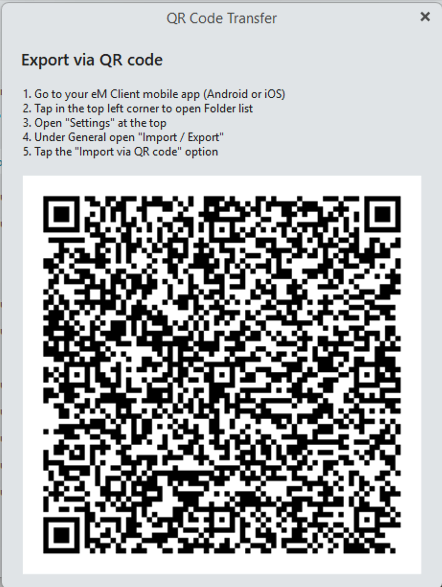
Then “at the end of the export wizard” then “Scan the QR Code” with your eM Client mobile app “as per the QR Code instructions screenshot” end of this post below.
And em client doesn’t appear to have the same version avaiable for the android that it has for windows.
There is a later V10.4.4134 Droid Beta which you can signup for to test if your happy to test Beta. See the following webpage for how to join the Beta program Mobile Beta FAQ | eM Client
Note:- If you have any problem joining the Beta, email [email protected] for assistance.