I get mutliple emails per day from an access control system. Each message includes an image of the user entering the facility. On all of my Apple devices, using the Apple mail client, the pictures always show up. And on the same computer, using Outlook, they also show up 100% of the time. However, on eM Client the image only shows up around 70-80% of the time. If I re-download the broken messages from Barracuda and manually import them to eM Client, they also seem to show images every time. This is sensitive data, so I can’t really post sample messages on a public forum.
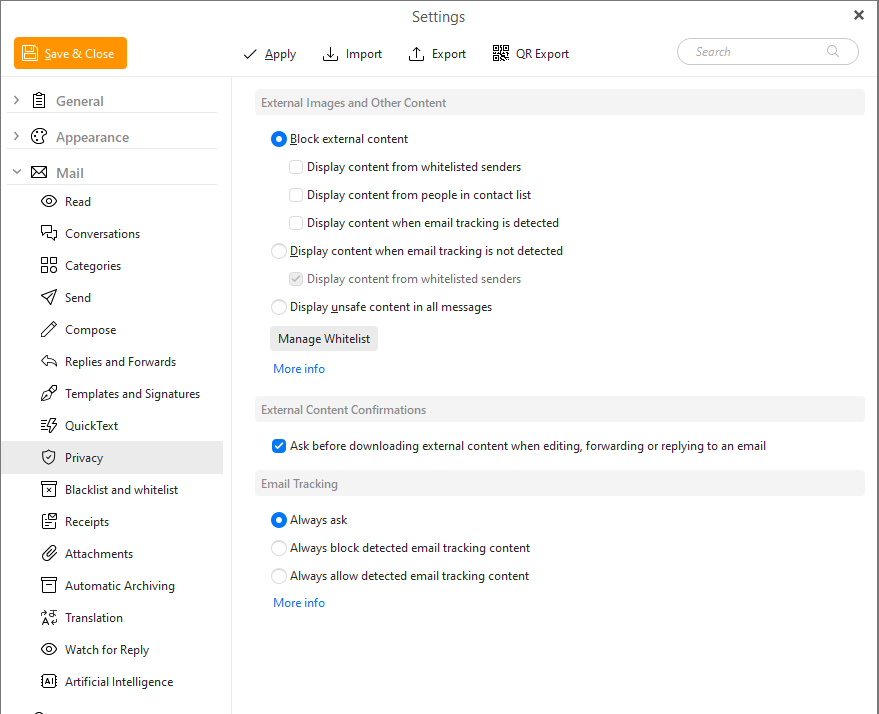
Could be possibly your Privacy settings might be blocking. Go to “Menu / Settings / Mail / Privacy” and for a test set it on “Display unsafe content in all messages”. If that works then you need to adjust your privacy settings for those senders.
If that doesn’t work, then might be something specific in those senders emails that would need to be investigated by official support via exporting an (.eml) via “Menu / File / Export” and lodging a ticket if you have a current active paid Pro, Personal or Business license.
Also check that you are running the latest V9 or V10 incase you have an older version that might have an update to fix that. If you originally downloaded eM Client from the website, go to the release history page to check for latest updates. If there is an update before updating, “make a manual backup” via “Menu / Backup” incase you need to restore for any reason. Also close eM Client before updating.
I found the problem. It was an encoding issue on the access control system’s email sending app. We were able to change a setting there and fix it. eMclient was just less forgiving of the encoding errors than Outlook or Mac Mail.
Thank you for the suggestions tho!