Whenever I send an email, a window pops up and displays this error message. How can I fix this?
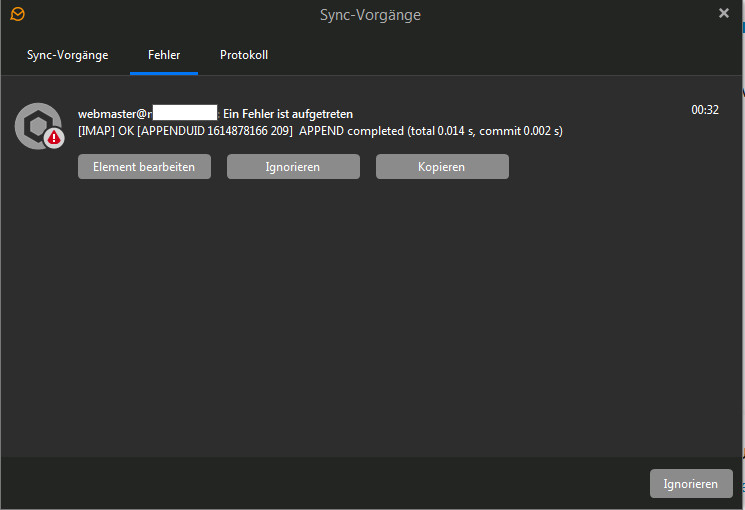
Whenever I send an email, a window pops up and displays this error message.
Sync operations X Sync operations Error Log 4 webmaster@r An error has occurred [IMAP] OK [APPENDUID 1614878166 209] APPEND completed (total 0.014 s, commit 0.002 s) Edit item Ignore Copy 00:32 Ignore
What SMTP Mail server is giving you that message when you send ?
Also Is this a mail server you setup yourself or a free or paid mail server you send through ?
Also does this error happen with even a plain text basic email you compose ? or is the sending error only happening when you reply or forward emails from other senders created emails ?
I have Strato.de
Is a paid mail server (Strato)
It doesn’t matter whether I reply or write one myself.
Ok does this error happen if you send mail with any other mail client ? to rule out if this is a sending mail server problem or if its a mail client issue.
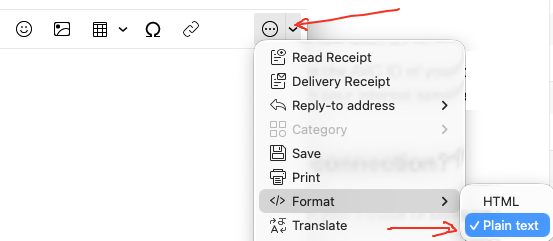
Also if you compose a new email and select “Plain Text” for a test via the dropdown on the far right of the compose window and try sending that to see if its anything to do with sending HTML messages via your smtp server or the receiving server.
Lastly what version of eM Client do you have ? and what SMTP server settings are you using ?
1 Like
Hi, we’ve had several reports of this from Strato users and are planning a fix for future releases. For now there’s a workaround. Go to Accounts and open the Diagnostics tab. Then enter this:
--disable-imap-capability OBJECTID
Save the changes, restart eM Client, and you should stop getting the errors.
1 Like