i am changing into a new laptop and now cannot find license under help to activate the license
miércoles 23 julio 2025 :: 1450hrs (UTC +01:00)
Hey @2562187
Try closing and then start again, it should be there.
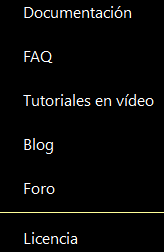
See here in Spanish as “Licencia”…
skybat
¡Buena suerte!
¡Saludos desde Sevilla la soleada en España!
¡Mis mejores deseos y mantente a salvo!
Hablo español, luego portugués, inglés, francés y alemán
con conocimiento de varios otros idiomas.
I am changing into a new laptop and now cannot find license under help to activate the license.
If there is no License menu to activate, that can also mean you have eg: installed the Windows store version where you pay Microsoft a monthly subscription so you don’t enter it manually.
So if you have installed the Windows Store version instead of the eM Client Website version and have setup eM Client already, then first make a manual backup of eM Client via “Menu / Backup” which creates a dated backup.zip file in your “Documents / eM Client” folder by default.
Note: You can see when the backup is complete in Show Operations via clicking the drop-down on the right of Refresh top left.
Once the backup is complete, then close eM Client and uninstall eM Client and the download the same or later version via the release history page and then reinstall eM Client.
Then when you open eM Client “skip the setup wizard” and restore your backup via “Menu / File / Restore”. Then enter your licence via “Menu / Help / Licence”
Lastly if you carn’t locate your eM Client website version licence key, go to the following page and enter your registered email address, and the licence will be resent to your email which you can access via your webmail and then copy into eM Client licence activation screen.
1 Like