This is, admittedly, a bit of an esoteric issue, but it is a deal breaker for me with eM Client.
I often need to paste HTML tables into my emails. I use dark mode in every app that allows it, including eM Client because I find it easier on my eyes. The tables I paste into an email message are typically formatted in a specific way - they use CSS to define the table formatting, including colors. The CSS defines black text (“color: black”) for every cell, but the background colors can be undefined or various shades of gray.
If I paste this into eM Client, using dark mode, it changes much of the text to white. This is good for display purposes. However, the issue is that it actually changes the text color to white in the HTML. Then, when someone receives the message, if they are not using a dark mode viewer, the text is invisible because their background is white. I have verified this behavior by sending a message to myself, then copying the table and pasting it into an HTML editor. Much of the text is given a style with “color: rgb(255, 255, 255)”. Even when the css specifically defines the background color to be white and the text black, the white background gets removed and the text is converted to white.
I don’t think eM Client should be changing any colors in an email message just because dark mode is active; it should only change the way those colors are displayed by the user viewing in dark mode.
I also would like to request that a dark/light toggle button be added to the Compose email window. The email reading view has this, but for some reason, the compose window does not.
I suspect you would need to contact official support for that problem to see if there is a way around that, as your pasting external code into eM Client which obviously is custom and not designed for the default eM Client dark theme.
You might need a custom dark theme written to then allow your CSS code to integrate with it.
So if you have a current active paid Pro, Personal or Business version go to the VIP support page and login and lodge a support ticket.
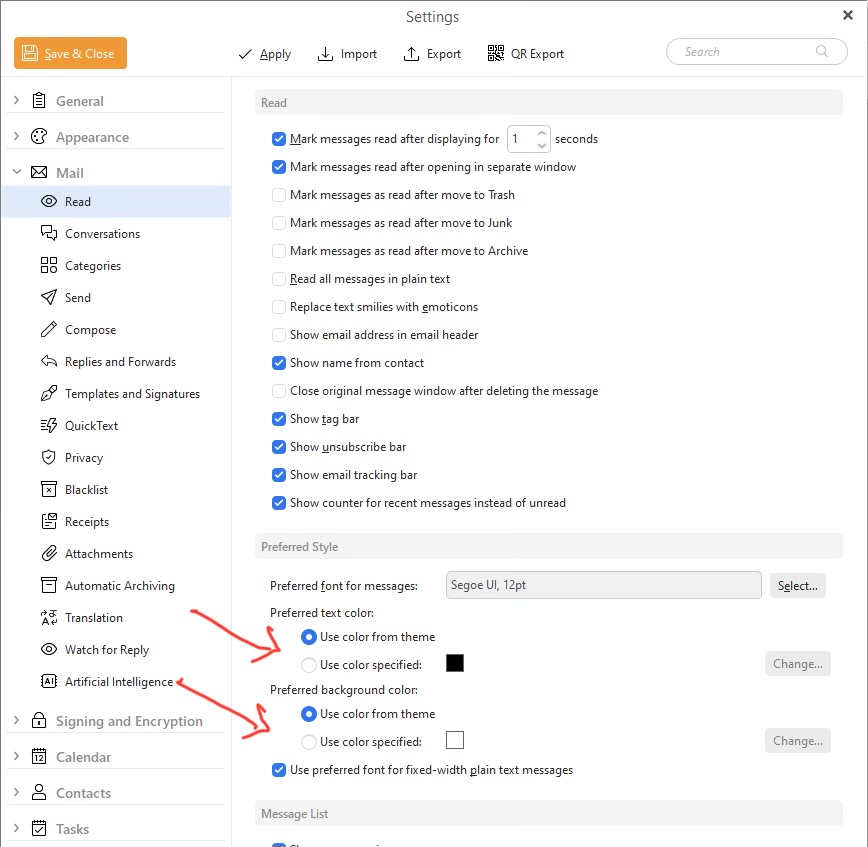
The only thing I’m aware of is eg: you can change the default preferred read text colour and background for emails as per the screenshot further down that may help you with this issue via “Menu / Settings (Preferences) / Mail / Read”.
Thank you for the reply, cyberzork. I am pretty new to eM Client and thought this was the main support area, but I will contact VIP support. I appreciate the link.
The more I think about it, what I am doing is not all that strange - it’s just pasting formatted text into the email editor window. That text happens to be formatted as HTML, but that is the default way eM Client formats email messages, so it should be able to accept it without making changes to it automatically.
Hello,
unfortunately we were not able to reproduce the issue on our side. To investigate further, we would need to know exactly which version of eM Client you are using.
Additionally we would need a sample HTML snippet of the table you are pasting and a .eml file of the sent message. This would help us reproduce and fix it.
Please contact us via the VIP support link above.