I can’t find how to zoom out message texts.
I zoomed in a couple of messages and it affected them all.
Suggestions on the forum just do not work.
eM 10.4.5326 (97a2e75)
Mac Book pro 2019 Sequoia 15.7.7
Thanks !
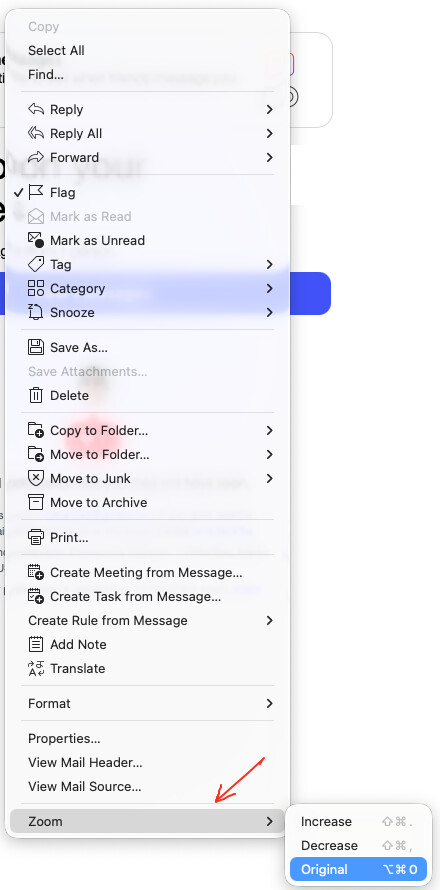
“Right click in the body of the email” and click “Zoom” and you can increase or decrease the font or set it to original size as in the screenshot example further down below. There is also shortcut keys you can use as well for Pc & Mac.
You can “click in the body of the email” and press “Ctrl and + or - keys” to zoom in or out on eM Client for Pc, or press the “Command and + or - keys” to zoom in or out on eM Client for Mac.
You can also press the “Ctrl key and use the Scroll wheel” up and down to zoom in or out on Pc, or press the “Option key and use the Scroll wheel” up and down to zoom in or out on Mac.
Then to reset the Zoom “click in the body of the email” and you can press “Ctrl + 0 key on PC” or press “Command & Option + 0 key on Mac”.
Note: If the Mac shortcuts don’t work, you may have changed the “Settings / Keyboard / Keyboard shortcuts / Modifier keys” from the default like eg: swapping the Cmd & Ctrl.
(eM Client V10 Mac example right click zoom increase / decrease / original)
Thanks a lot. I realize I had got an answer a few months ago !
For the benefit of the community : in my case (Mac OS etc.), the one and only way is :CLICK IN THE MESSAGE BODY + CONTROL + SCROLL WHEEL