After internal IMAP server migration (same domain, new Kerjamail/Kirim server), many old emails are missing from Inbox and Sent in eM Client, though fully visible in webmail.
I updated IMAP/SMTP settings correctly, but Refresh, offline sync options, and restarts do not restore the missing messages.
Please advise how to force full folder resync without deleting local cache/database.
The only way to force a resync locally to the client is to either run the repair which clears the local cache and then resyncs new from the server. Or remove and re-add the account again.
So to run the repair you “right click on the Inbox” and click “Properties” at the bottom, Then click the “Repair” tab along the top and click Repair. Once the cache is cleared your messages will just be slower to reread till fully synced again.
Now you may not need to run the repair as your IMAP messages might not all be showing in eM Client “due to a Sync Limit” in your account setup.
You can check that via going to “Menu / Accounts” and click on your account “IMAP” tab and under “Sync Options” part way down you can see if you have limited the mail synching which might explain why your not seeing all your mail in your Inbox and Sent box.
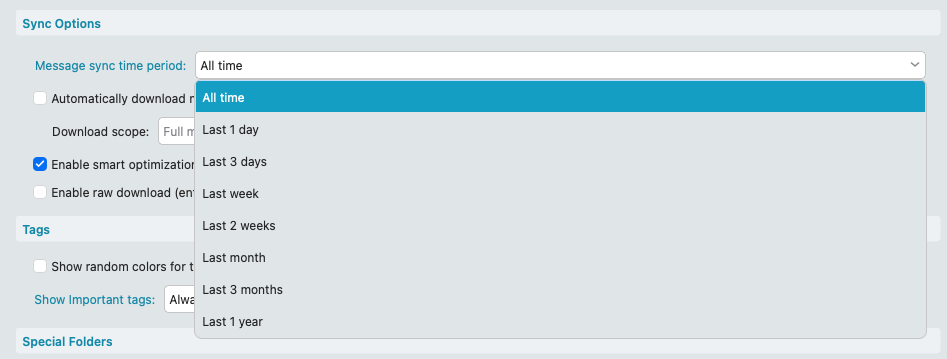
If its already set to All Time, then the alternative is if you have been making regular eM Client backups either automatically via Settings or manually via the Menu, you can restore a recent backup when you know all the messages where showing ok via “Menu / File / Restore” and any new messages since the restore point will update when eM Client reconnects.