My customer thinks about using EM client instead of Outlook, but I don’t see a way how to create HTML emails with attachments in EM Client. Is there a documentation somewhere?
I don’t see a way how to create HTML emails with attachments in EM Client.
By default when you compose new emails they are in HTML. You can check via “right clicking in the body of the email” and click “Format”.
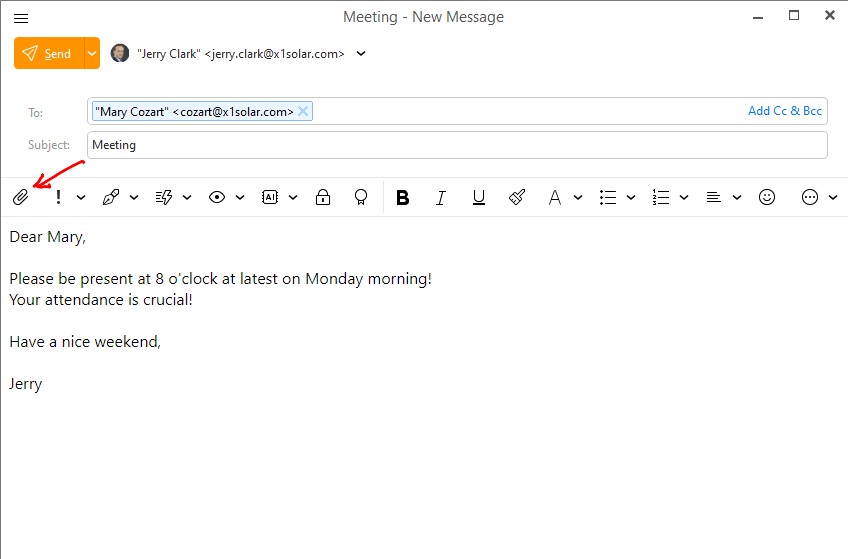
To add an attachment click the “paperclip” icon far left to add an attachment as per the eM Client composing email documentation link below & example screenshot.
https://www.emclient.com/webdocumentation/en/10.0/emclient/default.htm#E-mail/Composing%20Email.htm
This is for an ERP integration. The user already has email templates for different tasks in the ERP. The ERP should now prepare the mail and open it in the compose view. Multiple attachments must be attached.
Then the user should just need to click send, or maybe write some additional sentences. The Email should also contain all the HTML formattings from the template.
This is possible witjh our ERP in Outlook, Thunderbird, Icedove, TobitMail and LotusNotes already, only for eM client I cannot find out how to do it.
eM Client is already able to open an .eml file. Including HTML and attachments. It also has a commandline switch to open the composer.
The only missing piece is: How do I prefill the composer with my eml AND have the user edit the contents? Bonus when the sender account is automatically selected in dependence of the sender email in the eml.
For an email client that states on its homepage that is the best one on the market and one never neds another the integration part surely still requires some more information.
PS: Don’t misunderstand me, I would be happy if I could find a real alternative to Outlook to recommend to my customers and one actually wants to switch to eM Client but I’d have to drop some features for automatic emails in that case. Now the customer wants to use Thunderbird instead, but I still have the urge to get my software running with this eM Client also.
This is for an ERP integration. The user already has email templates for different tasks in the ERP.
The ERP should now prepare the mail and open it in the compose view. Multiple attachments must be attached.
The only missing piece is: How do I prefill the composer with my eml AND have the user edit the contents?
I carn’t personally find anything specific on how to prefill an email with an eml and edit the contents on this free community forum by typing ERP in the forum search “only that you can drag an externally saved eml file onto the subject line which attaches it to the email”, so I suspect that would be an “official support question” as that sounds like eM Client might need to be specially programmed to to prefill and edit the contents.
So if you have only just installed eM Client “and are inside your 30day trial” then I would suggest to email [email protected] to see if that can be done and can assist you.
Or if you are outside of your 30day trial and have a current active paid Pro, Personal or Business version go to the VIP support page and login and lodge a support ticket who will assist you.
I’m only aware of the “built-in Templates & Signatures” section which you can use as per the following documentation and “maybe create new templates in eM Client” instead to edit on the fly.
Apart from the above, other users on this free community forum or forum moderators etc who use ERP might reply on this thread.