Is there a way to set how many messages are in the inbox, and not just the new arrivals for a short period of time?
In the current version, if you click on a folder, the unread/total count is displayed in the title bar of the application.

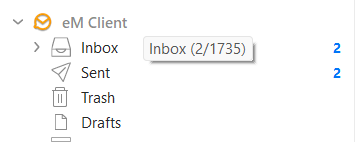
In version 10 which will be released next year, you will get this as a popup when you hover over a folder.
1 Like
Thank you. . . I hadn’t even noticed that . . 
we are looking forward to version 10 . .
Greetings from Athens / Greece
It would be nice to see the total number of mails (individually adjustable for every folder) in the folder constantly, like the number of unread messages.
I have a few folders where I keep track of things and want to see if there’s still some work waiting or if the folder is empty.
Thanks, Stefan
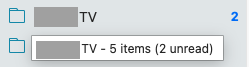
You can already see (the number of emails in any folder) and (the number of unread emails in any folder) via “hovering over the folder” as per the example V10.4 screenshot below.
The unread message number also shows “on the far right of the folder” as per below.
may I quote myself?: “to see the total number … constantly”
meaning: all the time without hovering over the folder. Exactly like the numbers shown for unread messages.
1 Like
Where do you suggest the Total number of messages would go in the folder gui if it was constantly there ,all the time ?
As the problem is “alot of user folder names are really long” and there is then no where to display it, so thats why i suspect the hover was done.
the same position where the “number of unread messages” is - where is the problem?
the same position where the “number of unread messages” is - where is the problem?
Yes you could have at the end of the folder a eg: 8 / 2 to distinguish at the end between Total number of Messages and Total of Unread messages. I personally think thats a good idea too if that can be implemented.
There is a Sleekplan suggestion already for that you can vote for.
1 Like