Hello,
I’m testing emClient with other email software. Apparently, on an IMAP account, some emails are loaded by emClient but not others that were loaded by another application. How can I force emClient to load absolutely all emails from an account, even the oldest ones?
How can I force emClient to load absolutely all emails from an account, even the oldest ones?
Go to “Menu / Accounts” and click on the “IMAP” tab.
Scroll down to “Sync Options” and enable “All Time” under Message sync time period
Hello, just to expand on what cyberzork mentioned, we would recommend changing your account settings so that eM Client downloads all messages from the server for offline use. Please go to Menu > Accounts > IMAP tab, then, in the Sync options section:
- Change Message sync time period to All time
- Enable Automatically download messages for offline use and search
- Change Download scope to Full messages with attachments
After that, click Save & Close. eM Client should then begin downloading all messages from the server, including the older ones.
2 Likes
Thank you.
All the messages have indeed been uploaded, but I don’t know why they are separated/filtered into two tabs named “Primary” and “Other.” This separation seems arbitrary; how can I group all the messages into a single tab?
how can I group all the messages into a single tab?
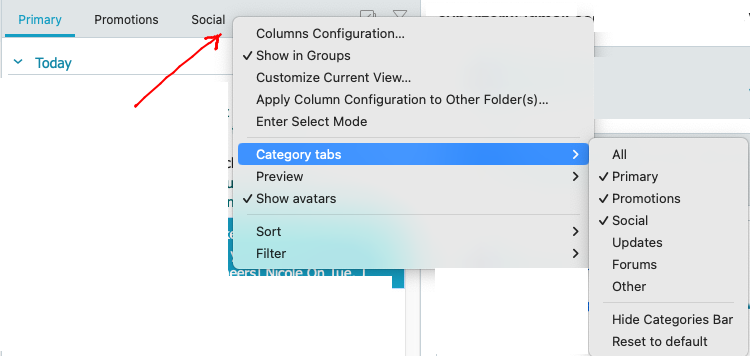
If you don’t want the Other Inbox Category, “Right click in a blank area next to a Category” and deselect the Other Category Tab on the menu as in the below Gmail acct example.
You can also hide the Categories bar if you choose as well at the bottom of the dropdown.
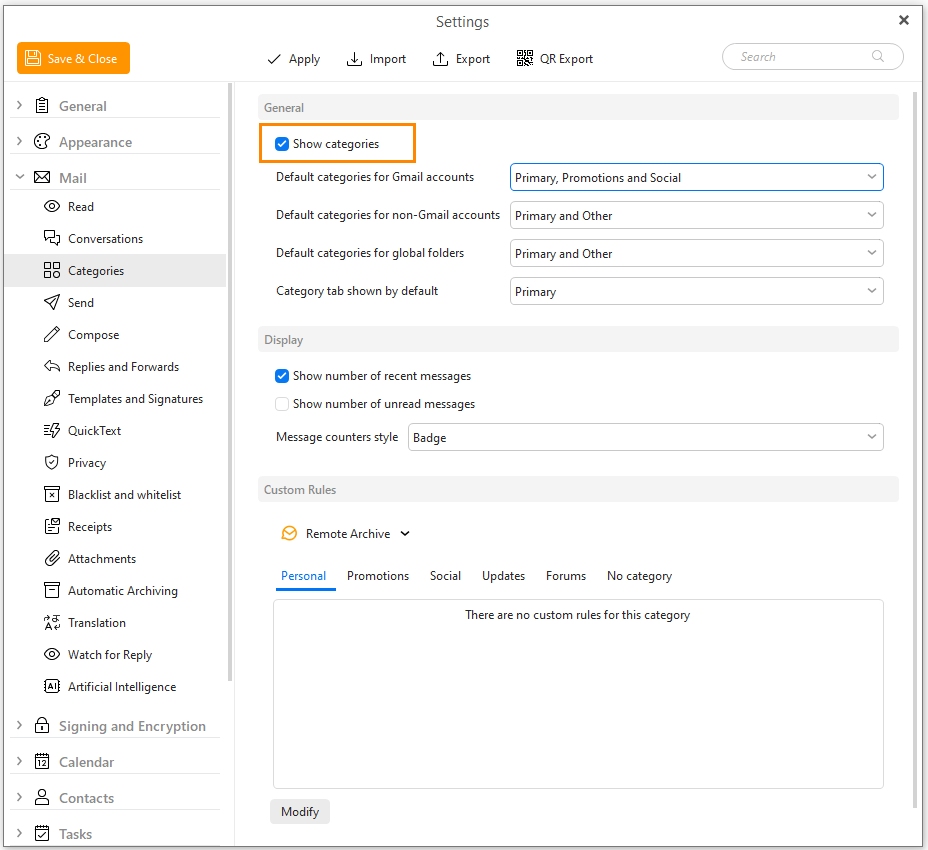
Alternatively you can disable categories by going to “Menu / Settings / Mail / Categories” and disable Show Categories & Save & Close.
Thanks!
It’s great!
I need to familiarize myself with the interface, which seems great.
I would see the point of these categories if we could create new ones with my own criteria and names, because I saw that we could assign emails to categories, a bit like IMAP filter folders.
I would see the point of these categories if we could create new ones with my own criteria and names
There is a Sleekplan suggestion to be able to rename or create custom Category names which you can vote for below & add any comments.
1 Like