Hello everyone,
I recently switched from Postbox to eM Client on macOS. I’m generally happy with it, but one thing is missing for me.
What I’m trying to do:
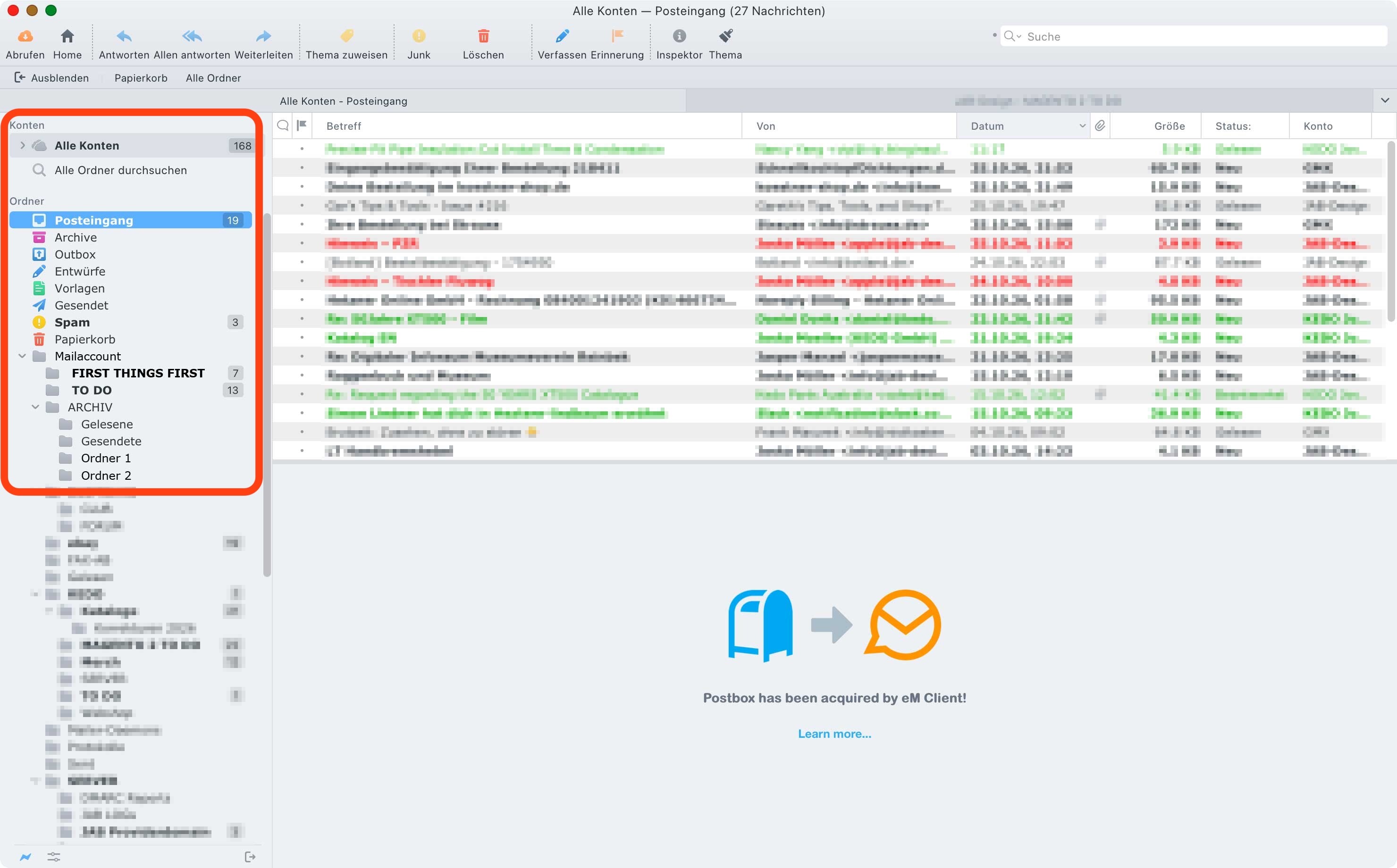
In the folder list on the left side of the main window, where all accounts and their subfolders are shown, I’d like folders that contain unread emails to be displayed in bold. In Postbox and Thunderbird this is the default behavior. At a glance I can see which folders, including nested subfolders, have new messages, even when they are collapsed or when the unread counter is small or easy to overlook.
What I see in eM Client:
Unread folders only show a number badge next to the folder name. The folder names themselves always have the same font weight, whether or not they contain unread mail. With many accounts and deeply nested folders (e.g. under “ARCHIV”), this makes it much harder to spot folders with unread mail.
I’ve attached a screenshot how my Postbox folder list looked like, where folders with unread mail (e.g. “Spam”, “FIRST THINGS FIRST”) are shown in bold.
My questions:
- Is there a setting in eM Client (under Settings → Appearance or elsewhere) that shows folders with unread messages in bold?
- If not, is there a workaround, such as a custom style, or a hidden or advanced setting?
- If it’s not possible at all, is this a known feature request, and is there a way to vote for it?
I’m using the latest version of eM Client on macOS.
Thanks in advance for any hints!