[Google Calendar] Uploading event ‘XYZ’ on 1/26/2024 9:30:00 AM to calendar ‘[email protected]/Calendar’ failed due to the following error: The requested identifier already exists.
1 Like
Dear HectorJ,
I have only just joined this forum and do not see how to read any replies or help that you have received. I have the same problem: have you found a solution?
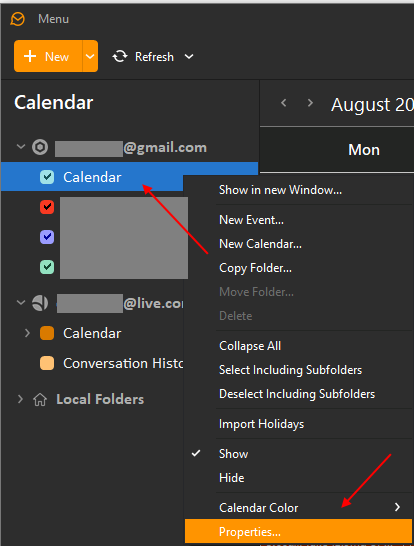
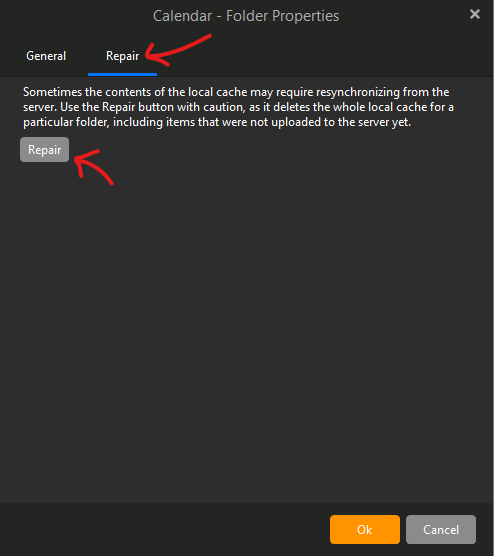
Yes. Go to your calendar, and on the left hand side right click the calndar giving you the error, a drop down menu should appear so click on properties, a another acreen should appear with two tabs- general and the other repair, click on repair and then click on the repair button. That should fix it.
Thanks for your reply HectorJ, but I cannot locate ‘Properties’ when I right-click on my calendar on the left side of the Google Calendar window. Are you using Windows or Mac? Here is a screenshot of my right-click using Mac:
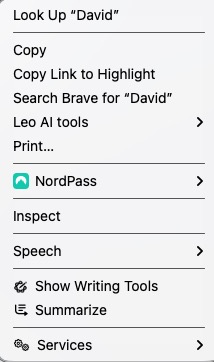
but I cannot locate ‘Properties’ when I right-click on my calendar on the left side of the Google Calendar window
See my example screenshots and info below for how to Repair the Google Calendar as per @HectorJ advised to try above.
If repairing your Google Calendar still has the same error, i would next suggest to go to “Menu / Accounts” and remove and re-add your Gmail account via the automatic account wizard.
Note:- If you do try removing and re-adding your Gmail account, make a backup first via “Menu / Backup” incase you need to restore for any reason. You can see when the backup is complete in Show Operations via the dropdown on the right of Refresh top left.
“To Repair a Gmail / Google calendar”
"Right click on the word Calendar” directly under your Gmail address. Then click “Properties” at the bottom. Then click the “Repair tab” at the top and finally click Repair. This clears the local calendar cache in eM Client and resyncs your online Google calendar back to eM Client.