Having finally dumped Microsoft, I am very happy with eM, but cant find how to set-up one item. ALL new mail from my gMail account is being added to the All Mail folder with only a very small percentage of these also being added to my inbox. Is there a setting somewhere I have set incorrectly? Any assistance greatly appreciated. If necessary, I have no problems dumping All Mail completely, but I am unsure of the gMail ramifications of doing this.
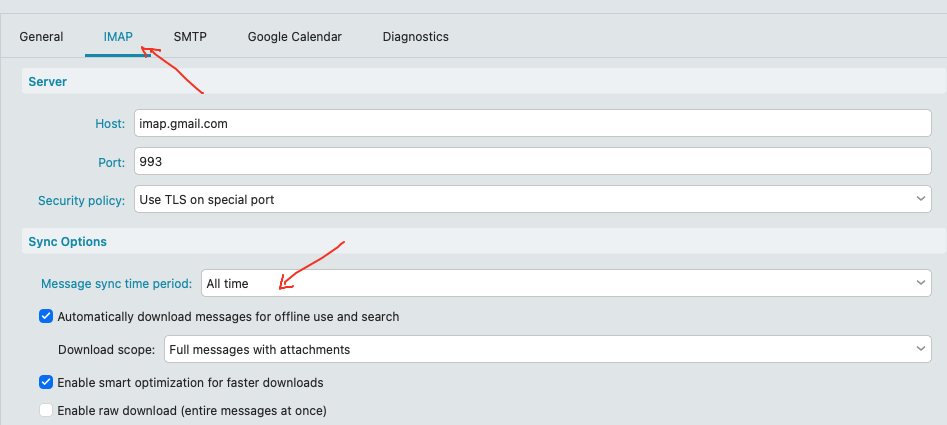
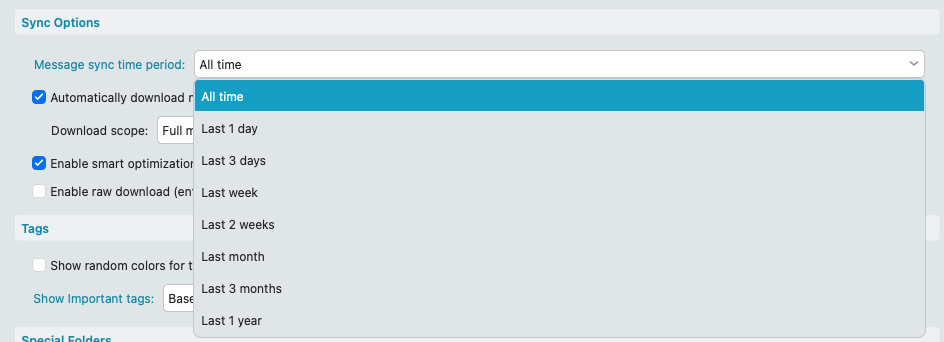
Go to “Menu / Accounts” and click the “IMAP” tab and under Sync Options you can set to sync mail to the client anywhere from 1day to All time as per examples below. Then Save & Close accounts as per the example screenshots below.
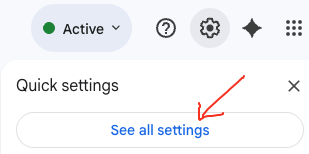
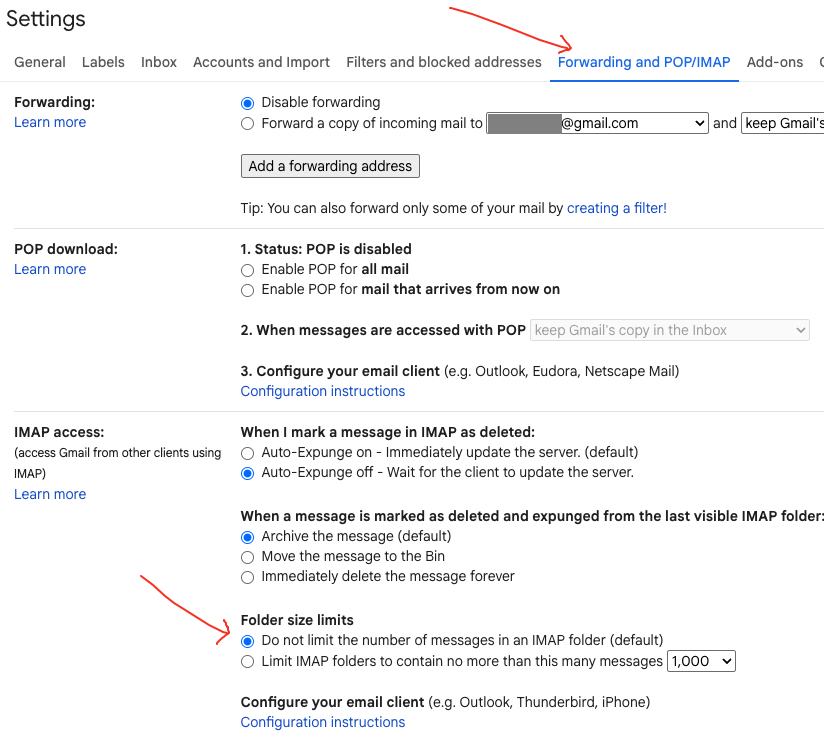
Also go into your Gmail account online “Settings / See all settings” in Webmail and under “Forwarding and POP/IMAP” check at the bottom you have set "Do not limit the number of messages in an IMAP folder (Default) as per the example screenshot below.
Apart from that, “if you have only just added your Gmail account” and already have the Gmail account Sync options set to eg: All time, then it might still be synching your Inbox “depending on how large your online mailbox is” and “how many other Gmail labels (folders) its synching”.
You can see where its up to in Show Operations via clicking the dropdown box on the right of Refresh.
Thanks friend. I made all of the changes as you recommend, except one. The on in Settings / Forwarding and POP/IMAP / Forwarding. You suggest to set thie to “Disable Forwarding”
However, I am not permitted this option.
In my system, I have a single option available: All I see is a grey box with the wording “Add a forwarding Address”
With all of the other changes I have made, I am still seeing dozens of messgaes going to “All Mail” but only a handful reaching the inbox. Interestingly, some of the emails that I would like to reach the inbox, but seem to only have gotten to All Mail, have little coloured stickers attached to them. A grey box containing the word “inbox” and a yellow one labelled “important”.
Even more interesting is that NO emails currently in the inbox, have any stickers on them labelled as “inbox”.
Any ideas?
Thanks and regards, Stephen
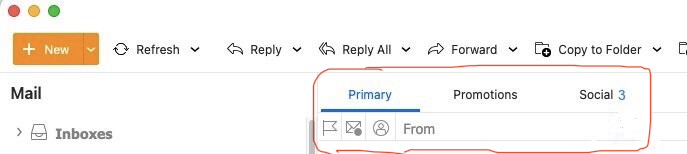
Could be then you have the default recommended Inbox “Categories” enabled in V10, where your missing emails not in your Primary Inbox from All Mail “are in other Category Inbox tabs” such as Promotions, Social, updates etc. See the below link for more Information.
Then on in Settings / Forwarding and POP/IMAP / Forwarding. You suggest to set thie to “Disable Forwarding” However, I am not permitted this option.
I advised under Gmail “Forwarding and POP/IMAP” to check at the bottom you have set "Do not limit the number of messages in an IMAP folder which also can restrict what syncs in your Gmail acct.

So if you don’t see that option or carnt enable that option and are using eM Client with a Gmail IMAP setup, then suggest to post that problem on the Gmail Community link below.
I think I am close to closing this one, so many thanks to those helping out. I have balanced the categories so that more mail now goes to primary with less to social or promotions. In fact, I may try to consolidate categories with an end-goal of just two, primary and secondary being the only options.
I do not have any size limits imposed and the option to “do not limit the number of messages etc.” has been confirmed as checked.
The only query really outstanding now, and I have no idea whether or not this could even be considered a problem, is as mentioned in an earlier post. You suggested that I should set the forwarding option to “Disable Forwarding”. However, I am not permitted this option as it is greyed out with the single option available is to type in an address to receive forwarded mail. Is this causing issues anywhere else that I have not yet encountered?
As I say, not even sure if this is even a real problem.
So. Thankyou for your kind assistance.
Stephen.
You suggested that I should set the forwarding option to “Disable Forwarding”.
No I never suggested you do that, and only to “check you have not limited IMAP at the bottom”.
Disable Forwarding is normally though “enabled by default in Google accounts”, but if you carnt enable that and it is greyed out, then as advised previously suggest you post that problem on the Google Gmail community who can assist you. But it won’t affect eM Client receiving mail not being disabled.