Hallo,
ich habe ein Problem, dass ich bisher nicht lösen konnte.
Ich verwende einen Mailserver bei Strato (Imap) und habe diesen im em Client eingerichtet. Sowohl das versenden, als auch das empfangen von Mail funktioniert soweit. Beim senden werden die Mail allerdings nicht im “gesendet” Ordner abgelegt.
Ich habe nun mehrere Tests durchgeführt.
-
ich schreibe die Mail vom Webmailer in Strato. Ergebnis: die Mails werden korrekt verschickt und unter “gesendet” angezeigt. Dies kann ich dann auch im em Client sehen.
-
ich schreibe eine Mail von Outlook. Ergebnis: die Mails werden korrekt verschickt und unter “gesendet” angezeigt. Dies kann ich dann auch im em Client sehen.
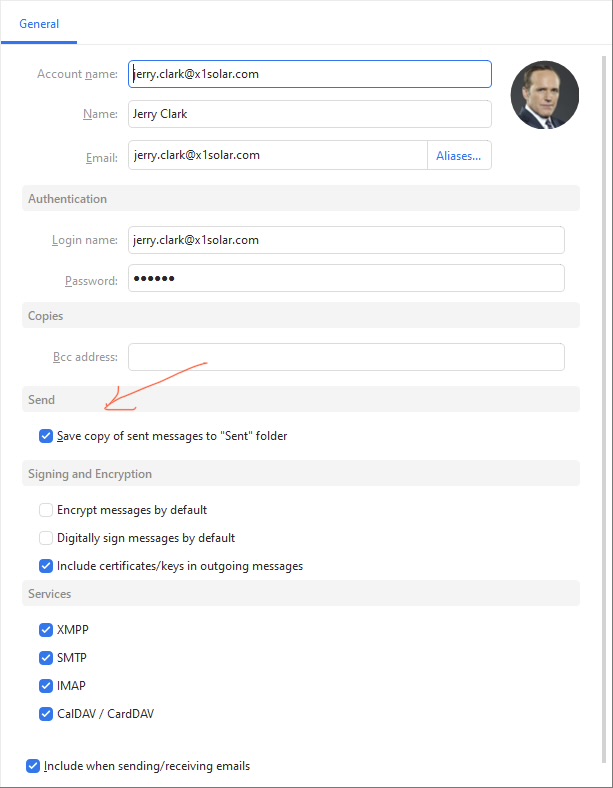
Sobald die “Kopie gesendeter Mails erstellen” anklicke bekomme ich eine Fehlermeldung:
MailClient.Storage.Application.ItemOperationException: OK [APPENDUID 1778792732 7] APPEND completed (total 0.020 s, commit 0.002 s)
AccountId = ae51cc00-27c9-48d5-b8fe-bffbf4b78xxx
AccountName = [email protected]
Item.Type = MailClient.Storage.Application.Mail.MailItem
UniqueItemId = [email protected]
GUIStatus_Exception_Reported = True
Dann werden die Mails zwar abgelegt aber immer doppelt und mit dem Fehler.
Wähle ich die Kopie Option ab, wird keine Mail in “gesendet” abgelegt.
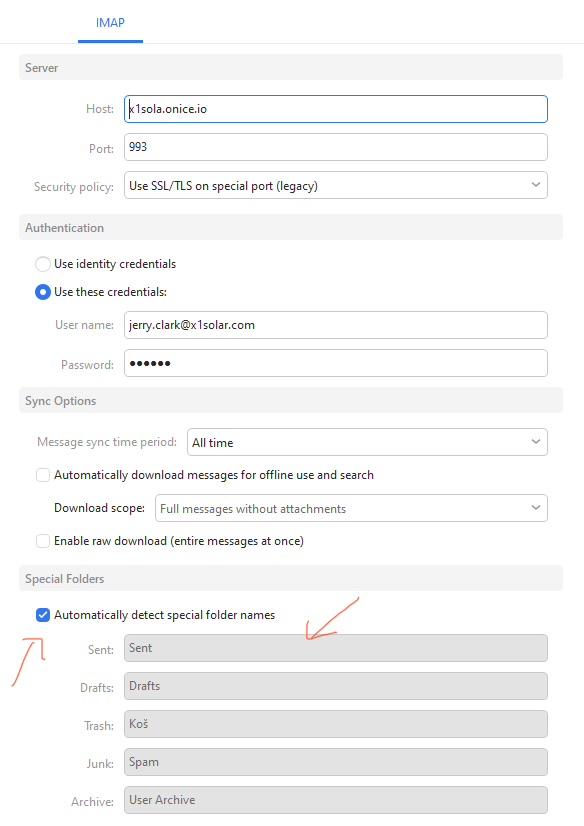
Ich habe herausgefunden dass Strato den Ordner wohl “sent item” nennt - allerdings auch die Umstellung der Ordner brachte keine Veränderung.
Mir erscheint das irgendwie unlogisch. Kann mir das jemand erklären?
Danke und liebe Grüße
Kim
Hello,
I am encountering a problem that I haven’t been able to resolve yet.
I use a mail server hosted by Strato (IMAP) and have configured it within eM Client. Both sending and receiving emails work fine so far. However, when sending emails, they are not being saved to the “Sent” folder.
I have now conducted several tests:
I compose an email using the Strato webmail interface. Result: The emails are sent correctly and appear in the “Sent” folder. I can also see this reflected in eM Client.
I compose an email using Outlook. Result: The emails are sent correctly and appear in the “Sent” folder. I can also see this reflected in eM Client.
As soon as I check the option to “Create a copy of sent messages,” I receive an error message:
MailClient.Storage.Application.ItemOperationException: OK [APPENDUID 1778792732 7] APPEND completed (total 0.020 s, commit 0.002 s)
AccountId = ae51cc00-27c9-48d5-b8fe-bffbf4b78xxx
AccountName = [email protected]
Item.Type = MailClient.Storage.Application.Mail.MailItem
UniqueItemId = [email protected]
GUIStatus_Exception_Reported = True
In this scenario, the emails are saved, but they appear as duplicates—and the error persists.
If I uncheck the copy option, no emails are saved to the “Sent” folder at all.
I discovered that Strato apparently names this folder “sent item”—however, changing the folder settings did not resolve the issue.
This seems somewhat illogical to me. Can anyone explain this?
Thanks and best regards,
Kim