I am receiving timeout exceptions at random times for my primary IMAP mail server. In checking the setting, I see absolutely no way to configure a timeout. It appears to be hard-coded to timeout after 60 seconds.
How can I increase this timeout?
Here is an example exception:
[IMAP] MailClient.Accounts.ConnectionException: Synchronizing folder '{removed}/Inbox' failed due to the following error: Server did not respond in 00:01:00
            ---> System.TimeoutException: Server did not respond in 00:01:00
              at MailClient.Imap.Base.Extensions.CopyToAsyncWithTimer(Stream source, PipeWriter writer, TimeoutTimer timer, IProgress`1 bytesRead, Action`1 loggingCallback, CancellationToken cancellationToken)
              at MailClient.Imap.Base.TransportPipe.StartReading(Stream stream, CancellationToken token)
              at System.IO.Pipelines.Pipe.GetReadAsyncResult()
              at System.IO.Pipelines.Pipe.DefaultPipeReader.GetResult(Int16 token)
              at MailClient.Imap.Base.Extensions.<ReadLineAsync>g__SlowAsyncPath|30_1(PipeReader reader, CancellationToken cancellationToken)
              at MailClient.Imap.Base.Connection.ReceiveAsync()
              --- End of inner exception stack trace ---
              at MailClient.Protocols.Imap.ImapActionCommand.ExecuteInternalSync(WorkerStatus status)
              at MailClient.Protocols.Imap.ImapActionCommand.Execute(WorkerStatus status)
              at MailClient.Commands.Command.Process(WorkerStatus status)
             AccountId = 5179887f-f07b-423e-977f-6bdbc198f631
             AccountName = {removed}
             IMAP_SERVER_TYPE = Zoho
             RunInPlace = False
             GUIStatus_Exception_Reported = True
As you are getting timeouts that can sometimes be caused by eg: unstable or inconsistent internet connection speeds where you might possibly be getting lag / latency if you have a eg: Satellite or slower ADSL / Cell / Mobile connection
Or if you have a fast stable internet connection and not getting delay / lag, then that can sometimes be caused by eg: resident programs interfering such as optionally installed firewall / security programs or optionally installed antivirus programs or vpns. So if you have anything like that installed other than what comes default with your os, try completely disabling those to test.
Lastly if your physical internet connection is fast and stable and you have no optionally installed programs interfering like i mentioned above, then could be eg: your mail server might be currently experiencing issues with server timeouts. So I would contact them to check if they are aware of any current mail server problems.
It appears to be hard-coded to timeout after 60 seconds
You don’t normally need to adjust the timeout in mail clients so that’s why there is no adjustment.
Here is a list of email clients where you can adjust timeouts. Note that some of these are completely free. I paid for eM Client that does not allow it:
Microsoft Outlook (Classic Desktop): Includes a prominent Server Timeouts slider directly in the account settings (More Settings > Advanced). Users can drag the slider anywhere from 30 seconds to 10 minutes to accommodate slow connections or large attachments.
Mozilla Thunderbird: Allows full customization of connection timeouts. Users can adjust mailnews.tcptimeout or network.connection-timeout via the built-in Config Editor (about:config) to extend the wait time to whatever value they choose.
The Bat! (Ritlabs): Offers explicit Server Timeout settings per account under Account Properties > Transport > Network Properties, where you can manually define the network timeout in seconds.
Claws Mail: Includes a dedicated IO timeout setting directly in Preferences > Other > Miscellaneous > Network, allowing users to adjust socket read/write timeout thresholds.
Windows Mail / Outlook Express (Legacy): Even older native Windows mail clients featured a direct Server Timeouts slider under the account Properties > Advanced tab (up to 5 or 10 minutes).
Xfinity Broadband up to 1.1Gbps down (usually over 700Mbps down); up to 500Mbps up (usually 300Mbps up)
Mail server does not respond to pings and most production servers do not.
Ok you definitely do not need any timeout adjustments in the Mail client with that sort of connection and d/l speed. I have a way slower 50-100mbps NBN connection and don’t get any timeouts with my own 4 IMAP accounts.with the same eM Client version and same Windows 11.
So if you are not running any optionally installed programs resident like I mentioned previously “then check with Infinity technical support” if they are experienced any current timeout issues.
If they are not experiencing any current server timeout issues, then you will need your IMAP logs checked by official support to see why you are getting timeout problems.
So if you have a current active paid Pro, Personal or Business license go to the VIP support page and login and lodge a support ticket and link this thread.
If you have run out of your 12 months support you can get another year support extension via the fill page. VIP Support Extension | eM Client
Apart from contacting official support other users on this free forum who use Infinity might comment.
I installed the latest 64-bit Thunderbird instead that allow full customization. I configured its timeout to 10 minutes for all four of my email accounts using different mail servers. This issue is resolved just by switching to Thunderbird 153.0.1 (64-bit). Email client performance is also significantly faster.
Timeout can be changed on per account level basis in eM Client too via advanced parameters. It is not included in the UI, because we believe this should really not happen. A server that is not able to send a response in 60 seconds is in serious troubles.
You can use --imap-timeout (ie --imap-timeout 180 for 3 minutes timeout) advanced parameter to change the timeout. Advanced parameters can be set in Menu>Accounts>Diagnostics>Advanced options
Thunderbird outperforms em Client in all activity that I have observed–
*Its startup is instant.
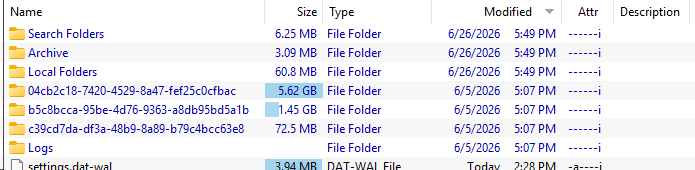
*Shortly after installation, all email was downloaded (that’s 6.59GB of mail in my primary professionally hosted mail server); I have three other mail servers where I also experienced no delays
*all activity within the client is instant – I cannot comment on the technology to develop Thunderbird, but it appears to be native code based on its performance.
That’s weird. What hardware do you use and what account provider do you have (Gmail etc)? Based on our tests, eM Client has quicker sync for most of the account providers (but it really depends on the server capabilities), also batch operations are quicker on eM Client, based on our benchmarks. Only startup time is slightly slower on eM Client, something we are working on.
And as you can see, even the Timeout can be adjusted with advanced parameters. But once again a server that is unable to answer for 60 seconds are badly configured or somehing definitely wrong is goin on there. It always should respond in less than 10 seconds.
My primary mail provider is ZOHO mail; however, I also have have Microsoft, Gmail, Yahoo as mail servers.
I do not experience this issue with other email clients. Specifically, I also have Evolution 3.56.2 installed under Linux and have never seen this issue a single time. Also, Evolution was a default install with nothing changed in configuration.
OT: I really hope this will be fixed. The time it takes for eM Client to launch on a modern computer must be fixed. I don´t know if it just is like that or if it is because the different tips are shown each time, iow “If you want to do A, click on B” etc. If the latter, remove them and make it a setting to turn on for those who still wants it.
It would be a very welcome fix if we get a startup time similar to other mail clients!
Add up all this mail content, and I get 7.14GB if Internet mail downloaded. You are stating that this mail gets sync’d instantly? This has never happened in all my years of using em Client. I can delete it all right now and share how long it takes to re-download all of it. It is not instant.