All of a sudden when I send an email with a picture of an invoice I send every day, it no longer will copy the email to the Sent Items on the server and I have to delete the email completely out of Sent Items and Trash just to clear the error. I’ve trying repairing, deleting account and recreating account and it’s happening with both my emails I use within emClient 10.4.4195 (7d32f97)
I can successfully send an email with a small test picture, but it seems if it’s too large, this error happens. I don’t know if the email server is rejecting it now all of a sudden?
Here is current log:
eM Client 10.4.4195+7d32f97cfb (Windows)
eM Client 10.4.4195+7d32f97cfb (Windows)
5:26:39 PM [email protected] SMTP Connecting: To [email protected]
5:26:41 PM [email protected] SMTP Connected: To [email protected]
5:26:41 PM [email protected] SMTP Sending messages
5:26:43 PM [email protected] SMTP Disconnected: From [email protected]
5:26:43 PM [email protected] SMTP Disconnected: Done
5:26:43 PM [email protected] IMAP Uploading item(s) to folder ‘/Sent’
5:26:46 PM [email protected] [IMAP] MailClient.Accounts.ConnectionException: Uploading item(s) to folder ‘[email protected]/Sent’ failed due to the following error: Lost connection with server
—> MailClient.Imap.Base.ConnectionLostException: Lost connection with server
at MailClient.Imap.Base.Extensions.g__SlowAsyncPath|30_1(PipeReader reader, CancellationToken cancellationToken)
at MailClient.Imap.Base.Connection.ReceiveAsync()
— End of inner exception stack trace —
at MailClient.Protocols.Imap.ImapActionCommand.ExecuteInternalSync(WorkerStatus status)
at MailClient.Protocols.Imap.ImapActionCommand.Execute(WorkerStatus status)
at MailClient.Commands.Command.Process(WorkerStatus status)
AccountId = aa98f31a-6be2-402f-a876-13cfecad8e1b
AccountName = [email protected]
IMAP_SERVER_TYPE = Other
RunInPlace = False
GUIStatus_Exception_Reported = True
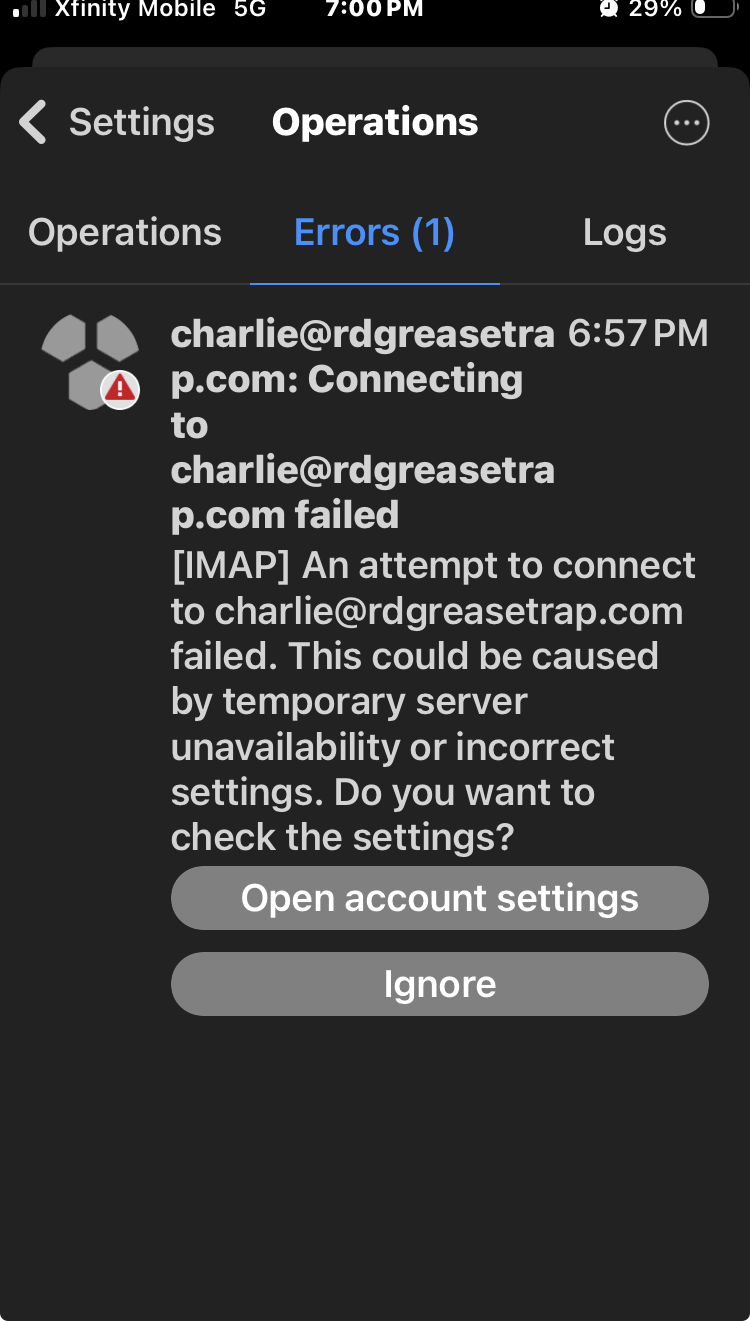
This problem is not isolated to my internet connection, security software, antivirus programs, or VPN software, or among others because this problem is happening on different devices using different internet connections and with different outside applications (outside of WebMail/SmarterMail). Attached is the same problem happening on my iPhone using 5g for internet and not on my WiFI also using a different version of emClient which is the free mobile version. (The pro licensed version is used on my Windows desktop). Also keep in mind this is happening with 2 different accounts within these now 3 separate apps including Thunderbird on 2 separate devices / internet connections. [email protected] and [email protected]
Once an email is generated within this app and this error is given because the email cannot be synched, I cannot put the email into any folder to make the error go away. I must delete it from all folders including trash, otherwise the app is completely disabled and it will no longer Send/Receive messages.
Thankfully I can use WebMail/Smartermail to get by, but I do not want to be restricted to using ONLY WebMail/Smartermail for sending out emails as a permanent solution. I would like to use emClient Pro as I went through a lot of time setting it all up and have gotten used to its interface. I do not like Thunderbird even though this app is having the same problem.
I have not made any changes to my setup and have been sending out emails perfectly fine almost every day the past year until 2/15/26 this problem all of a sudden started happening with both emClient and Thunderbird. WebWiz support is telling me there are no problems on the server end and I must get support from emClient or Thunderbird to resolve this problem.
also just to add, this is a uploading data size thru IMAP problem, it has nothing to do with a specific folder such as Sent, Drafts, Inbox, etc.
I can easily recreate this problem simply by composing a new email and making the email large enough just over 9kB and simply save it to Drafts (since this synchs to server). If the message size is under 10kB it uploads to the server just fine.
I figured this out simply by cropping a picture smaller and smaller and attaching it to a message until I got it under 10kB and the problem would no longer happen.
MailClient.Imap.Base.ConnectionLostException: Lost connection with server
at MailClient.Imap.Base.Extensions.g__SlowAsyncPath|30_1(PipeReader reader, CancellationToken cancellationToken)
at MailClient.Imap.Base.Connection.ReceiveAsync()
— End of inner exception stack trace —
If the message size is under 10kB it uploads to the server just fine.
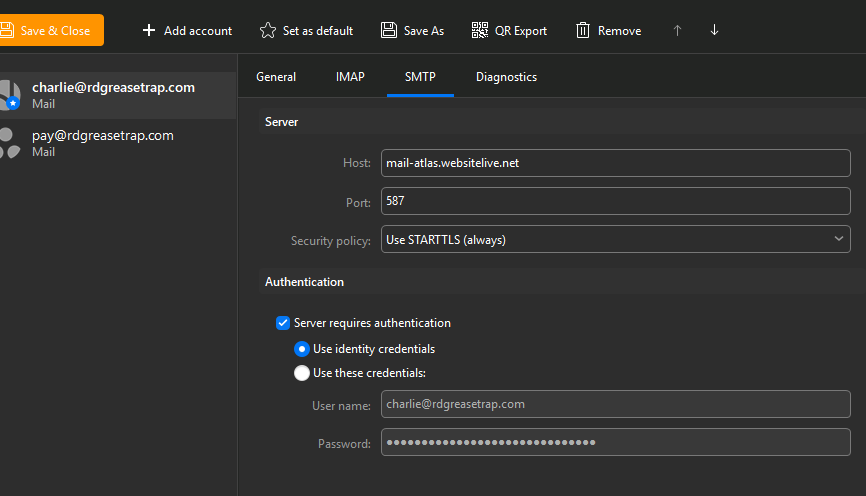
What is your SMTP “Server Address, Server Port & Security Policy” so we can see if there is any obvious errors. Also what version of Windows do you have.
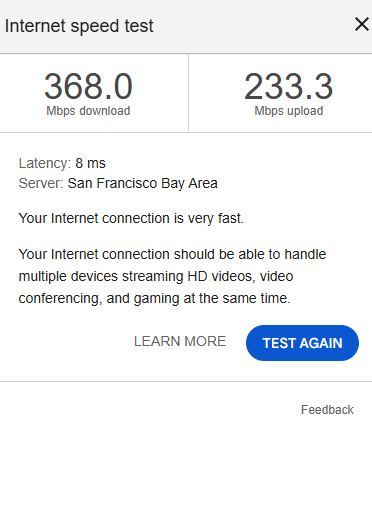
Also “have you checked your upload speed” to check its not slowed and is constant ?. As lost connection with the server when uploading large attachments can sometimes happen if the upload goes to slow.
Also I see you mentioned you have VPNs, Antivirus programs etc, have you completely disabled all those on your desktop computers to make sure its none of those interfering ?
Keep in mind we are talking about a measly 9kB having no problems vs. if it’s just a little tiny 1kB larger of a attachment, the whole app gets shut down until I delete or move it out of the data files completely. It’s as if there is a threshold of 10kB not allowed to be uploaded to the server. This is happening on both 5g Xfinity mobile on my iPhone iOS26, and on my Windows 11 Home using the fastest internet available. Attached speed test.
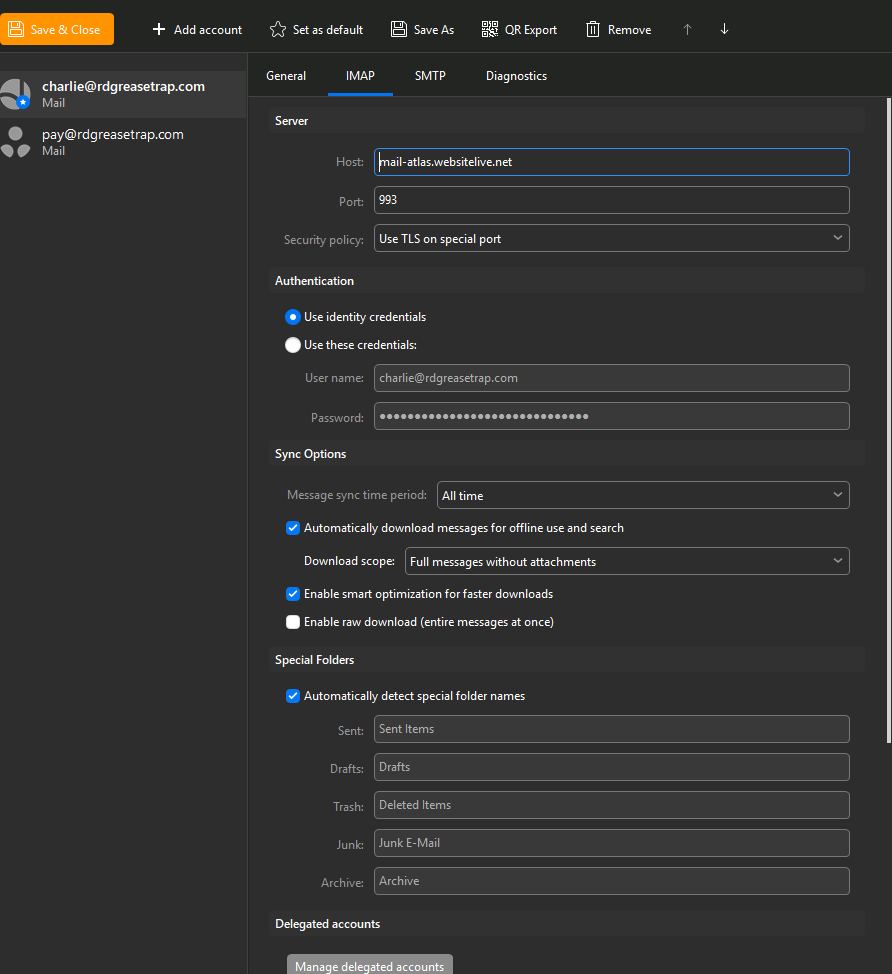
Also attached my IMAP settings in emClient which has not changed the slightest bit since day 1 I’ve not been having this problem.
Whats your SMTP Server Settings
Both Thunderbird and emClient auto generated these IMAP/SMTP settings. I’ve never had to configure this and has worked perfectly fine the past year up until yesterday.
Everything is default settings. And thank you for being the first to respond to my post. WebWiz support is not willing to help me with this problem any further and they have spent too much time with me on it already. So I hope I either figure out the solution myself or you or someone in the community can identify the problem. I will not be responding anymore for the next 8 hours since I have to go to work. I will read anything posted here though. Thank you again!
Ok as your IMAP and SMTP Server settings look ok and your download and upload speed is fine and repairing, deleting account and recreating account hasn’t made any differance, then i would next test with a new database “to determine if its anything to do with your current database”,
To test with a new database, close eM Client and rename the current hidden database folder to eg: eM Client-Current . Then reopen eM Client and setup as new and see if that makes any differance,
(Hidden database folder Windows)
C:\Users%username%\AppData\Roaming\eM Client
Ok I will try this when I get back from work. Thank you for having me try something I haven’t tried yet.
Keep in mind this problem happens with the 2nd account as well. But I guess both accounts are under the same database file?
Yes they are within the same database
Ok also I would be using a different database file on my iPhone. Also keep in mind Thunderbird has this same problem which obviously is a completely different database file and application.
Also if you originally installed eM Client from the website, there is also a new release 10.4.4756 via the release history page. you can try.
Ok, I guess it’s not available on the “Check for Updates” menu option just yet. I will update when I get back. This is my last message for the next 8 hours.
If Thunderbird is doing the same thing suddenly on all your computers and mobiles “using your same Internet connection” that could be then some eg: resident program running in the background installed on them possibly interfering or a OS problem or possible isp mail routing issue
So i would recommend to completely disable any optionally installed Firewall Security Program, or optionally Installed Antivirus Program or VPN “to dbl-check it’s definitely not that causing it”.
If you have nothing like that optionally installed or you do but disabling makes no difference, then you may have a eg: mail routing issue between your internet provider and the mail server.end.
Lastly make sure you have done all your Windows 10/11 updates in case of any OS issues.
I just turned Windows Defender off and back on and problem went away.
So basically turning Windows Defender off and on like a “reboot” is all that was needed to fix this bizarre problem! I tell ya, I hate Microsoft sometimes… and yes, I rebooted my laptop completely a few times during the past couple days, and it never would fix the problem! I guess I needed to turn the service off and on to fix whatever corrupted Windows Defender.
And I guess why the problem was happening on my iPhone even though it was on cellular 5g internet which was a separate internet connection from my Windows laptop, I did just realize that it is connected via Bluetooth always to my laptop. So I guess it still passes thru Windows Defender thru Bluetooth first and was being blocked? It just seems bizarre. I now wish I tried to see if the problem would’ve happened on my iPhone with my Windows laptop completely shut down. I bet the problem would not have happened which would’ve proved something on the Windows laptop was the culprit causing the iMap disconnect. But unfortunately I didn’t get to testing that theory.
You would think the error would show in the log what was causing the disconnect. If it would’ve shown that Windows Defender was causing the IMAP disconnect, then we would’ve solved the problem right away. But nope, it had to be a lucky guess… But that is standard troubleshooting I guess, is always start by shutting down all firewalls, antivirus, and any other background scanning processes that the data passes thru on all internet connections. ESPECIALLY Windows Defender since every Windows user is more likely running that.