In error, I attempted to send a message to “[email protected].”. Note the period following “com”. Needless to say, it wasn’t sent. Now every time my inbox is refreshed, I get the dreaded red triangle and an error message. Simple, says I; just delete the message. Well, I can’t find it. It’s not in the inbox, Sent, Drafts, Trash or Junk. How can I rid myself of this now-eternal annoyance?
Well, I can’t find it. It’s not in the inbox, Sent, Drafts, Trash or Junk.
Look in Local Folders Outbox at the bottom left of eM Client and see if the message is stuck in there. If you don’t have Local Folders enabled, go to “Menu / Settings / General / Folders” to enable it in V10, or for V6-9 go to “Menu / Settings / General” and enable Show Local Folders.
If your message is not in Local folders outbox and not in your account outbox and “only shows in your account sent folder”, then it means you server is still automatically trying to send the email and will normally automatically stop trying after a period of time. Mail servers can try resending failed email for sometimes between 2-5 days.
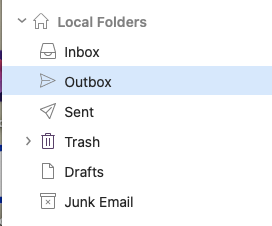
By golly, that was it. I deleted the message from the Local Folders Outbox and poof! problem gone. Thanks for saving my sanity!