Just updated to the latest version today and now emojis are not showing in the subject bar correctly. This was fine before the update
Hey, could you please send us a screenshot of the issue?

Start of the subject is an emoji, as mentioned worked fine before I updated the app
I see, we will need the message file to investigate the issue. Do you think you could right click that message, select “Save as” and send us the .eml file please? Thank you very much.
Thanks very much. We will take a look at it and let you know.
Is there any update to this at all?
Just updated to the latest version today and now emojis are not showing in the subject bar correctly. This was fine before the update
What version of eM Client are you running ? And what OS do you have and what OS version?
Running windows 11 fully up to date, also running the latest version of emclient
Emojis are showing in Subject line ok for me using the latest eM Client V10.4.4405 build and Windows 11 25H2, so should be an update hopefully soon on the release history page.
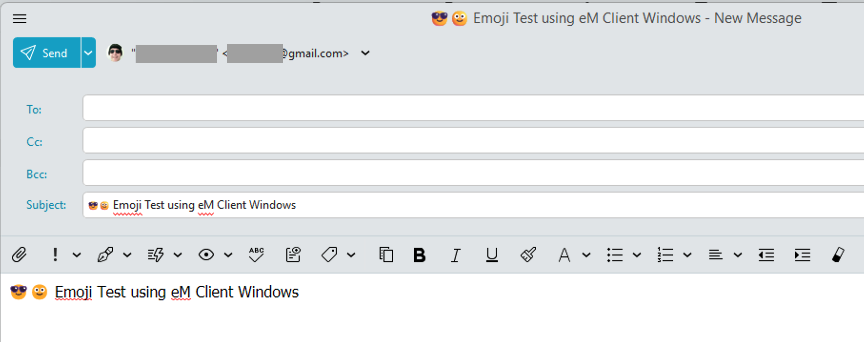
This is recieving emails not sending.
This is recieving emails not sending.
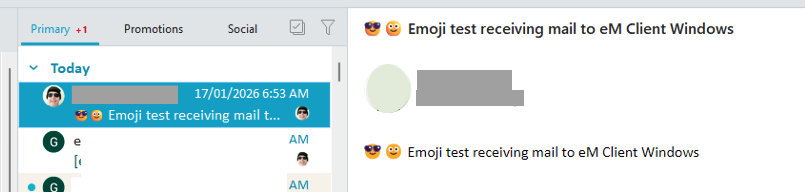
Emojis show ok for received emails as well for eM Client Windows V10.4.4405 build
I have 10.4.4195 (7d32f97) and it doesn’t work. How come your build is more up to date mine says there’s not updates?
have 10.4.4195 (7d32f97) and it doesn’t work. How come your build is more up to date mine says there’s not updates?
There is a later eM Client for Windows V10.4.4209 via the release history page you can download and try which may already have that fix in it.
If you do update, make a backup first via “Menu / Backup” incase you need to restore for any reason. Also close eM Client before updating.
I was emailed newer Interim V10.4.4405 for a fix for a Task Due Date issue. So if V10.4.4209 doesn’t fix it and you want to try the later interim version, see the following thread post. Be aware it may have issues being not officially released yet.