I had someone send me 5 or 6 pictures from their iPhone to me. Each one of them showed up along the top of the email. To view each one I had to click on each one, select open have irFanView my default JPG handler open the picture. I had to copy and past these pictures one by one into another app and found eMClient handling of these pictures cumbersome. So I opened Thunderbird which is still installed, open the email right click on each of the thumbnails and selected copy picture.
Is there any way of improving the way eMClient handles attachments in particular pictures?
To view each one I had to click on each one, select open have irFanView my default JPG handler open the picture.
You can “hover over the attachment” to quickly view a thumbnail of the image without fully opening it in your external image viewer, and if you have a Mac also click “Quick Look Attachment” to give you are larger view of the image attachment.
To view each one I had to click on each one, select open have irFanView my default JPG handler open the picture.
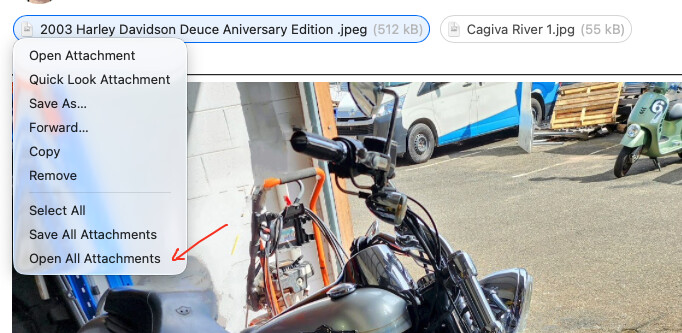
You can also view all the images at once, by “right clicking on an image” and click “Open All Attachments” which will open them all in your external image viewer, where you can then copy any of them into whatever other program you want if you need to edit them or email them later.
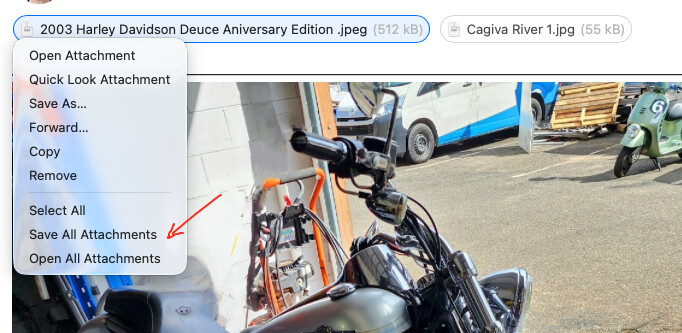
You can also right click and “Save All Attachments” at once to a folder in your Local pictures if you want to store them to edit or email them later as per below example.
Appreciate the time and effort you put into your reply. The open all and save all would have saved me some time in this case.
The person taking the pictures in this case, did not zoom in so the pictures needed me to enlarge them to see the information that they had a question about.