emClient has worked well for years. I note that a folder is now empty and that counting is blank. My version number is 7.2.34711.0 which seems wrong because I always keep up to date. I’m reluctant to do anything rash because there are about 15 - 20 thousand emails here. I have a lifetime licence.
That’s very strange you lost a complete email folder. Could be you might have just eg: accidentally moved it under another mail folder.
Have you tried search for some of the emails by Sender Name , Subject or Body words and selected All Folders in the search field ?
Also have you checked the Trash folder incase it got accidentally deleted ?
If it’s not anywhere and only just happened, then if you have been making regular eM Client backups either automatically via the Settings or manually via the menu, then you could try restoring a recent backup via “Menu / File / Restore”. Any new emails since the backup will sync when eM Client next connects.
If you don’t have any recent eM Client backups, then “if you have a backup copy of your OS User profile”, then you could alternatively “close eM Client” and then “rename your current hidden database folder” below to eg: eM Client-Current .
(Windows hidden eM Client database folder)
“Users\yourusername\AppData\Roaming\eM Client”
(Mac Hidden hidden eM Client database folder)
“Users\yourusername\Library\Application Support\eM Client”
Then “go to your OS User profile backup” and copy the eM Client hidden database folder and “paste it into your current Roaming or Application Support folder” depending on if you have Windows or Mac.
Then reopen eM Client and any new emails aince the backup will sync when eM Client connects.
Thanks for that. As of this morning all my missing emails are back but most of the counters are showing blank. This is very strange. I’m going to do a new backup and then look for a repair option.
My version number is 7.2.34711.0 on a perpetual licence. How do I know my ‘real’ version number? Or do I need to purchase a new licence?
You were correct! I had moved all my 2025 incoming emails to the Sent_25 folder. All sorted, thanks, but emClient is still not showing the number of emails in all of my Sent sub folders.
Could be eM Client is still synching the mail back to where it used to be and won’t update the number of emails till it’s all completed.
Click Refresh and then “click the dropdown” on the right and click “Show Operations” to see.
Thanks. I seem to have a different version because the dropdown does not have 'Show Operations". Puzzled!
Thanks. I seem to have a different version because the dropdown does not have 'Show Operations". Puzzled.
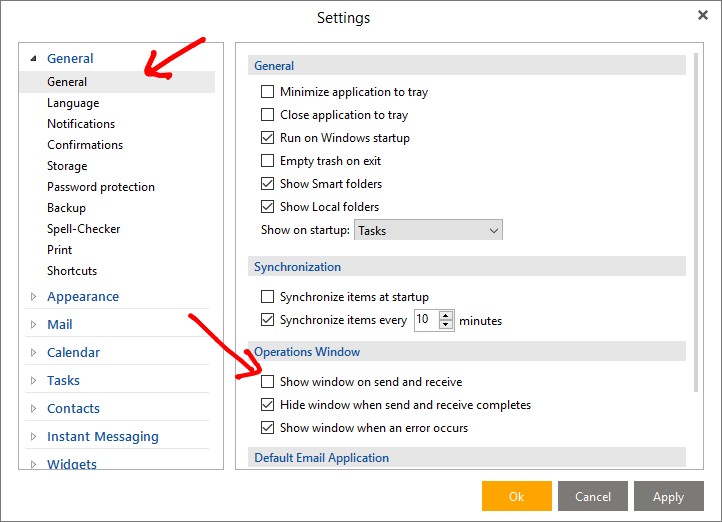
Yes sorry as you have V7, go to “Menu / Settings (Preferences) / General” and there is an option / checkbox to show the operation window during sync when you click Refresh.
I suspect I should upgrade to V10. I don’t mind paying £50 but will my data be maintained?
Yes your data is kept and you don’t loose anything. I’ve updated previously no problems. I reccomend V10.
For eM Client V10 make sure you have either Windows 10 /11 or one of the last three Mac OS’s which are then supported.
Also If you do upgrade, make a manual backup first via “Menu / File / Backup” incase you need to restore for any reason. Also close eM Client before upgrading.
.