So MacUpdater (program I use) noted an emClient 10 being available. I did the upgrade only to find out it was the beta BUT more importantly, it would NOT run on Catalina. Mac OS 10.15.7. Have you dumped us older Mac users???
Luckily I had the latest V9 installer and re-installed. Are you forcing me to move to Canary Mail?
Officially we only support the last 3 MacOS versions. So Monterey, Ventura and Sonoma.
We don’t support older versions, so can’t guarantee that eM Client will run on them.
You can try to install older versions of eM Client from the Release History that were around at the time we supported Catalina, so I think that will be one before June 2022. But if the last 9.2 release still works, you can also try that.
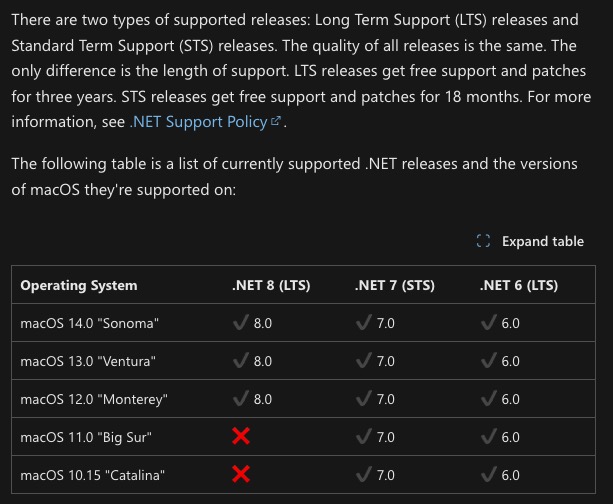
Hi Gary, sorry for the delay in responding. Thank you for the detailed info. It seems as though current versions of ASP.NET Core Runtime 7.0.15 are available from Microsoft. Viewing the chart below, DOTNET 7 is supported on Catalina. Is it worth the agg of installing only to find out later that you’ve moved the app up to DOTNET 8 (which is not supported on Catalina)?
I accidentally upgraded emClient this week forgetting that it is no longer compatible with macOS 10 (Catelina). So I uninstalled it and went to Release History | eM Client and downloaded my latest version that I had (9.2.2144).
That version may be improperly compiled as after installation it also stated that it was not v10 catalina compatible. These previous versions should be compiled appropriately. I was able to get my 9.x version from a backup on time machine so I am back up and running. My issue is that my version 9.x is Catalina compatible yet the same version on your support page isn’t. Hence likely compiled differently.
So I uninstalled it and went to Release History | eM Client and downloaded my latest version that I had (9.2.2144).
That version may be improperly compiled as after installation it also stated that it was not v10 catalina compatible.
These previous versions should be compiled appropriately. I was able to get my 9.x version from a backup on time machine so I am back up and running.
It’s not improperly compiled. You are only getting messages like that because eM Client “only supports the last 3 OS’s”, so if you are still running Catalina “you are very lucky any version of 9.x still works or installs at all” on Mac OS 10. It’s not designed for that old OS.as @Gary advised further up in this thread like also with eM Client V10.
You should really be running currently minimum Monterrey OS 12 to be using eM Client V9.x with then 100% compatible without install issues, and also for Security OS reasons, as there is no more OS updates or patches for Catalina ,where the OS is now vulnerable. The OS security updates & patches finished around the end of 2022.
However according to Apple and many other tech Mac sites, Monterey OS 12 will also be finished security updates & patches around the end of November 2024 as Mac Sequoia OS15 is out soon, so suggest to ultimately look at getting a new Mac if your current computer won’t update the OS to then be able to run the latest eM Client V9.2.x and V10 etc releases & be safe.
Ps I had that issue a while back with my old Mac and ended up getting a cheap eg: M1 mini Mac second hand hardly been used of a guy which runs Sonoma OS14 and now have (no install issues) with the latest eM Client V9.2 or V10 releases.