Emails taking inordinately long times to open

Lately when I am looking at my message list in eM Client and double click a particular email to open it in a new window, it can take between 5 and 15 seconds to actually render the message. The separate window will pop up immediately but it will be a blank white box for the several seconds. As you can imagine, this makes using my email client rather impossible.

What can cause this? I was first thinking that it was just my laptop getting old and slowing down, but my company issued me a new laptop and I’ve migrated over (exported old eM Client settings, imported to the new install on the new laptop) and the problem appeared again almost right away after the mail all sync’d.

My email database directory is about 2GB in size in total (which is somewhat large, sure, but when we consider that I have over half a dozen accounts connected to eM Client, some with messages going as far back as 1999, that’s not all that outrageous, I think.)

Is there a way to clean up or optimize the database? I would have thought that with this fresh install that it would pull all messages down from the IMAP server smoothly and reconstruct the database and indexing of the folders in a way that would all work well. But alas, I’m facing the same challenge as before.

Any suggestions?
Lately when I am looking at my message list in eM Client and double click a particular email to open it in a new window, it can take between 5 and 15 seconds to actually render the message.

That’s certainly not normal to delay that long “if your emails are already fully cached locally”. For me personally using the latest V10.4 with four large IMAP accounts mine open almost instantly.

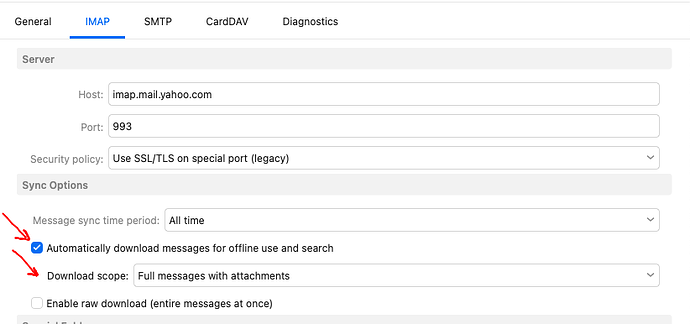
So suggest if you haven’t already tried, set your account “to download messages and attachments offline” to speed up opening emails via “Menu / Accounts / IMAP or Exchange tab” under “Sync Options” part way down as in the below V10 IMAP example. Then save accounts. You can see when that’s all completed in Show Operations via the dropdown on the right of Refresh.

I would have thought that with this fresh install that it would pull all messages down from the IMAP server smoothly and reconstruct the database and indexing of the folders in a way that would all work well

Yes normally a new clean install will download IMAP or Exchange messages smoothly, but as it doesn’t for you, “apart from enabling to download messages and attachments offline”, Initial long delays waiting to open / render emails can sometimes be related to eg: “external http web content waiting to load in the message body”.

is there a way to clean up or optimize the database?

Yes you can optimize the database. See @Gary post in the following thread if you have Windows.

“Optimize database”

https://forum.emclient.com/t/optimize-database/89795/4

Note: if you do try optimizing the database, make a manual backup first via “Menu / Backup” incase you need to restore for any reason. You can also see when that’s completed in Show Operations via the dropdown on the right of Refresh.

If optimising the database makes no difference and you have multiple IMAP or Exchange type accounts and are using the latest V9 / V10, I would suggest next to “remove them all” and then “add them one at a time” and see if separately it loads faster to rule out if the issue is caused by a specific account.

Lastly eg: external factors can sometimes cause emails to delay opening or rendering initially like eg: optionally installed VPNs, Firewall / Security programs or Antivirus programs. So if you have anything like that optionally installed “other than what comes default with your OS”, then try completely disabling those to test incase of interference.

1 Like