I read the emails, received in my account, some weeks later I search for them and can’t find them. Of course, I didn’t deleted them.
Someone can help me, please? Thank You.
I read the emails, received in my account, some weeks later I search for them and can’t find them. Of course, I didn’t deleted them.
Someone can help me, please? Thank You.
I read the emails, received in my account, some weeks later I search for them and can’t find them. Of course, I didn’t deleted them.
If you have V10 could be your missing emails are just in a “different Category Inbox” and not your Primary Inbox tab. So see the below blog how to check.
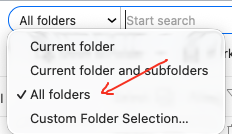
Next if the missing emails are not in a different Category Inbox or you don’t have V10, then “click the dropdown on the far left of the search box” and make sure you are selected on “All Folders” as per the below screenshot.
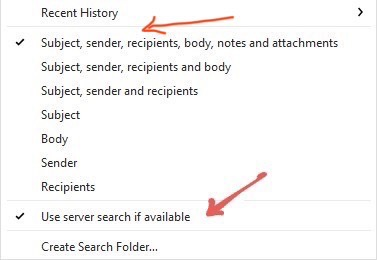
Also on the far right of the search box “click the dropdown arrow” and see if you are selected on “Subject, Sender, Recipients, Body, Notes and Attachments” incase your not as in the below example screenshot and try search again.
If you have already have those search options selected, then try removing the selection “Use Server Search if available” and see if that makes any difference to your results.
Lastly see the below blog on searching email in eM Client with more detail including Advanced search with keyword searches and wildcard searching etc.
I am having a similar issue. In my case, I put the emails in a folder and later the folder is empty.
I am using version 10.4.5326 on Windows 11.
Any help on this is appreciated.
Could be the folder you put the emails in “is possibly not fully synced yet” and is still moving the emails in the background.
Click the dropdown on the right of Refresh and click “Show Operations” and see if it’s synching.
If there is nothing showing synching, “and you have an IMAP, Exchange, Office 365 or iCloud account, go online to your webmail and see if the messages are showing in that folder.
If the messages are showing in that folder online but not in eM Client then “right click” on that folder and click “Properties” and click the “Repair” tab. The click Repair which will resync the server folder messages back to eM Client.
If the messages are not in that folder in webmail then either they have been deleted or you might have accidentally moved them to another folder in which case you will need to search for them.
Unfortunately not the answer - hadn’t thought of that though.
The emails were also missing when I checked my google account online.
If the emails are missing in Gmail online from the folder (label) you put them in, then go to your “All Mail” folder under your Gmail account in eM Client or online and search for them there.
As long as they haven’t been deleted you will find them in All Mail, and can then drag or move them back to the folder you wanted them in originally.
So could be you might have just eg: accidentally removed the Gmail Tag Label on those messages which “then archives them” to All Mail.
I checked “All Mail” in Gmail and in eM Client and could not find the missing emails.
I do like to organize my emails in folders. Are you aware of an issue regarding the number of folders in either eM Client or Gmail? I have over 100 folders and several of these have sub-folders beneath them.
Thanks again for your help.
I checked “All Mail” in Gmail and in eM Client and could not find the missing emails
If the missing messages are not showing in All Mail in Gmail via webmail or in eM Client that usually means they have been deleted. If they have been deleted then you have 30days to retrieve them from your Gmail Trash folder.
But if they are no longer in your Trash, then if you are a Google One personal or Google Business customer then suggest you contact Google technical support via email or phone and see if your mailbox or emails can be restored.
Are you aware of an issue regarding the number of folders in either eM Client or Gmail? I have over 100 folders and several of these have sub-folders beneath them.
No im not aware of any issue with the number or amount of mail folders or sub folders in Gmail. I also have 100s of Gmail parent and sub folders.
The only thing I’ve sometimes seen rarely happening is eg: if messages are showing ok online in Gmail folders (labels), but are not showing locally in eM Client, then that means the local cache is corrupted in eM Client and just needs repairing to resync the server messages back. Thats done by “right clicking on the Gmail acct All Mail folder” and clicking “Properties / Repair” & Repair.
But as you also carn’t find those messages online in All Mail or any other folder in Gmail, then they must have been deleted. So hopefully Google tech support can restore them for you.
Hello,
With the last update of the software em client to windows, some of my older emails (+2 months) desappear from the usual boxes. My emails come from an IMAP server. If I check in the em client to android in my mobile they still there.
With the last update of the software em client to windows, some of my older emails (+2 months) desappear from the usual boxes. My emails come from an IMAP server. If I check in the em client to android in my mobile they still there.
[/quote]
If your emails are showing ok on the mail server webmail end and your android mobile device is showing them ok, then you need to either clear the local cache in the desktop client by either “repairing it” or by “removing and re-adding the IMAP account”, or by restoring a recent backup when you know all the emails where showing ok on the desktop.
So to repair your IMAP account “right click on your Inbox” under your mail account (or ALL Mail folder if its a Gmail account), and then click “Properties” at the bottom. Then click the “Repair” tab at the top and click Repair. That clears the local mail cache.
Note: Once the local cache is cleared, your messages in each folder might take a little while till they re-appear and will be slower to re-read till fully cached locally again. So be patient.
If the repair doesn’t work, then either go to "Menu / Accounts and remove and re-add your IMAP mail account, or alternatively if you have been making regular eM Client backups then go to “Menu / File / Restore” where you can then restore a recent backup “when you know the emails were showing locally ok”, and any new mail since the backup will update when eM Client syncs.