The inbox sort is set to Decending and received, but the inbox is jumbled. At the top, are emails from 2/2 in the middle of the listing are some from current date and at the bottom are the oldest emails where they should be. I haven’t changed anything. The trash which has the same settings is correct. I did see the post about conversations but not relavent.
Thanks for any help.
What about your Filter “Secondary Sort” further down ?
That might possible have changed which might then be affecting the conversation sort order.
If the secondary sort is correct, then update what version of eM Client you are using incase it’s an outdated or older version and might need updating. Also what OS version you are running.
Secondary is set to the same Decending/Received. It just updated about a week ago.
Version 10.4.4867 (a1d5549)
Ok as the Secondary Sort is correct what happens when you disable conversion view for a test ?
Is the email received then sorted correctly or is that also wrong ?
On my phone emails are good, and on the server email, those are correct. As for conversations, I’m not a fan so, those were never set to work. One odd thing I just noticed for some reason the clump of emails that are wrong have time stamps of yesterday at 6:40 pm in orange. When you open the emails the date is correct within the email. Not sure how that all happened, I don’t mess with anything that’s working well.
On my phone emails are good, and on the server email, those are correct
That could be then your eg: computer date and time might have been out or changed locally and affected that as it’s only wrong in eM Client. So dblcheck your computer date and time and computer regional setting to make sure that’s correct just incase it’s possible changed.
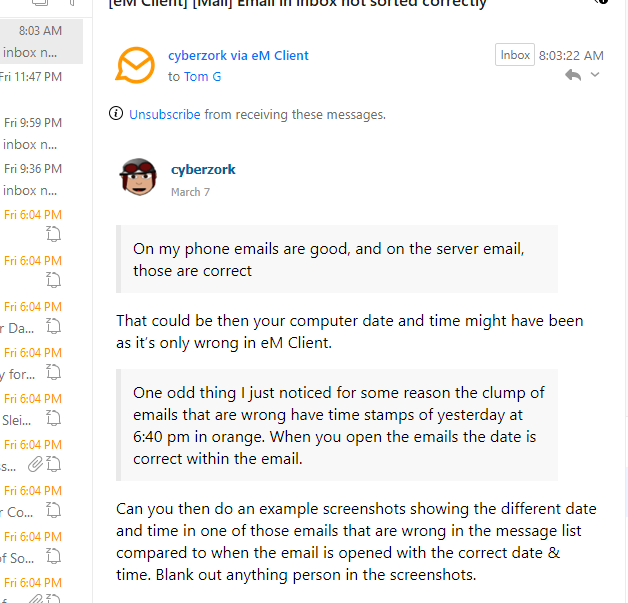
One odd thing I just noticed for some reason the clump of emails that are wrong have time stamps of yesterday at 6:40 pm in orange. When you open the emails the date is correct within the email.
Can you then do example screenshots showing the different date and time in one of those emails that are wrong in the message list compared to when the email is opened with the correct date & time. Blank out anything person in the screenshots.
You can see that the emails with the wrong date and time are in orange. Emails received since that time are in order.
Ok emails like that with orange text (specifically in the date/time column) usually indicate that the message has been “snoozed” and is currently scheduled to reappear in your inbox at a later time back in your Inbox.
So sounds like you probably snoozed those group / clump of emails in your Inbox to then process later in the day or next day etc, and they all then arrived back in your Inbox together at the date / time you set when you snoozed them and will look out of order because of that reason.
You will also see on the right of this orange text date & Time a “snooze white icon” so you know they were also snoozed emails.

Snooze documentation
https://www.emclient.com/webdocumentation/en/10.0/emclient/default.htm?page=e-mail-snooze#E-mail%5CSnooze.htm
That was it. I have no idea how they got snoozed. I would think there’s be a confirmation question or such. Thanks for your help!