Hello,
I installed version 11 on my first user session, and it works perfectly. However, it doesn’t work on my second session; I am unable to launch it. I uninstalled everything to try installing an earlier version, but I am told that the new version must be installed—which is causing the problem on the second session. What should I do? Thanks for your help.
Bonjour,
J’ai installé la version 11 sur ma session 1 qui fonctionne très bien. Mais ne fonctionne pas sur ma session 2, il m’est impossible de lancer. j’ai tout désinstallé pour installé une version antérieure mais il m’est dit qu’il faut installer la nouvelle version ce qui pose un problème sur la session 2. Que dois-je fair ? Merci de votre aide.
I just installed the version from Microsoft on Session 2 and it works, but I am being asked to purchase a license, even though I have a Pro license on Session 1. Thanks for your help.
I presume you have two computers when you say session and you had a later V11 Beta being it wanted a newer version.
Try uninstall eM Client and “don’t delete the database” when asked on the uninstall wizard.
Then go to the release history page and download and install the latest version 11 Beta and see if eM Client will open again.
If it still won’t open, then suggest to “first close eM Client” and then go to the following hidden database folder and “rename it” to eg: eM Client-Old. Then reopen eM Client and setup as new.
(Windows hidden eM Client database folder)
“Users\yourusername\AppData\Roaming\eM Client”
If you have an IMAP, Exchange, Office 365 or iCloud account all your emails, contacts, tasks etc will automatically come back from the server.
Alternatively if you did make a backup prior to upgrading to V11 Beta, then uninstall eM Client and “delete the database” when asked on the uninstall wizard and then go to the release history page and “download whatever version you had previously” and reinstall that version. Then open eM Client and “skip the setup wizard” and restore your backup via “Menu / File / Restore”.
If you then want to trial V11 Beta “close eM Client” and go back to the release history page and download the latest version and install again.
I just installed the version from Microsoft on Session 2 and it works, but I am being asked to purchase a license, even though I have a Pro license on Session 1.
Sounds like you have V10 on your second computer from the Windows Store installation.
If you don’t have a V10 Personal 3 device license or don’t have a Pro multi license or never had the Windows Store version before and want to get to V11 Beta to trial it then do the following.
First if you have a POP account or have data in Local folders, go to “Menu / File / Export” and export any email, contacts, tasks etc you need to a folder on your desktop.
Then uninstall eM Client and “delete the database” when asked on the uninstall wizard. Then go to the release history page and download and install the latest V11 Beta and see if that opens.
If it then opens ok and If you have an IMAP, Exchange, Office 365 or iCloud account all your emails, contacts, tasks etc will automatically come back from the server
if you had to reset up a POP account as new then once setup and working go to “Menu / File / Import” and import your messages, contacts, tasks etc from your desktop folder you exported prior to uninstalling V10.
Hello cyberzork,
I have two user accounts on one computer: one for myself and one for my wife. When I updated to version 11 on my account, it didn’t install on the second account and actually blocked the version already installed there. So, I uninstalled the version on the second account to install version 11; however, a dialog box now claims that version 11 is installed, yet I can’t find it on the second account—there are no buttons and the software itself is missing. Consequently, I installed the version from the Microsoft website (10…) on the second account; it works, but without version 11. Since I had backed up the database, I was able to recover everything. However, I don’t know why that account won’t accept version 11. Thanks for your help.
Bonjour cyberzork,
J’ai deux sessions sur 1 ordinateur, une pour moi et une pour mon épouse. Quand j’ai mis à jour pour la version 11 sur ma session, celle-ci ne s’est pas installée sur la deuxième session et à bloqué la version installée. J’ai donc, désinstallé la version de la deuxième session pour installé la version 11, mais là, une boite de dialogue me dit que la version 11 est installé, sauf que je ne trouve pas cette version sur la session 2, et il n’y a plus de boutons et plus de logiciel. Donc, j’ai installé sur la session 2 la version du site microsoft (10…) et là cela fonctionne mais sans la version 11. Comme j’avais sauvegardé la bse de données
Hello,
I have two different user profiles within the same EM client.
Before version 11, everything worked fine, and the update was applied to both profiles.
Bonjour,
J’ai deux profils utilisateur differents au sein d’un meme client EM.
Avant la version11 tout fonctionnait bien et la mise à jour se faisait sur les deux profils.
Ok could be then your two profile databases setup are clashing in eM Client.
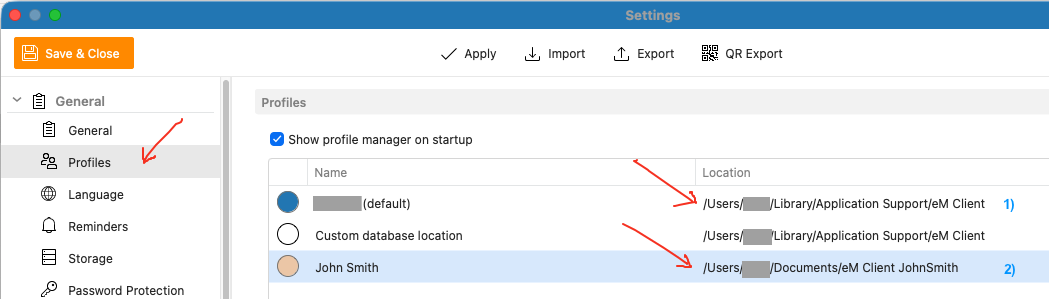
Make sure “in your second profile” that you “specify a different database folder path location” to set it up in, as per the below example via “Menu / Settings / General / Profiles”.
Suggest to create the second profile database “outside of the hidden database folder” just to be on the safe side such as in eg: Documents / JohnSmith . Also check that you are using the latest eM Client 11 Beta V11.0.158 from the release history page as it has alot of fixes.