I use a Corsair IronClaw RGB Wireless mouse which has some programmable buttons on it.
When I’m doing email, I like to have my “forward” mouse side-button programmed to delete the current message after I’ve viewed it, meaning that when sifting through email previews I don’t have to touch my keyboard unless I want to reply to a message, I can read and delete with just my mouse. I’ve done it that way forever, back to the days of Outlook Express and Microsoft Intellimouse!
The programming is in a Profile in iCue. iCue recognises when a program has the focus, and turns on the correct profile for that program.
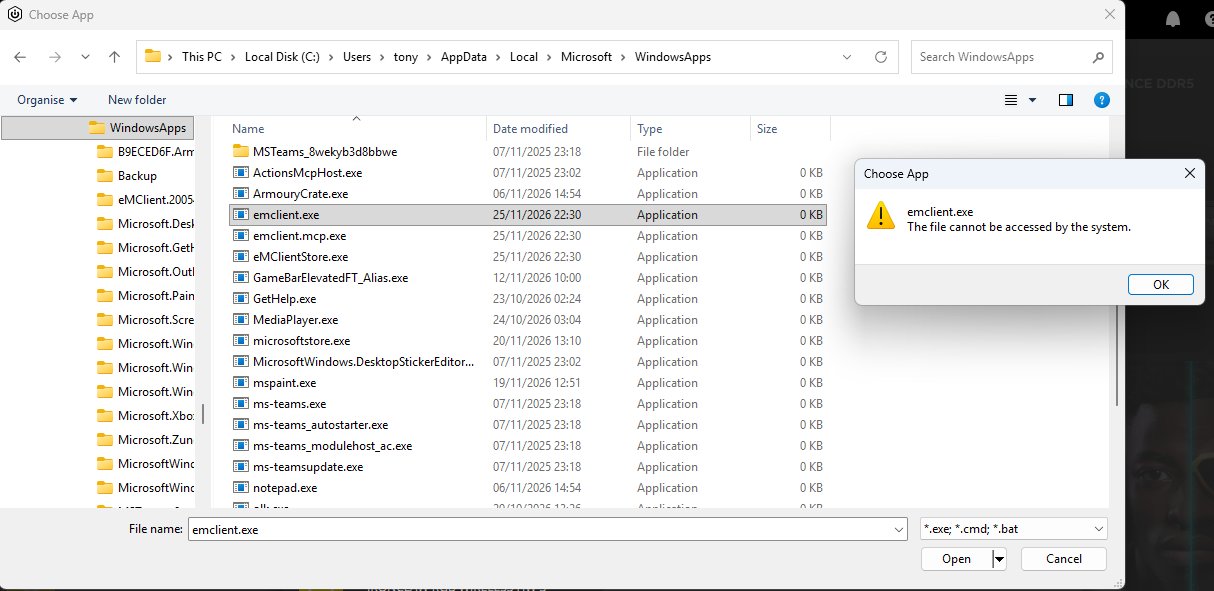
This stopped working for eM Client the moment I moved from v10 to v11, and the latest build v11.0.1577 hasn’t fixed it. The exe in the Program Files (x86) folder is MailClient.exe, but this doesn’t match the exe which TaskManager is reporting, which is MailClient.Cef.exe but that’s buried deep in Program Files/WindowsApps/eMClientblahblahblahblahweirdstuff/ and can’t be accessed by normal mortals to add the exe to the Profile for recognition because permission is denied!
So how are we supposed to let iCue know that eM Client is running if you hide it in an inaccessible location now? I can open the file location in TaskManager and see it there, but for some reason I can’t view the folder directly via security permissions.