I am using eM Client, and since a recent update I have noticed that the search function is no longer working properly. It misses many emails that I know are there.
For example, I can clearly see a message in my Inbox in eM Client, but when I search for it, the search does not return it. The same search works normally in the web-based Gmail interface, so the issue seems to be specific to eM Client.
This has become very inconvenient, because I now have to switch to Gmail on the web whenever I need to find certain emails. That defeats much of the purpose of using an email client in the first place.
For reference, my settings are:
Account type: IMAP
Sync option: All time
“Automatically download messages for offline use and search”: enabled
Download scope: Full messages with attachments
Has anyone else experienced this issue after a recent update? Is there any fix or workaround?
I hope this can be resolved soon.
Thank you.
If you want, I can also make it sound more technical, more concise, or more forceful for a bug report.
I am using eM Client, and since a recent update I have noticed that the search function is no longer working properly. It misses many emails that I know are there.
Has anyone else experienced this issue after a recent update?
No i personally don’t have that issue using Windows or Mac. The search finds all emails for me using the latest V10.4.5298.
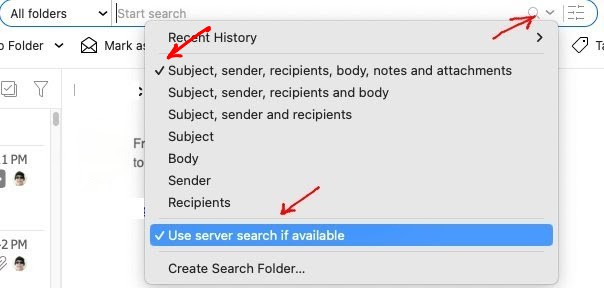
So first make sure you have “All Folders” selected in the dropdown as per the below example incase you only have specific folders selected.
Next “click the dropdown on the far right of the search field” and make sure you have checked “Subject, sender, recipients, body, notes and attachments” as per below example.
If you already have that checked the same, then try unchecking “use server search if available”.
If unchecking that “still makes no difference”, then could be you might possibly need and eM Client updated version, where you can check via the release history page.
Note: If you do update make a manual backup first via “Menu / Backup” incase you need to restore for any reason. You can see when thats complete in Show Operations via the dropdown on the right of Refresh.