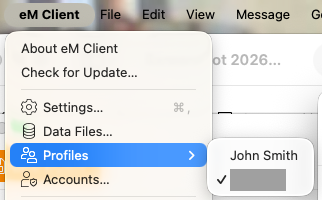
If you setup different profiles and “switch between the profiles on the fly”, when you close / exit eM Client and reopen eM Client, the user profile that appears “always opens the top profile username in the Profile list” in Settings, and not the one you had opened last.
Yes you can set eM Client to ask on startup which Profile username you want, but if you don’t want to do that and “just open the last profile you had open” there is no way currently to do that.
If eM Client is already supposed to remember the last profile username you had open, it doesn’t work on Mac OS26 or Windows 11 with the latest V10.3.x via the releaser history page.
So if its not a bug, then needs an option in Settings “Profiles” to Set Default profile or alternatively program eM Client to remember the last profile that was open when you close it.
2 Likes
This appears to be caused the by same problem we are discussing in this thread.
@eb-zealot
Yes this is still a problem even with the latest V10.4.5326
if you right click on a second Profile in Settings you want as default and then Save Settings and close and reopen eM Client, it still opens the first Profile.
After reopening eM Client if you go back into Settings / Profiles its set ok on the second profile as default, but if you go to the Menu where you switch profiles its still set on the first profile.
So there is still a bug in the client thats not recognising you have changed the default profile in Settings.
Eg: I created a John Smith Profile as an example and set it as the default in Settings as @Kim_Fisher advised in that other thread and saved Settings. Then closed and reopened eM Client, and it still loads my main Profile again and still shows my Main Profile as default with the tick / check via the switch Profiles menu as in the second example screenshot below.
1 Like